Wave vs QuickBooks for Freelancers: Which One Should You Actually Use?
If you are comparing wave vs quickbooks, the price difference hits you immediately — QuickBooks starts at $38 per month while Wave costs nothing. For a freelancer just starting out, that difference matters a lot. But price alone should not make the decision — because these two tools are built for very different situations.
If you have been searching wave vs quickbooks, you are likely asking one of these:
- Is Wave really free?
- Is QuickBooks worth the price for a solo freelancer?
- Which one is better for simple invoicing?
- What happens when my business grows?
This comparison breaks it all down in plain English. No jargon. No fluff.
Quick Comparison Table
| Feature |
Wave |
QuickBooks |
| Core Accounting |
Free |
Paid only |
| Invoicing |
Free |
All plans |
| Bank Feeds |
Pro plan required |
All plans |
| Payroll |
Add-on from $40/mo |
Available |
| Inventory |
No |
Plus plan and above |
| Receipt Scanning |
Add-on $8/mo |
All plans |
| Multi-Currency |
Free |
Essentials and above |
| Best For |
Solo freelancers |
Growing businesses |
| Learning Curve |
Very easy |
Moderate to steep |
| Support |
Chatbot only (free), Live chat (paid) |
Phone and chat (mixed reviews) |
| Starting Cost |
$0 |
$38/month |
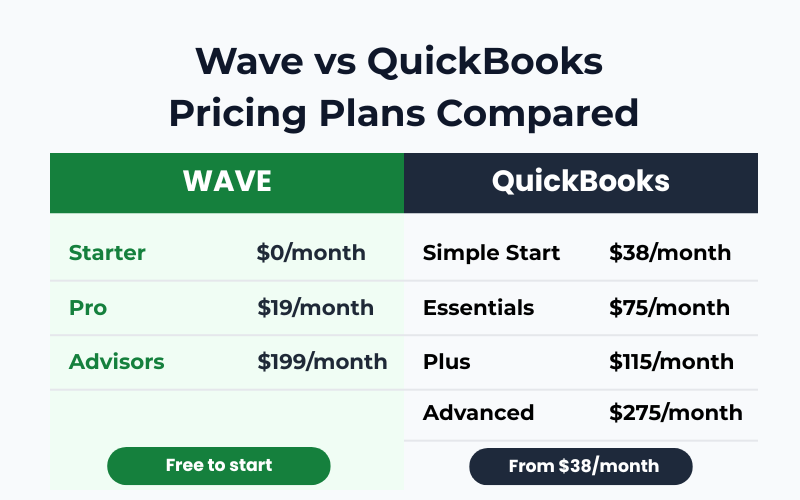
Standard prices as of 2026. QuickBooks frequently runs promotional discounts — always check current pricing before signing up.
Wave Plans — What Each One Offers
Wave has three tiers. Two you pay for yourself, one is a managed service.
Wave Starter | $0 Forever
Best for: Solo freelancers who need basic invoicing and bookkeeping at zero cost
What You Get
- Unlimited invoices, estimates, and bills
- Income and expense tracking
- Basic financial reports — profit and loss, balance sheet
- Multi-currency invoicing at no extra cost
- Mobile app for invoicing on the go
- Manual bank transaction entry (CSV upload)
- Basic customer dashboard
What Is Missing
- No automatic bank feeds — you upload statements manually
- No automatic late payment reminders
- Wave branding appears on invoices
- Support is chatbot only with limited hours
✅
Verdict: Great for freelancers just starting out. Manual bank upload is the main inconvenience but manageable for low transaction volumes.
Wave Pro | $19/month or $190/year (saves $38)
Best for: Freelancers who want automation, bank feeds, and branded invoices
Everything in Starter, Plus
- Auto-import bank transactions via Plaid connection
- Auto-merge and categorise bank transactions
- Automated late payment reminders (3, 7, and 14 days after due date)
- Add your logo and brand colours to invoices
- Remove Wave branding from invoice footers
- Create reusable email message templates
- Add users — partners, collaborators, or accountants
- Discounted payment processing: 2.9% + $0 per card transaction for first 10 transactions/month
Optional Add-Ons (Any Plan)
- Receipt scanning: $8/month or $72/year
- Payroll: from $40/month
- Wave Advisors (dedicated bookkeeper): from $149/month
✅
Verdict: Pro makes sense if you have regular transactions and want automation to save time. Annual plan is the better deal if you commit.
Wave Advisors | From $199/month
Best for: Business owners who want to hand off bookkeeping entirely — not typical freelancers
This is a fully managed bookkeeping service, not software. A real human bookkeeper handles your books, prepares monthly statements, and is available for questions.
⚠️
Verdict: Too expensive and unnecessary for most solo freelancers.
QuickBooks Plans — What Each One Offers
QuickBooks has four plans. Note that QuickBooks regularly runs promotional discounts — the prices below are standard rates. Always check the current price on their website before signing up, as introductory offers can look very different from what you will pay after 3 months.
Simple Start | $38/month (1 user)
Best for: Freelancers billing clients in one local currency who want everything automated from day one
What You Get
- Income and expense tracking
- Invoices and quotes
- Automated bank feeds
- AI-powered bank transaction categorisation
- Basic financial reports
- App integrations
- Access for your accountant (free)
What Is Missing
- No multi-currency — you need to upgrade just to invoice international clients
- No bill management
- No time tracking or recurring invoices
- Only 1 user
ℹ️
Verdict: Covers core accounting well, but lack of multi-currency is a serious limitation for anyone billing international clients.
Essentials | $75/month (3 users)
Best for: Freelancers who bill internationally and need recurring invoices
Everything in Simple Start, Plus
- Multi-currency support
- Bill management
- Recurring invoices
- Time tracking
- Reputation management, lead management, appointment scheduling
- 3 users
ℹ️
Verdict: Only if you bill internationally and cannot live without automated recurring invoices. Price nearly doubles from Simple Start for features most solo freelancers will not fully use.
Plus | $115/month (5 users) — QuickBooks’ Best Value Pick
Best for: Product businesses and growing teams — NOT solo freelancers
Everything in Essentials, Plus
- Inventory tracking
- Budgeting tools
- Project profitability tracking
- Contract upload and e-signature
- Class and location tracking (up to 40)
- Customer AI for lead management
🚫
Verdict: Designed for product businesses and growing teams. A solo freelancer has no need for inventory tracking at $115/month.
Advanced | $275/month (25 users)
Best for: Medium-sized businesses — not for freelancers
Everything in Plus, Plus
- 25 users
- Custom report builder
- Workflow automation
- Data sync with Excel
- Finance AI and project management AI
- Unlimited chart of accounts
- Backup and restore
🚫
Verdict: Built for medium-sized businesses with teams, complex reporting needs, and dedicated accountants.
Which QuickBooks Plan Should a Freelancer Choose?
| Situation |
Recommended Plan |
| Billing in one currency only |
Simple Start — $38/month |
| Billing international clients |
Essentials — $75/month |
| Solo freelancer in any situation |
Skip Plus and Advanced |
Wave — Full Review
What Is Wave?
When comparing wave vs quickbooks, Wave stands out as a free accounting platform built for freelancers and small service businesses. It covers invoicing, expense tracking, and reporting without a mandatory monthly fee.
Note: Wave currently offers full functionality primarily in the US and Canada.
Check availability in your country before signing up.
Who Wave Is Best For
Wave works best if you are a solo freelancer — a consultant, designer, writer, coach, or independent contractor — who needs simple invoicing and basic bookkeeping without a monthly subscription.
One freelancer in the r/smallbusiness community put it plainly: they kept Wave because they would need to bill over $10,000 a month before QuickBooks’ cheaper transaction fees would offset its subscription cost. For anyone below that threshold, Wave is the smarter financial choice.
Real Drawback: Customer Support Is Poor
⚠️
This is Wave’s most consistent criticism across Reddit and G2 reviews. On the free plan, support is chatbot-based with limited hours. Even paid users report difficulty reaching someone helpful when real problems occur.
⚠️
Some users have reported accounts being disabled without warning or explanation. If your entire invoicing system depends on Wave, this risk is worth knowing about.
✅ Verdict on Wave
For solo freelancers who want free accounting software that just works, Wave is hard to beat. The trade-off is limited support and some platform risk. If your needs are simple, the Starter plan is often all you need.
QuickBooks — Full Review
What Is QuickBooks?
In the wave vs quickbooks debate, QuickBooks is the industry standard for small business accounting. Accountants prefer it, bookkeepers use it daily, and it integrates with almost every payroll, banking, and e-commerce tool available. It is powerful — but it is not cheap.
Who QuickBooks Is Best For
QuickBooks makes sense if you have employees, run payroll, sell physical products, track inventory, or work closely with an accountant. Many accountants specifically request QuickBooks because it is standardised and integrates cleanly with tax tools.
Real Drawback: Expensive and Getting More So
Pricing increases are frequent and frustrating. Reddit threads are full of users who started on an attractive introductory offer and found themselves paying significantly more within months. In-app upsells add to the frustration.
For a solo freelancer sending basic invoices, QuickBooks can feel like paying for a commercial kitchen when all you need is a kettle.
⚠️ Verdict on QuickBooks
If you run a growing business with employees, payroll, inventory, or an accountant relationship, QuickBooks is worth the investment. For solo freelancers, it is almost certainly more than you need.
How to Choose Between Wave and QuickBooks
✓ Choose Wave Starter (Free)
- Solo freelancer with simple invoicing needs
- No employees
- Budget is tight
- Comfortable uploading bank statements manually
- Bill internationally — multi-currency is free
✓ Choose Wave Pro ($19/mo)
- Want automatic bank feeds and time-saving automation
- Send many invoices and want automated payment reminders
- Prefer annual billing to save money
Note: Wave currently offers full functionality primarily in the US and Canada.
Check availability in your country before signing up.
✓ Choose QuickBooks Simple Start ($38/mo)
- Want everything automated from day one
- Work with an accountant who prefers QuickBooks
- All clients pay in your local currency
✓ Choose QuickBooks Essentials ($75/mo)
- Invoice international clients and need multi-currency
- Need recurring invoices and bill management
- Budget is not a primary concern
💻 Wave vs QuickBooks for Freelancers
Wave wins clearly for solo freelancers. Zero cost, multi-currency free, simple invoicing — it covers everything a one-person business needs without paying a monthly fee.
✔ Best pick: Wave Starter — $0/month
🏢 Wave vs QuickBooks for Small Business
QuickBooks pulls ahead once you have employees, run payroll, or need inventory tracking. The integrations and accountant compatibility justify the cost at that stage.
✔ Best pick: QuickBooks Simple Start — $38/month
For more software comparisons for freelancers, browse our
accounting tools comparison guides.
Final Verdict
Wave is the right choice for most solo freelancers. It is free, clean, and handles invoicing and basic bookkeeping reliably. The Pro plan at $19/month is a reasonable upgrade when you want automation. The customer support limitations are a genuine weakness, but for straightforward freelance work, Starter is often enough.
QuickBooks is the right choice once your business grows beyond solo. If you have employees, run payroll, or need deep accountant collaboration, the cost is justified. For freelancers, Simple Start is the only plan worth considering — and even then, Wave’s free plan does most of the same things at zero cost.
There is no universal winner. The right tool depends on where your business is today — and where it is heading.
Frequently Asked Questions
Is Wave really completely free?
Wave Starter is permanently free. Core accounting, invoicing, and multi-currency support are included at no cost. Bank feed automation, receipt scanning, and payroll require paid plans or add-ons.
Is QuickBooks worth it for freelancers?
For most solo freelancers, QuickBooks is more than necessary. Wave covers the basics at zero cost. QuickBooks becomes worth the price when you have employees, payroll, inventory, or regular accountant collaboration.
Which QuickBooks plan is best for freelancers?
Simple Start at $38/month if you bill in one currency. Essentials at $75/month if you invoice international clients. Skip Plus and Advanced — those plans are built for teams and product businesses.
Can I switch from Wave to QuickBooks later?
Yes. Many freelancers start with Wave and move to QuickBooks when their business grows. Migration is possible but may require some cleanup or accountant assistance.
Which is better overall — Wave or QuickBooks?
Solo freelancer with simple needs → Wave Starter, free. Growing business with employees and complexity → QuickBooks. That is the clearest answer in the wave vs quickbooks debate.