
Last verified: May 2026 — pricing confirmed from notion.com/pricing.
Notion AI pricing in 2026 has four tiers: Free ($0), Plus ($10/month annual), Business ($20/month annual), and Enterprise (custom). Only the Business plan includes ongoing AI access. Free and Plus accounts get a lifetime trial of approximately 20 AI responses total — not a monthly allowance that resets.
Notion restructured its AI pricing in May 2025, killing the standalone add-on. Full access now costs $20 per member per month on annual billing. That is the same price as ChatGPT Plus. For a freelancer on Notion’s Free or Plus plan, that single fact makes the upgrade decision more complicated than Notion’s marketing suggests.
This page covers exact notion ai pricing for each plan, what is actually included, and a decision framework for solo freelancers.
Pricing verified from notion.com, 17 May 2026. See the full Notion AI review for freelancers for hands-on feature testing.
Free plan
Plus / month (annual)
Business / month (annual)
Min. annual cost for full AI
What Does Notion AI Pricing in 2026?
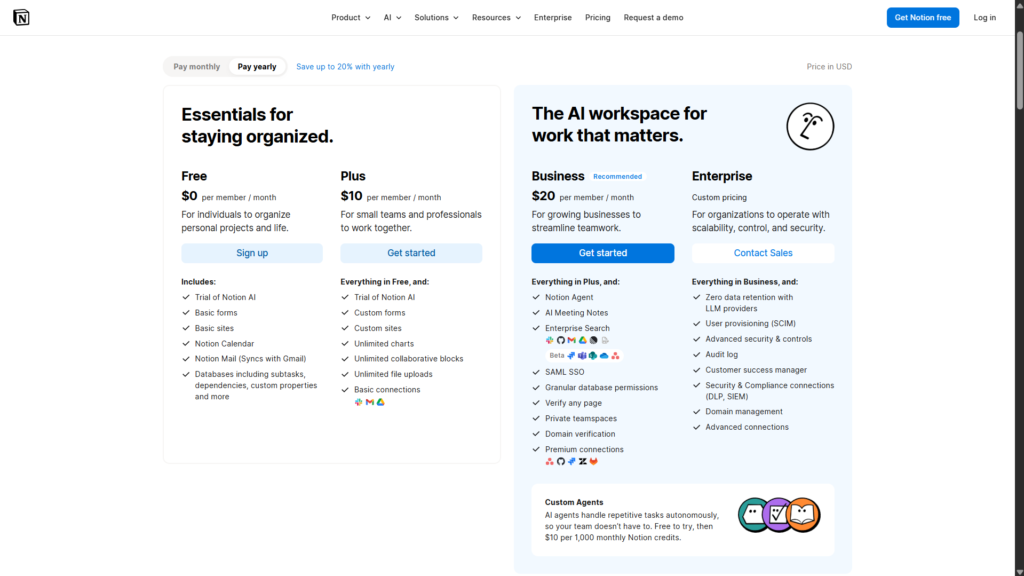
| Plan | Monthly billing | Annual billing | Notion AI access |
|---|---|---|---|
| Free | $0 | $0 | Lifetime trial (~20 responses total) |
| Plus | $12/month | $10/month | Lifetime trial (~20 responses total) |
| Business | $24/month | $20/month | Full AI included |
| Enterprise | Custom | Custom | Full AI + zero data retention |
The critical detail: “limited trial” is not a monthly free allowance. Based on testing documented in the Notion AI review for freelancers, Free and Plus accounts have approximately 20 AI responses in total — a one-time lifetime limit across the entire workspace. Once used, AI access stops until you upgrade.
Check Notion’s current plans before purchasing
Pricing verified May 2026. Notion has changed its structure before — always confirm on the official page.
What Each Plan Actually Includes
Free — Trial Only, Then Nothing
The Free plan gives you a one-time Notion AI trial. Enough to test a couple of features. Not enough to build a workflow around. Ask Notion and AI Meeting Notes are accessible during those 20 responses — but once the trial ends, there is no path to ongoing access without paying for Business.
Plus — Same Trial, Higher Price
The Plus plan ($10/month annual) unlocks real Notion features: unlimited blocks, 30-day page history, larger file uploads. But the AI trial is identical to Free. Twenty lifetime responses, no reset. If Notion AI is the main reason you are considering an upgrade, Plus is the wrong tier. You pay more for the same AI access you had on Free.
Business — Where Full AI Actually Starts
The Business plan ($20/month per member, annual) is where ongoing Notion AI begins. It includes:
- Notion Agent — completes multi-step tasks using your workspace, connected apps, and the web
- AI Meeting Notes — automatic transcription and summary, no separate bot required
- Enterprise Search (Beta) — searches across Slack, GitHub, Asana, and more
- Ask Notion — queries your entire workspace in plain language
- Core in-page AI: summarise, rewrite, generate, translate, autofill databases
Custom Agents — for building autonomous automation workflows — are on Business but billed separately. From May 4, 2026, usage costs $10 per 1,000 Notion credits per month, charged on top of the plan fee. Workers (Beta) for custom code integrations are free to try now, with credit billing starting August 11, 2026.
How Much Does Notion AI Cost Per Year?
The minimum annual cost for persistent Notion AI access is $240 — Business at $20/month, annual billing. No cheaper plan includes ongoing AI.
Monthly billing runs $24/month ($288/year). That is a 20% premium over annual — $48 extra for the flexibility of month-to-month. Worth it if you are genuinely unsure about committing. Not worth it if you are already set on the tool.
Custom Agents add cost on top. Regular automation workflows at $10 per 1,000 credits monthly can push the real spend well past $20. Business is not an all-in price for power users.
Is Notion AI Free?
No. And the distinction matters more than most reviews make clear.
Free and Plus plans include a one-time trial of approximately 20 AI responses — total, across the entire workspace lifetime. Not per month. Not per year. Use them up, and AI access is gone until you upgrade to Business.
Twenty responses sounds like a reasonable evaluation window. In practice, a few summarise tests plus one Ask Notion workspace query can exhaust most of that budget. It is enough to see what the features do. It is not enough to know whether they fit your actual workflow.
Ongoing Notion AI requires the Business plan at $20/month (annual).
Notion AI vs ChatGPT Plus: The Real $20/Month Decision
Both cost $20/month on annual billing. For a freelancer who can only justify one subscription, this comparison is the actual decision — not just a sidebar.
| Factor | Notion AI Business | ChatGPT Plus |
|---|---|---|
| Knows your Notion workspace | ✅ Yes — reads your pages | ❌ No — manual input |
| Writing quality | Functional, needs editing | Stronger, more versatile |
| Works inside your notes | ✅ In-page editing | ❌ Separate window |
| Meeting transcription | ✅ Included | ❌ Not included |
| Automation | ✅ Agents (credit cost extra) | Limited |
| Best for | Organised Notion users | Writing + research |
They are not substitutes. Notion AI is a workspace tool. ChatGPT is a writing and research tool. Notion AI knows what is in your pages. ChatGPT writes better prose. Choosing the wrong one wastes $240 a year.
The right choice depends on one question: where does your actual work happen?
For a task-by-task comparison on real freelance scenarios, see Notion AI vs ChatGPT for Freelancers (coming soon).
Who Should Upgrade to Business
- Freelancers managing three or more active clients in a well-organised Notion workspace
- VAs running client wikis, project databases, and meeting notes in Notion
- Plus plan users who exhausted the trial and found the features genuinely useful
- Freelancers who need automatic meeting transcription — Notion AI Meeting Notes replaces a standalone tool like Otter.ai at no extra cost on Business
Biggest mistake to avoid: Upgrading to Business before your Notion workspace has real content in it. Ask Notion can only surface information from pages that already exist. Upgrade when your client notes, project pages, and task trackers are already there — not to motivate building them.
Who Should Stay on Free or Plus
- Freelancers using Notion for occasional note-taking — the AI’s value scales directly with how much workspace content exists to query
- Anyone whose primary AI need is writing quality, editing, or research — ChatGPT Plus is the better tool at the same price
- New Notion users without an established workspace — build it first, then decide
- Anyone on a tight budget where one $20/month subscription must cover multiple needs
Notion AI Pricing: Frequently Asked Questions
Pricing verified from notion.com, 17 May 2026. Notion has changed its AI pricing structure before — check the official page before purchasing.
Related Reads
- Notion AI Review for Freelancers (2026): Is the Upgrade Worth It?
- Otter.ai Review for Freelancers (2026)
- Canva AI Review for Freelancers (2026)
- Notion AI vs ChatGPT for Freelancers (coming soon)
