
Notion AI no longer costs extra. That sounds like good news — until you read the small print. Since May 2025, the standalone AI add-on has been discontinued. Full AI access now requires the Business plan at $20/month per member (annual billing) or $24/month monthly. That is the same price as ChatGPT Plus. For freelancers already paying for Notion, the upgrade decision is less obvious than Notion’s marketing suggests. This Notion AI review for freelancers is based on hands-on testing using the free trial — covering what actually works, what is locked behind the paywall, and whether the Business plan makes financial sense for a solo freelancer.
How I Tested Notion AI: I tested Notion AI in May 2026 using a freelancer-style workspace with two client project pages, rough writing samples, deadline notes, and task-style project information. This Notion AI review covers summarising, action item extraction, writing improvement, draft generation, Ask Notion workspace queries, AI page creation, and the Custom Agents upsell flow. Pricing and plan limits were checked against Notion’s public pricing and help pages alongside my own test account screenshots.
What Is Notion AI?
Notion AI is an AI assistant built directly into the Notion workspace. It can summarise pages, rewrite text, generate content, and answer questions based on your notes. The more advanced features go further: Ask Notion queries your entire workspace in plain language, AI Agents run multi-step tasks autonomously, and AI Meeting Notes transcribes and summarises calls.
The core advantage over external tools like ChatGPT is workspace context. Notion AI can read your client pages, project notes, and task lists — and connect information across them without any copy-pasting. That context awareness is what makes it different. Whether it justifies $20/month for a solo freelancer is a different question.
Notion AI BUSINESS ONLY
$20/mo (annual) · $24/mo (monthly)
AI assistant built into Notion’s workspace. Includes Ask Notion, AI Agents, AI Meeting Notes, and in-page editing. Free and Plus plans include a limited trial only — no monthly reset.
- Queries your own workspace pages instantly
- In-page editing — no copy-pasting from a separate window
- Infers action items beyond basic summarising
- AI chat can create structured pages autonomously
- AI Meeting Notes included on Business plan
- Full AI costs $20/month — same as ChatGPT Plus
- Free and Plus trial has no monthly reset
- Writing improvement loses specificity
- Custom Agents billed separately on credits
- Email and calendar access is setup-dependent
Notion AI Pricing in 2026
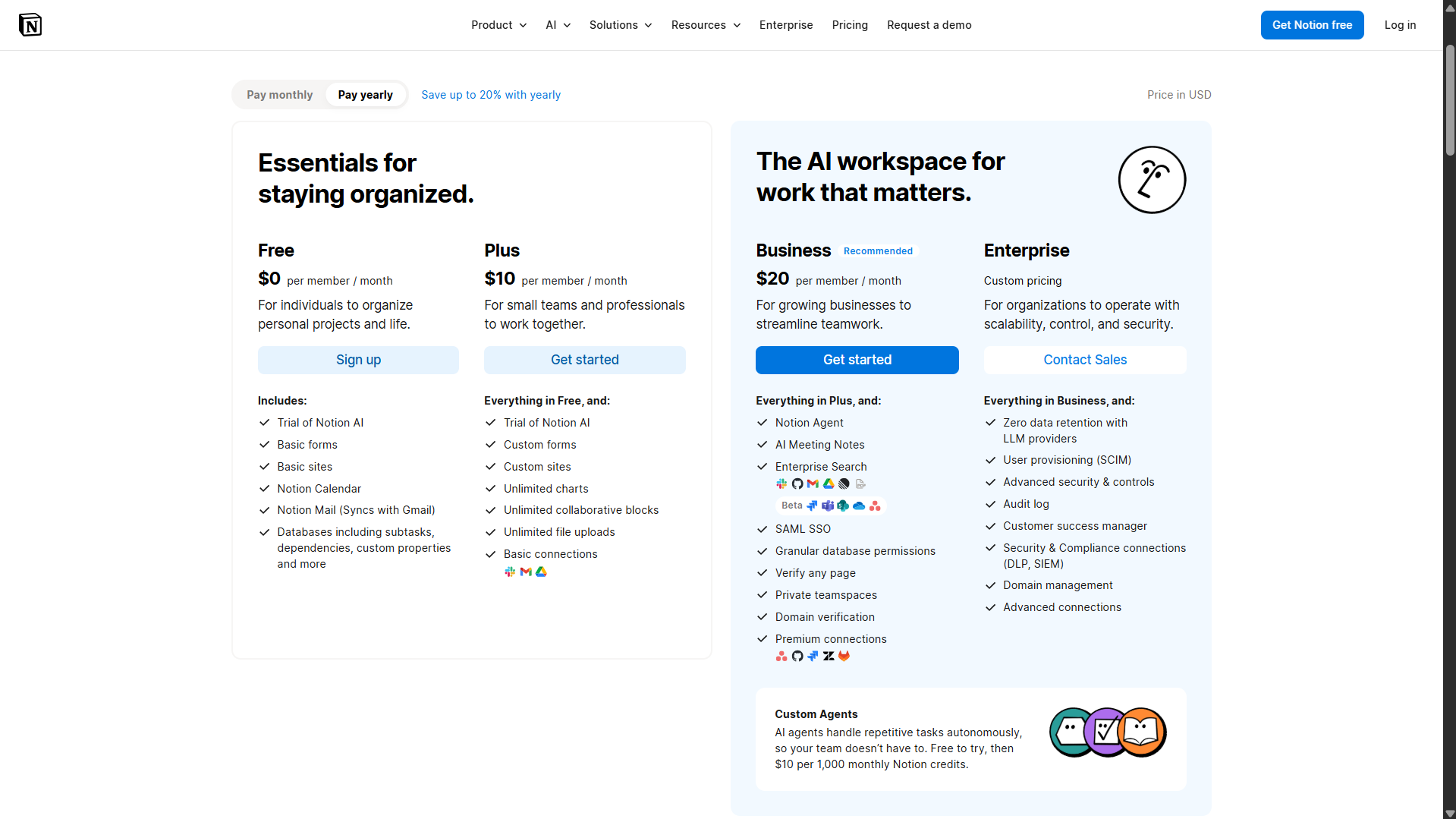
Free plan — limited trial only
Plus / month (annual) — limited trial only
Business / month (annual) — full AI included
Minimum annual cost for full Notion AI
| Plan | Monthly | Annual | AI Access |
|---|---|---|---|
| Free | $0 | $0 | Limited trial only |
| Plus | $12/month | $10/month | Limited trial only |
| Business | $24/month | $20/month | Core AI features included |
| Enterprise | Custom | Custom | Full AI + security |
The critical detail most reviews gloss over: in my test workspace, Notion showed a 20-response AI trial limit on the Free and Plus experience. Notion’s public pricing page describes this as limited trial access — not ongoing monthly AI usage. Once that trial runs out, there is no reset. Ongoing access to Notion’s core AI features requires upgrading to Business or Enterprise, although usage may still be subject to Notion’s fair-use limits.
The Business plan at $20/month (annual) includes Notion Agent, AI Meeting Notes, and Enterprise Search. Starting from each workspace’s monthly service date on or after May 4, 2026, Custom Agents run on Notion credits. Monthly Notion credits cost $10 per 1,000 credits, billed on top of the Business plan fee.
For a solo freelancer, that puts the minimum annual cost of full Notion AI at $240 — identical to a ChatGPT Plus subscription.
Pricing verified from notion.com on 11 May 2026. Notion changed its AI pricing structure in May 2025 and may do so again.
Notion AI Features — What Freelancers Actually Care About
Summarise and Extract Action Items
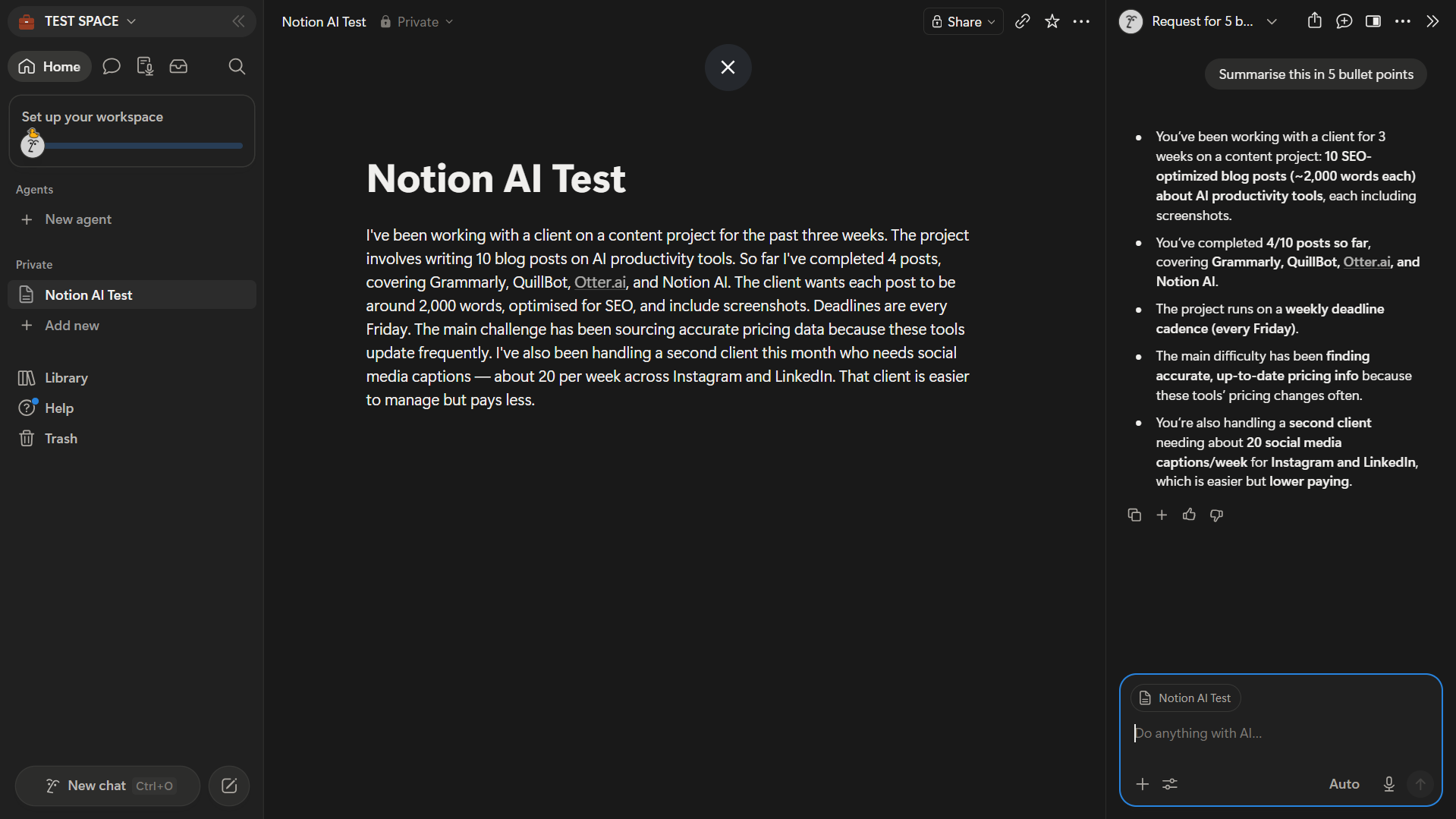
I tested Notion AI on a realistic freelancer project note — a paragraph covering two active client projects, deadlines, deliverables, and ongoing challenges. Asked to summarise in five bullet points, the output was clean, accurate, and well-structured. It auto-bolded key terms and missed nothing from the source text.
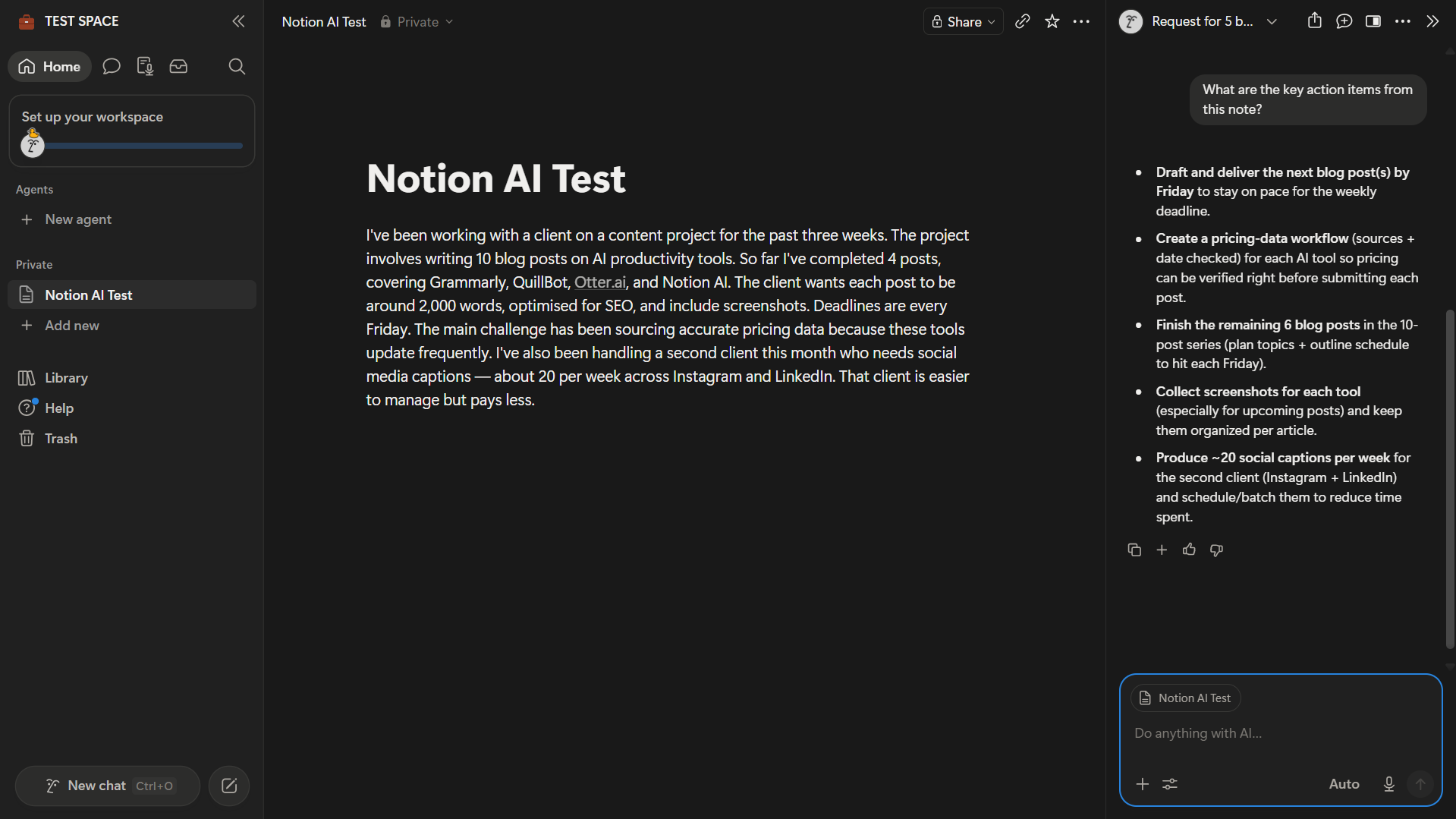
The action items test was the more impressive result. Rather than restating the note, Notion AI identified a recurring problem mentioned in passing — difficulty verifying pricing data — and suggested building a structured verification workflow to solve it. That inference, from a messy paragraph to a practical next step, is not something a basic summariser does.
Improve Writing and Generate Drafts
The writing improvement feature is useful but needs supervision. Running a rough paragraph through it produced a cleaner, more professional result. But it also softened specifics — a concrete observation about frequent pricing changes became “pricing has evolved recently.” The AI fixed the grammar. It also diluted the point.
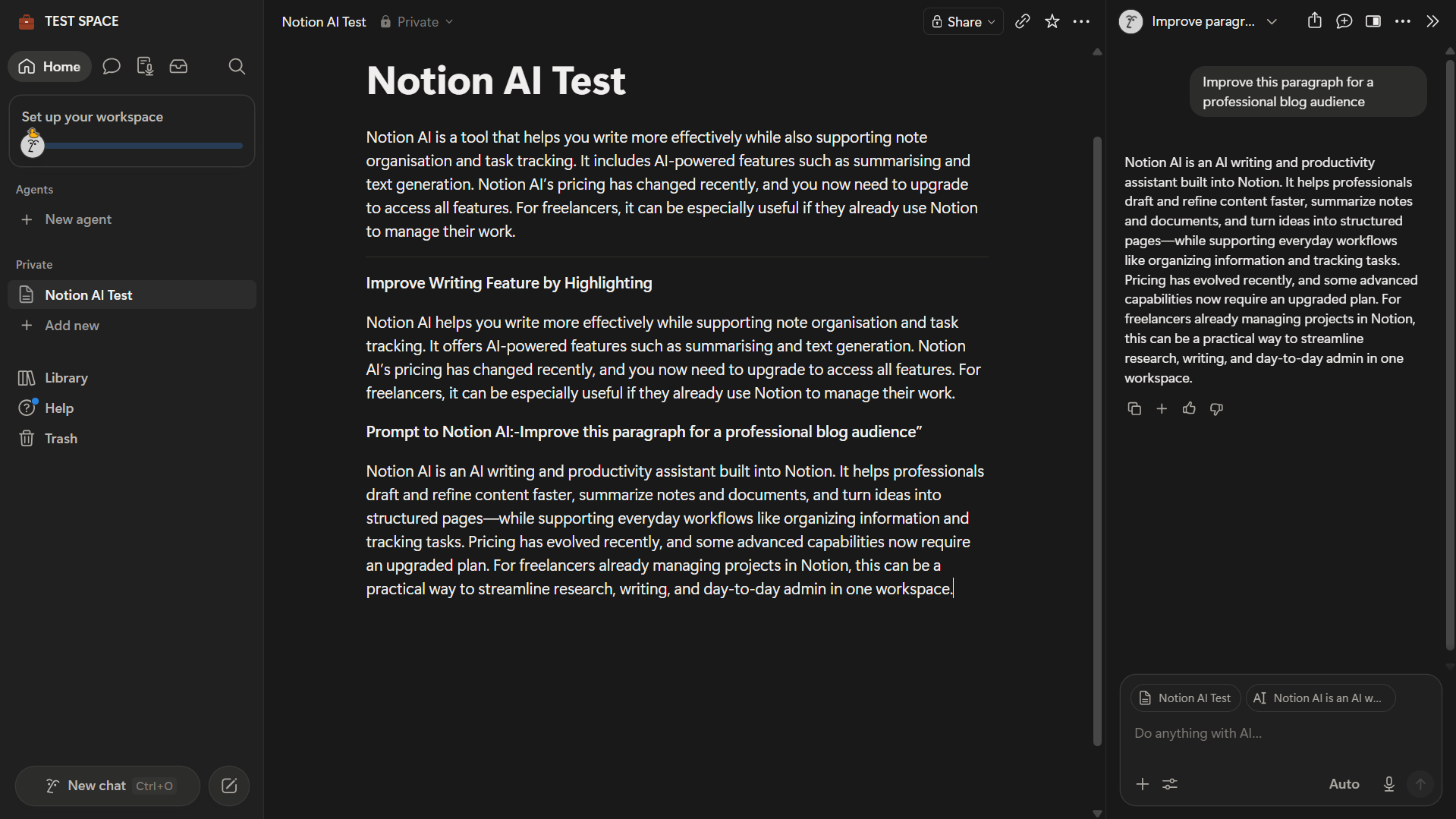
For generating new content, results were better. Given a prompt for a three-sentence blog intro in an honest, practical tone, Notion AI produced something genuinely usable — framing AI as “a quiet assistant that helps you move from messy notes to usable drafts faster” rather than reaching for superlatives. Worth editing, not replacing. For dedicated rewriting and paraphrasing, tools like QuillBot or Wordtune give you more granular control over the final output.
Ask Notion — Workspace-Aware Queries
This is the feature that separates Notion AI from every external AI tool.
I set up a two-client test workspace — one page for a blog content project, one for a social media retainer — and asked: “What projects am I currently working on and what are the deadlines?” Notion AI queried both pages, structured the response by client, and returned accurate details on status, scope, deadlines, and outstanding deliverables. It ran four internal steps to compile this without any prompting about format.
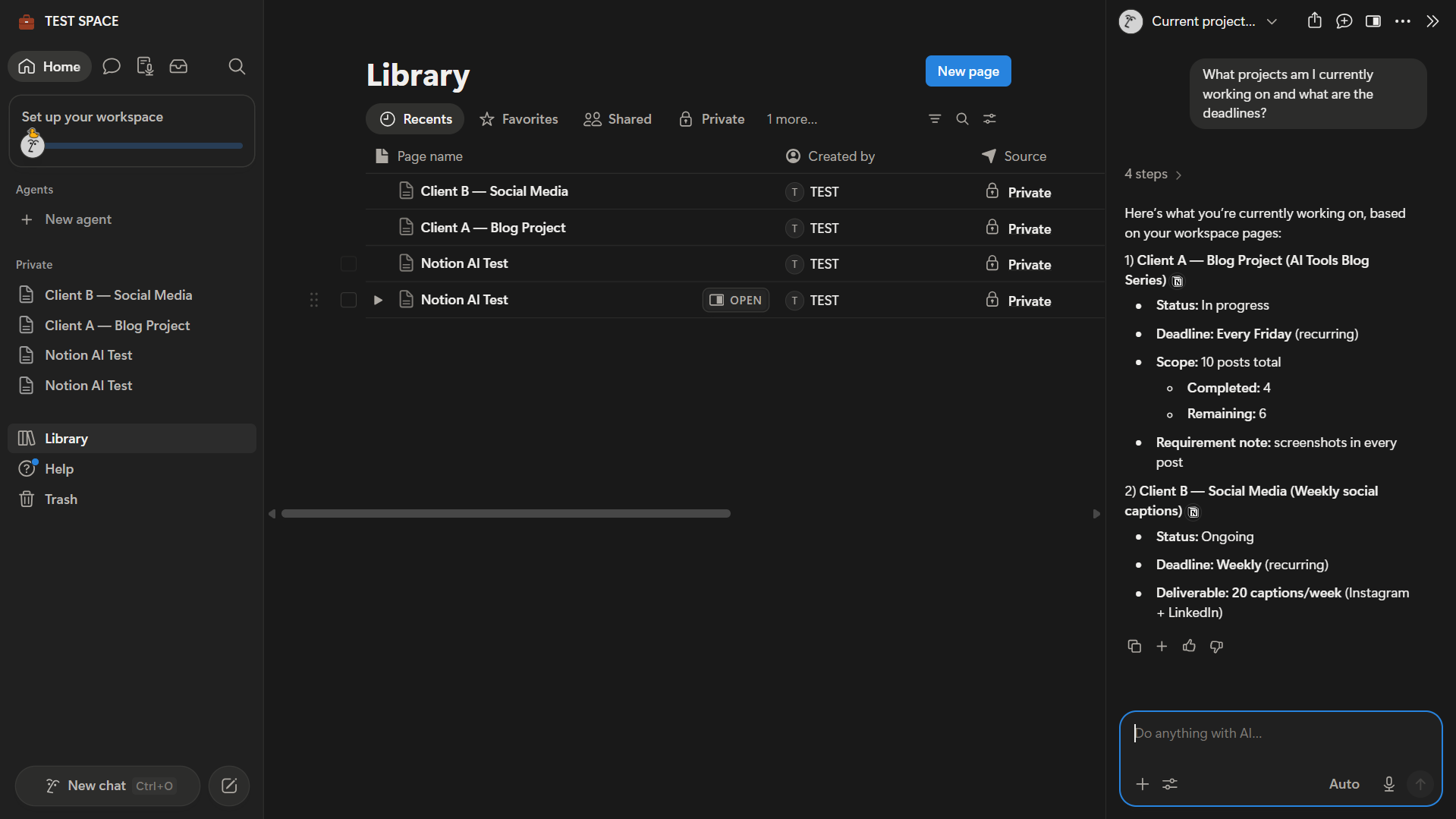
A freelancer managing multiple active clients in Notion could ask this every Monday morning and get an instant, accurate overview. No switching tools, no pasting context in. ChatGPT can now use connected apps in supported accounts, but Notion AI still has the smoother advantage when the source material already lives inside Notion — no setup or context-pasting required.
AI Chat Page Creation
During testing, I prompted Notion AI to “create a log of this article in the workspace.” Without any template or instructions about structure, it created a new page containing a title, article details section, audience field, date, and a draft intro paragraph — all from a single line.
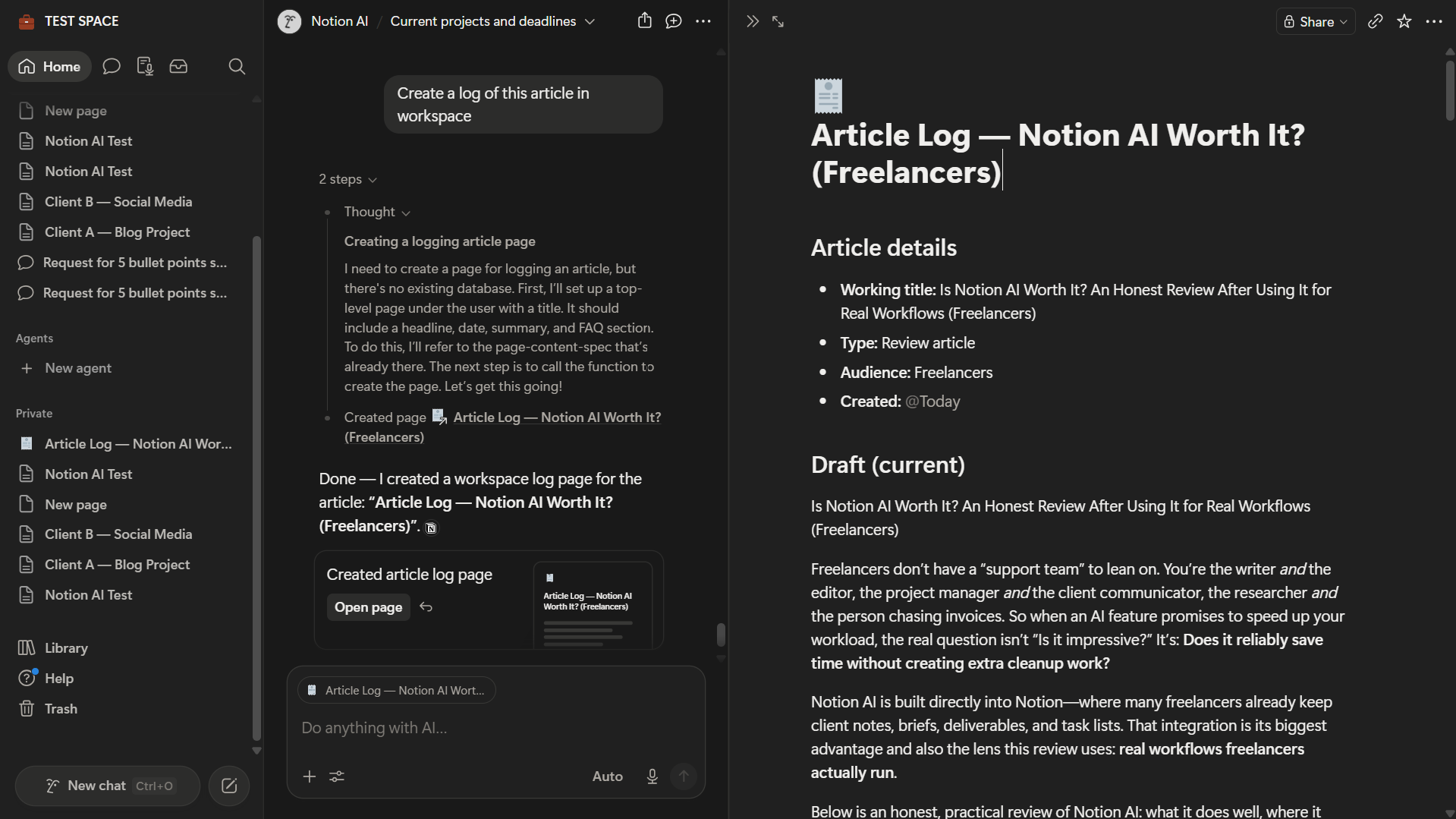
This runs through the standard AI chat on the free trial — not the dedicated Custom Agents panel. It shows that even trial-level access can handle autonomous, multi-step tasks beyond straightforward text generation.
Custom Agents — What Is Actually Locked
Clicking “New Agent” on a free account triggers an upsell screen.
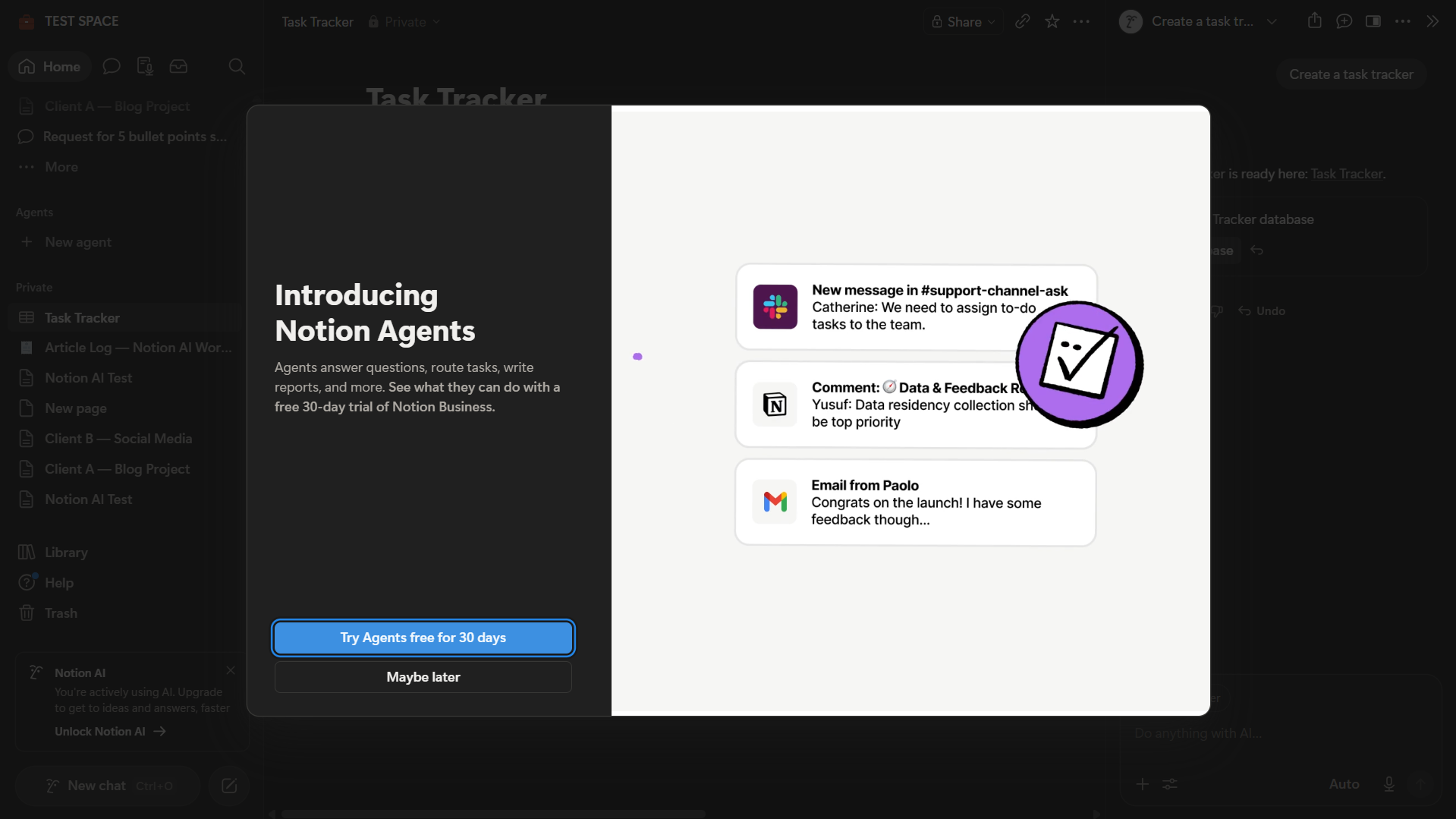
Custom Agents require the Business plan. A 30-day trial is available, but a credit card is required to start it. Starting from each workspace’s monthly service date on or after May 4, 2026, usage is billed at $10 per 1,000 Notion credits — separate from the Business plan monthly fee. For freelancers interested in automation workflows, that is an additional cost to budget for.
Limitations Worth Knowing Before You Upgrade
The free trial is genuinely limited. In testing, Notion showed a 20-response trial cap on the Free and Plus experience — and there is no monthly reset. By the time you have run a few summarise and rewrite tests, you are near the limit. Evaluating the features that make it genuinely useful (Ask Notion, page creation) takes most of those responses.
The writing improvement feature cleans up prose but loses specificity. It is better as a starting point than a final editor. Review the output carefully — specific details sometimes get smoothed away in the rewrite. If editing quality is the primary need, dedicated free AI writing tools or free Grammarly alternatives will serve you better at no extra cost.
Notion AI’s email and calendar access is powerful but setup-dependent. With the right connectors, Notion Agent can search Gmail, draft replies, manage labels, and work with calendar events. But Gmail access requires Business or Enterprise plus a paid Google Workspace setup — solo freelancers on a personal Gmail account will need to rely on Notion Mail or Notion Calendar connectors instead. For most freelancers who manage client email outside of any Notion integration, this is not as frictionless as the core workspace features.
Custom Agents add cost on top of Business. The $20/month plan is not an all-in price for power users who want automation workflows.
Notion AI vs ChatGPT for Freelancers — Quick Comparison
Both cost $20/month. That makes the comparison a real one.
| Feature | Notion AI (Business) | ChatGPT Plus |
|---|---|---|
| Price (annual) | $20/month | $20/month |
| Knows your workspace | ✅ Yes — reads your pages | ❌ No — needs manual input |
| Writing quality | Decent, needs editing | Stronger, more versatile |
| Works inside your notes | ✅ Yes — in-page editing | ❌ Separate window |
| Email/calendar access | ✅ Yes, but setup-dependent via Notion Mail, Gmail and Calendar connectors | ✅ Yes, via Google apps on Plus where available |
| Automation | ✅ Agents (extra credit cost) | Limited |
| Best for | Organised Notion users | General writing + research |
They are not direct substitutes. ChatGPT is the stronger writing tool. Notion AI is the better workspace tool. If you write and manage projects in Notion, the combination that makes least sense is paying for both — pick the one that covers your primary use case.
For a detailed side-by-side test on real freelance tasks, see Notion AI vs ChatGPT for Freelancers (coming soon).
Is Notion AI Worth It for Freelancers? — The Verdict
The honest answer depends entirely on one question: how much of your actual work already lives in Notion?
If you manage multiple clients in Notion — project pages, meeting notes, task trackers, deliverable logs — the Business upgrade has a clear case. Ask Notion alone is worth meaningful time per week for a freelancer with a well-organised workspace. The in-page editing, autonomous page creation, and action item inference all add to that.
If Notion is where you drop occasional notes between tools, the upgrade does not pay off. ChatGPT Plus at $20/month gives you a more capable writing assistant. Free Notion handles light note-keeping fine. Splitting them costs the same as Notion Business and gives you more flexibility.
The one advantage no external tool matches: Notion AI already knows your work. That context is the whole product. If your context is not in Notion, neither is the value. That is the honest Notion AI review verdict for solo freelancers.
If your freelance workflow needs both AI productivity and visual content creation, pair Notion AI with a design tool. Our Canva AI review covers what the free plan actually delivers for bloggers and freelancers.
Try Notion AI on Your Workspace
Start with the free plan to build out your workspace. Upgrade to Business only when your client pages and project notes are actually there — that is when the AI starts earning its $20/month.
Who Should Use Notion AI
- Freelancers managing three or more active clients inside Notion
- VAs running client wikis, meeting notes, and task databases in Notion
- Content writers who plan, draft, and track deliverables in one workspace
- Anyone who needs a project overview without switching between tools
Who Should Skip Notion AI
- Freelancers using Notion for light notes only
- Anyone whose main AI need is writing quality, editing, or ideation — ChatGPT serves this better at the same price
- New Notion users without an established workspace — the AI is only as useful as the content it can read
- Anyone on a tight budget where $20/month needs to cover multiple use cases
Notion AI Review: Frequently Asked Questions
Related Reads
- Otter.ai Review for Freelancers (2026)
- Grammarly Alternatives Free (2026): 7 Tools Tested
- Notion AI vs ChatGPT for Freelancers (coming soon)
- QuillBot Review for Freelancers
