

TL;DR: This Wordtune review covers the one question non-native English freelancers actually care about: is it worth it when the free plan gives you just 10 AI uses a day? Wordtune (by AI21 Labs) rewrites your sentences in multiple tones — formal, casual, shorter, longer — and the suggestions are genuinely more varied than most competitors. But the free plan gives you just 10 AI uses per day. That runs out inside a single email. For non-native English freelancers on a tight budget, QuillBot’s free plan offers far more practical daily mileage. Wordtune earns its place — but only on a paid plan.
Best for: Non-native writers who need precise, sentence-level tone control and can afford $6.99–$9.99/month.
Not ideal for: Freelancers relying on a free tool for daily writing work.
What Is Wordtune?
Wordtune is an AI writing assistant developed by AI21 Labs that rewrites and rephrases your sentences to improve clarity, tone, and fluency. Unlike grammar checkers, it doesn’t just flag errors — it offers complete alternative rewrites in different styles. The free Basic plan includes 10 AI-powered uses per day. Paid plans start at $6.99/month billed annually, with a 3-day free trial on all paid tiers.
How Wordtune Works for Non-Native Writers
Most AI writing tools fix your grammar. Wordtune does something more useful — it rewrites what you were trying to say.
That distinction matters a lot when English isn’t your first language. Grammarly will catch “was” when you needed “were.” Helpful. But Wordtune shows you four or five entirely different ways to write that same sentence — a formal version, a casual one, a shorter one, a clearer one. You pick what fits.
Take a sentence like: “I have completed the work and attached file for your review, sir.”
Wordtune’s Formal rewrite: “I have completed the work and attached the file for your review, sir.” Clean. But it also offered: “The work is done, sir, and I’ve attached the file.” That’s not just grammar — that’s a tone shift. For a non-native freelancer trying to sound natural in client communication, that kind of variation is where Wordtune earns its keep.
Sentence-by-Sentence Rewriting
Wordtune works one sentence at a time. Highlight a sentence, choose a rewrite style, get multiple suggestions for that sentence only.
This gives you precise control — you can keep your structure and polish just the awkward sentences. But editing a 500-word article this way is slow. And it burns through your 10 daily free uses fast. That’s the tension at the heart of this tool.
Tone Selector: Formal, Casual, and More
Wordtune’s tone options — Formal, Casual, Expand, Shorten — produce meaningfully different outputs. Not just vocabulary swaps. In testing, a Formal rewrite read tighter and more direct. The same sentence in Casual mode dropped the “sir,” used contractions, and felt genuinely conversational.
For non-native freelancers who write for different client types — corporate clients one day, blog editors the next — this is one of Wordtune’s more practical features. Switching register quickly is harder than it sounds when English isn’t your first language.
What Are the Catches With the Free Plan?
Wordtune’s free Basic plan includes 10 AI-powered actions per day. That sounds reasonable. It isn’t.
10 Daily AI Uses: What That Really Means
Each rewrite attempt counts as one use. Select a sentence, try Formal — that’s one. Not happy with it, try Casual — that’s two. You’re now at two uses for one sentence.
In testing across 3 rewrite tasks on the free plan, those 10 uses were gone within a single short client email. The “No daily AI Generation left” message appeared mid-session with no warning. It just stopped.
Worth flagging: Wordtune’s free plan limit resets daily — but there’s no progress indicator showing how many uses remain. You only find out you’ve hit the cap when the tool stops working.
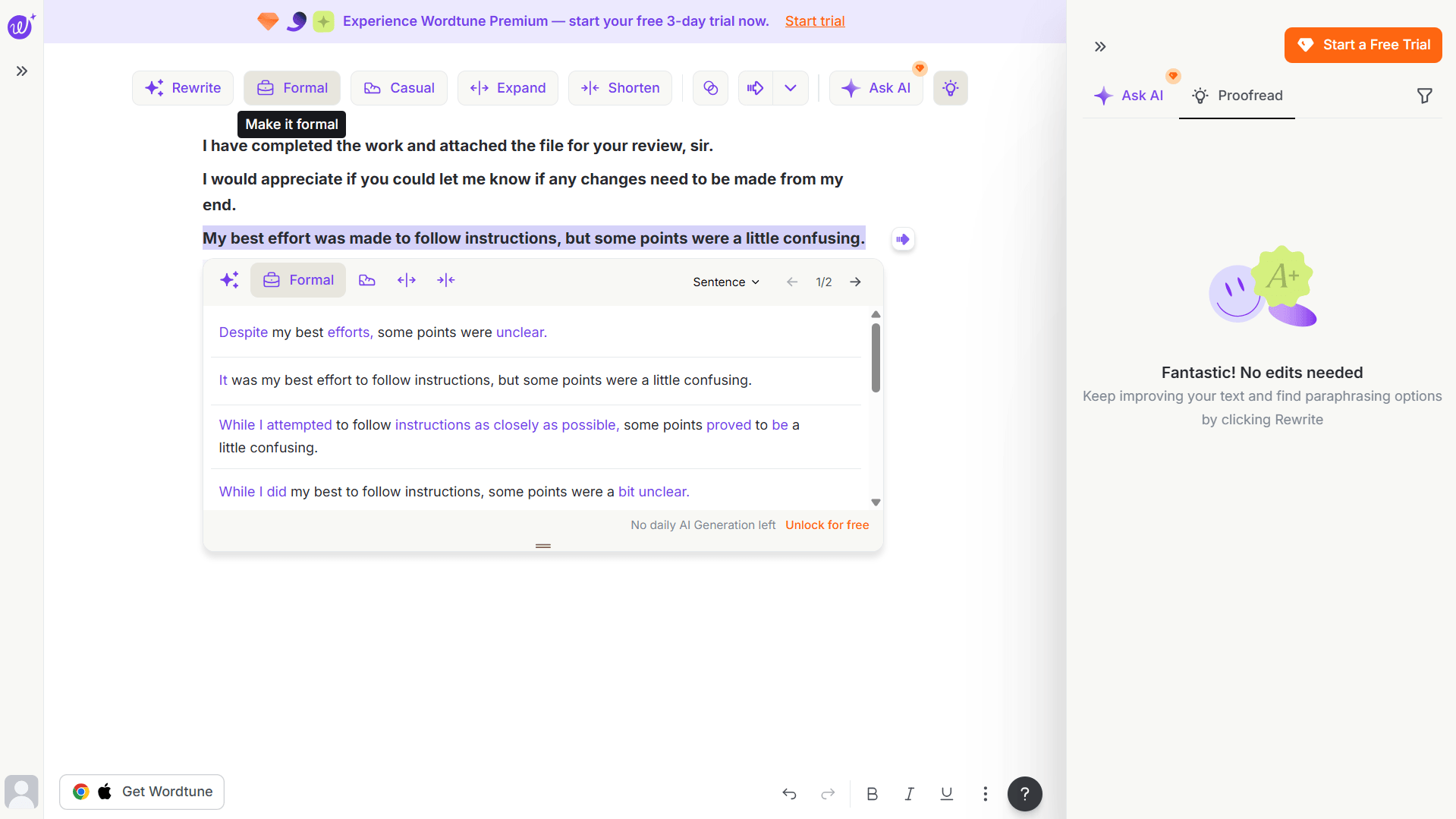
Honestly, that’s more restrictive than expected. Most limited free plans feel like a generous preview. This one feels like a strict sample.
For a freelancer writing three client emails a day, or polishing a blog post intro, 10 uses doesn’t cut it. The free plan shows you what Wordtune can do — it doesn’t let you actually do your work with it.
What’s Locked Behind Paid Plans
Annual billing saves 50% — Wordtune shows this prominently on their official pricing page.
| Plan | Monthly Price | Annual Price | Daily AI Uses |
|---|---|---|---|
| Basic (Free) | $0 | $0 | 10 |
| Advanced | $13.99/mo | $6.99/mo | 30 |
| Unlimited | $19.99/mo | $9.99/mo | Unlimited |
| Teams | Custom | Custom | Unlimited |
Prices verified against Wordtune’s official pricing page, April 2026. Confirm current pricing before purchasing.
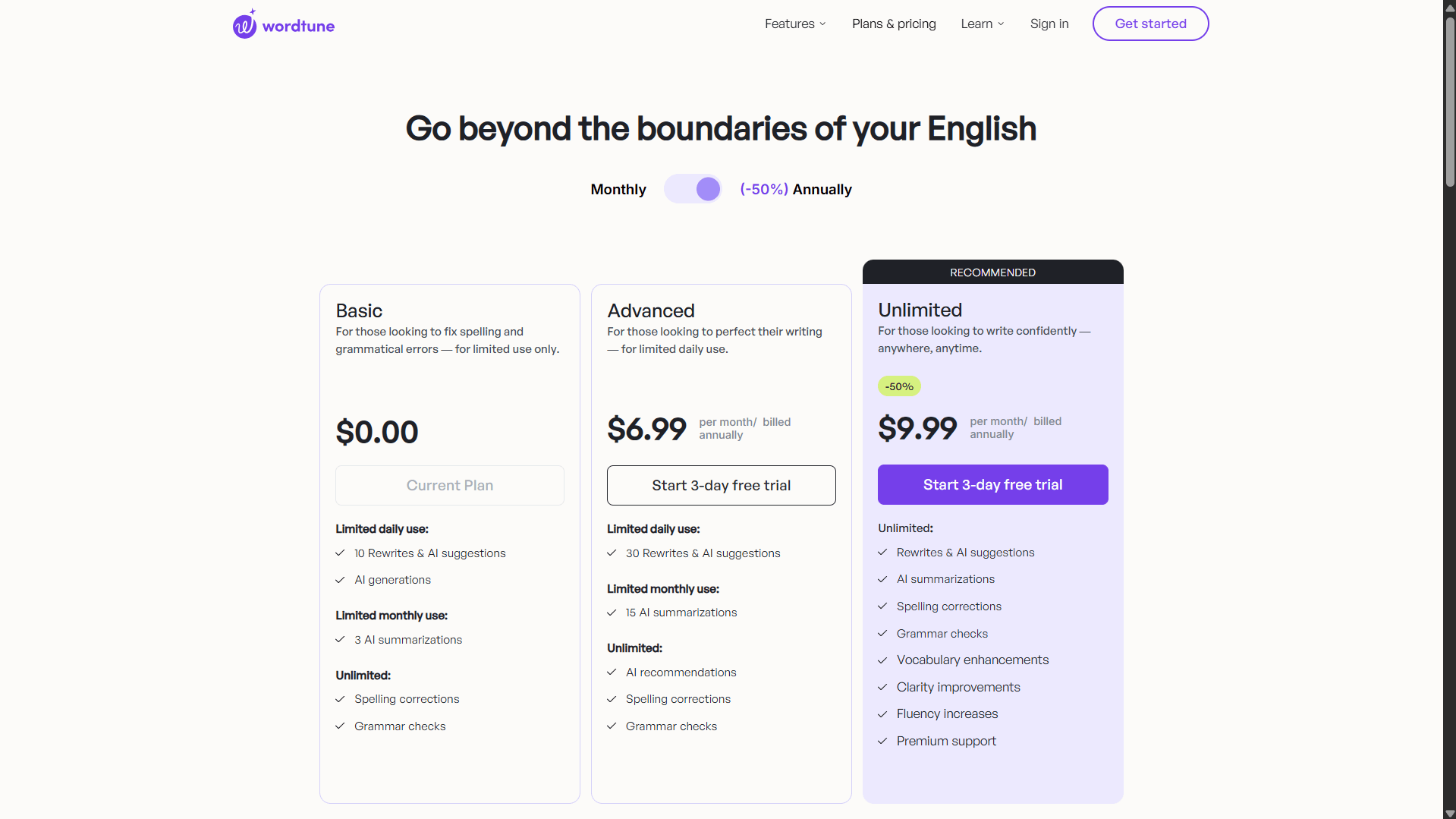
The Advanced plan at $6.99/month (annual) gives you 30 daily uses and 15 AI summarizations per month. Better — but still a cap. The Unlimited plan at $9.99/month (annual) removes it entirely. That’s the plan where Wordtune actually becomes a daily writing tool rather than an occasional one.
Wordtune vs QuillBot: Which Helps Non-Native Freelancers More?
Both tools help non-native writers produce more natural English. But they approach the job very differently.
Full Paragraph vs Line-by-Line
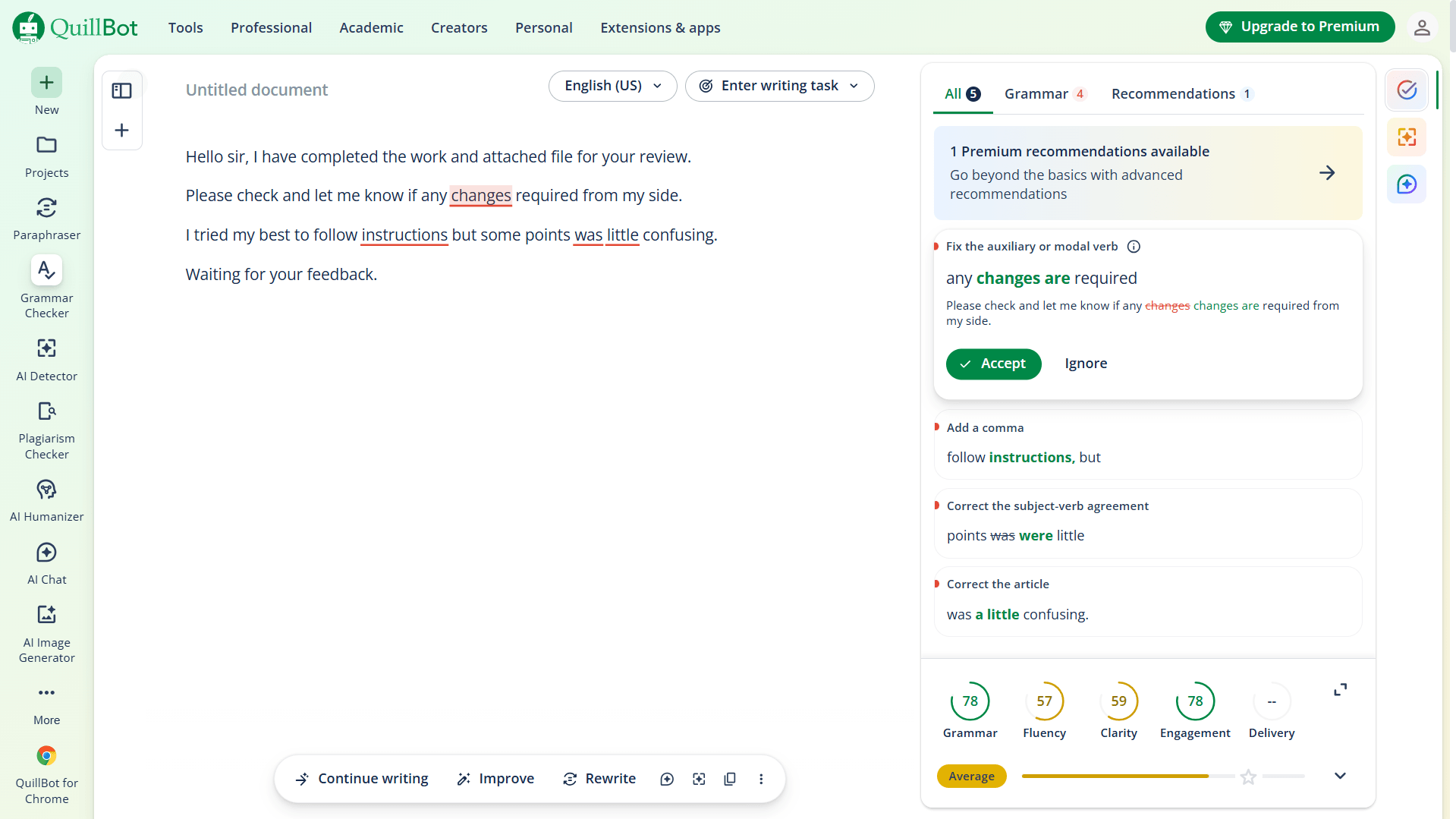
QuillBot takes your entire paragraph, rewrites it in one action, and hands it back. Paste your text, click Rephrase, done in seconds. In testing, it rewrote a four-sentence client email in one pass — fluidly, without losing the meaning.
Wordtune’s per-sentence rewrites were often higher quality. More nuanced. But working sentence by sentence, choosing from 4–5 options each time, burns through your daily free uses quickly. For editing a full article draft, QuillBot’s approach is simply faster and cheaper on the free tier.
For polishing just one paragraph or a key client email? Wordtune’s control is the better tool — if you have uses left.
Ease of Use
QuillBot is a two-panel editor. Paste left, get rewrite right. Straightforward. Wordtune requires highlighting text, then navigating a toolbar menu. More steps. And for new users, getting four or five rewrite variations per sentence can overwhelm rather than help — especially if you’re not yet confident enough in English to judge which sounds most natural.
That’s a real friction point for the exact audience Wordtune is best suited for.
| Feature | Wordtune Basic (Free) | QuillBot Free |
|---|---|---|
| Daily free uses | 10 AI actions | Unlimited paraphrasing |
| Rewrite scope | Sentence by sentence | Full paragraph |
| Tone options | Formal, Casual, Expand, Shorten | Standard, Fluency, Formal, Academic, Simple |
| Grammar check | Yes (Proofread tab) | Yes (Grammar Checker) |
| Browser extension | Yes | Yes |
| Best for | Targeted sentence polishing | Full draft cleanup |
Is Wordtune Worth It for Non-Native Freelancers?
On the free plan — no, not for daily use. On a paid plan — yes, with caveats. This Wordtune review makes that distinction clearly because most competitors don’t.
Wordtune is best suited to non-native English freelancers who need targeted, tone-aware sentence rewrites and can invest $6.99–$9.99/month in their writing quality. The sentence-level control and tone selector are genuinely useful for client communication, where register matters as much as grammar.
But if budget is the constraint, start with QuillBot. Its free plan covers full-paragraph paraphrasing with no daily cap. See how my QuillBot vs Wordtune comparison for freelance writers breaks down the two tools in detail.
Try Wordtune Free — 10 Uses Per Day, No Credit Card
Start with the free Basic plan to test the rewrite quality. Upgrade to Unlimited ($9.99/mo annual) when you’re ready for daily use.
Who Should Use Wordtune?
Wordtune FREE PLAN
Free / $6.99–$9.99/mo (annual)
AI writing assistant that rewrites sentences in multiple tones. Best for precise, sentence-level editing for non-native English writers.
- 4–5 rewrite variations per sentence — genuinely varied, not just synonyms
- Formal and Casual tone modes that actually shift register
- Proofread tab catches grammar errors alongside rewrites
- Chrome extension works in Gmail and Google Docs
- Only 10 free AI uses per day — exhausted within one email
- Sentence-by-sentence only — no full paragraph rewrites
- Multiple variations per sentence can overwhelm non-native users
- No usage counter — limit appears without warning
Skip if: You rely on a free tool for daily writing — QuillBot’s free plan is more practical.
How I tested: I ran the same 43-word non-native English email draft through Wordtune, QuillBot, and Grammarly in a single session. The test text used phrasing typical of non-native English writers — formally structured but slightly awkward, common among writers whose first language is Hindi, Spanish, or similar. I tested Wordtune’s Formal and Casual tone modes, the Proofread feature, and deliberately used the free plan until it hit its daily limit to document exactly when and how it cuts off. Screenshots were taken from live sessions in April 2026. User sentiment was also cross-referenced against verified reviews on G2 and Capterra.
Frequently Asked Questions
Verdict: Is This Wordtune Review’s Bottom Line Worth Acting On?
Wordtune is a focused, well-designed tool for non-native English freelancers — when used on a paid plan. The sentence-level rewrites are more nuanced than most competitors, and the tone selector handles the formal-to-casual switching that non-native writers actually struggle with.
The free plan is a wall, not a welcome mat. Ten uses per day isn’t a generous free tier — it’s enough to see the tool works, not enough to work with it. If you write daily, you’ll hit the limit before your morning emails are done.
At $9.99/month (annual), Wordtune Unlimited is a reasonable investment for freelancers who’ve outgrown QuillBot’s one-size rewrite and want more precise control. If you’re not there yet, start with the free tools in my best free AI writing tools for non-native English freelancers guide and work up from there.
Prices and features verified against Wordtune’s official pricing page, April 2026.
Related Reads
- QuillBot vs Wordtune for Freelance Writers
- Grammarly Review for Freelancers
- Best Free AI Writing Tools for Non-Native English Freelancers
