
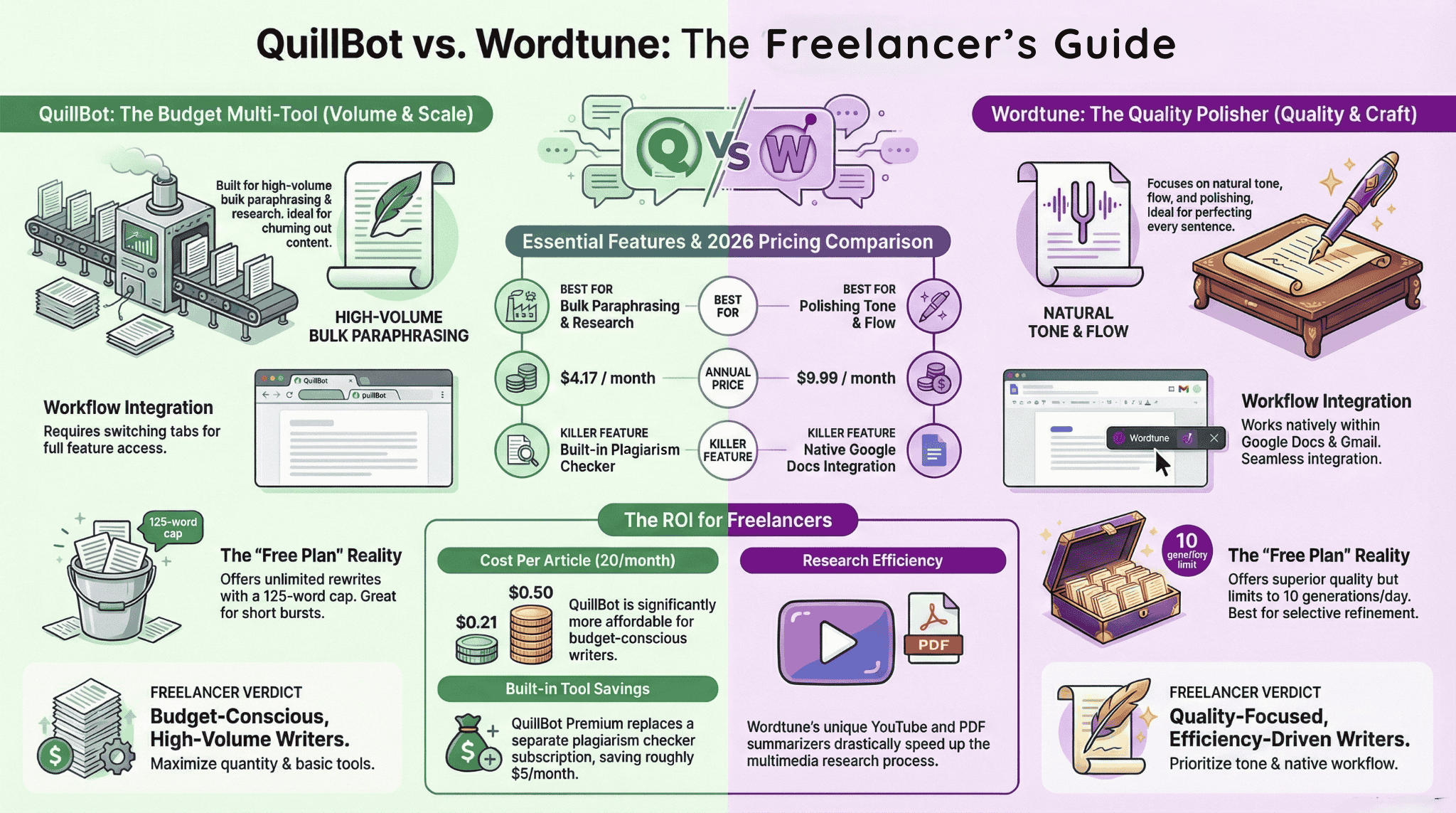
TL;DR: QuillBot and Wordtune both are AI writing tools which can be used by freelance writers — but each solves different problems. QuillBot is a better option for bulk paraphrasing, plagiarism checking, and overall value. Wordtune excels at natural inline rewrites inside Google Docs. For most freelancers, QuillBot’s free plan is enough to begin safer.
For a freelance writer, every tool is an investment to give a better return. QuillBot and Wordtune both promise to speed up your writing — but they serve very different purposes, and paying for the wrong one is losing the real cost.
Always using GPT or Gemini for grammar corrections or refinement appears a tedious task and doesn’t match the exact setting of a freelance blogger/writer. Thus, I started looking for tools which can help me with my writing on the go or in google docs, and I came up with this Quillbot Vs Wordtune for freelance writers, what to chose?
Short answer: QuillBot is better for volume workers; Wordtune is better for quality-focused writers. Full breakdown below.
QuillBot vs Wordtune for Freelance Writers — at a Glance
| Feature | QuillBot | Wordtune |
|---|---|---|
| Best For | Bulk paraphrasing, repurposing content | Polishing tone, natural rewrites, inline editing |
| Free Plan | 125 words/input, unlimited rewrites (2 modes) | 10 AI generations/day, Formal & Casual included |
| Paid Price (Annual) | $8.33/month | $9.99/month (Unlimited) |
| Paraphrasing Modes | 10+ modes | Contextual suggestions |
| Plagiarism Checker | ✅ Yes (Premium) | ❌ No |
| Grammar Checker | ✅ Standalone | ✅ Integrated |
| Summarizer | Text only (6,000 words) | Text + PDF + YouTube |
| Chrome Extension | ✅ 5M+ users, 4.7★ | ✅ 1M+ users, 4.6★ |
| Works in Google Docs | Limited | ✅ Native |
| Works in Gmail | ❌ | ✅ |
| Citation Generator | ✅ (1,000+ styles) | ❌ |
| Freelancer Verdict | Budget multi-tool | Quality polisher |
What Is QuillBot and Who Is It For?
QuillBot Best for Volume
Free | $8.33/mo (Annual)
- 10+ paraphrasing modes (Premium)
- Built-in plagiarism checker (Premium)
- Citation generator — 1,000+ styles
- No login needed for free plan
- AI Detector included
- Only Standard and Fluency free
- Doesn’t work natively in Google Docs or Gmail
- Copy-paste workflow required for full features
What Is Wordtune and Who Is It For?
Wordtune Best for Quality
Free | $9.99/mo (Unlimited Annual)
- Works natively in Google Docs, Gmail, LinkedIn
- Formal & Casual tone available on free plan
- More natural-sounding output
- Proofread panel with inline corrections
- YouTube & PDF summarizer
- Only 10 AI generations/day on free
- No plagiarism checker
- 3-day trial requires a credit card
- Nearly 2.4x more expensive than QuillBot annually
Free Plan Comparison: Which One Is Actually Usable Without Paying?
Most freelancers start free. And this is a section most comparison pages skip entirely — so let’s go deep.
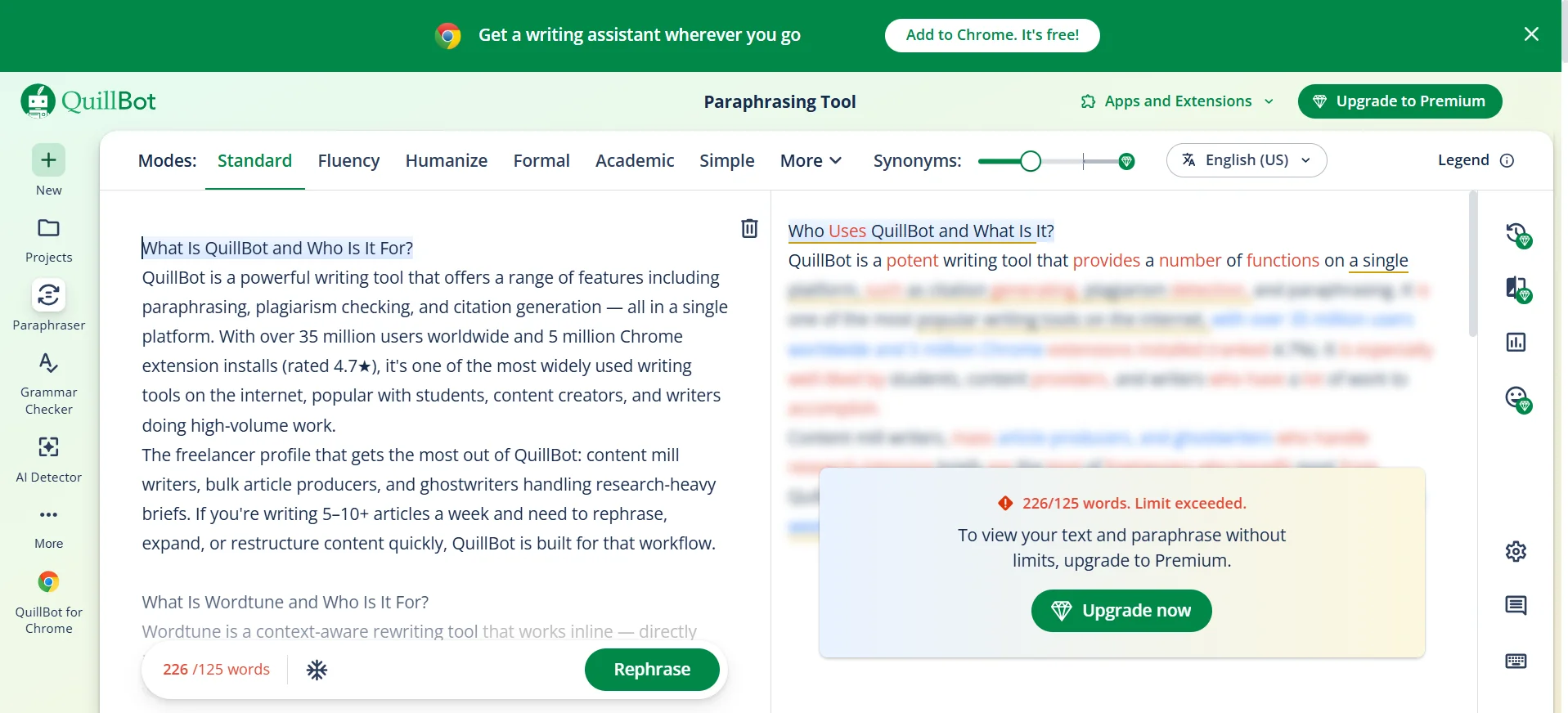
QuillBot Free Plan — What You Actually Get
- No login required — paste and go, results in under 2 seconds
- 125-word paraphrase limit per input (generous for a paragraph, tight for longer text)
- Only 2 modes free: Standard and Fluency — Creative, Shorten, Expand, Formal, Academic, Simple all locked behind Premium
- Grammar checker: free and unlimited
- Summarizer: up to 1,200 words free
From testing: Standard mode is functional but mechanical. Fluency mode is the real winner on free — it keeps natural sentence order and produces cleaner output than Standard. The synonym slider exists but behaves inconsistently; moving it to minimum actually produced more changes than maximum in testing, so don’t rely on it as a precision tool on the free plan.
One thing worth knowing: the free plan hits its ceiling fast. The first two rewrites feel smooth. By the third, you’re clicking modes that are all locked — and that’s when the frustration kicks in.
The speed was good, no complaints but anything beyond Standard and Fluency Modes needs premium access and it appears you are just being handed over with a demo, and not a real tool.
Wordtune Free Plan — What You Actually Get
- No mandatory signup wall — you can access the editor and start writing
- 10 AI Generations per day (hard limit covering rewrites + suggestions)
- 3 AI summarizations per month
- Unlimited spelling and grammar corrections
- Formal and Casual tone: available on free ✅
- Expand and Shorten: available as buttons, but hit the daily AI generation cap fast
- Fluency improvements, vocabulary enhancements, AI recommendations: paid only
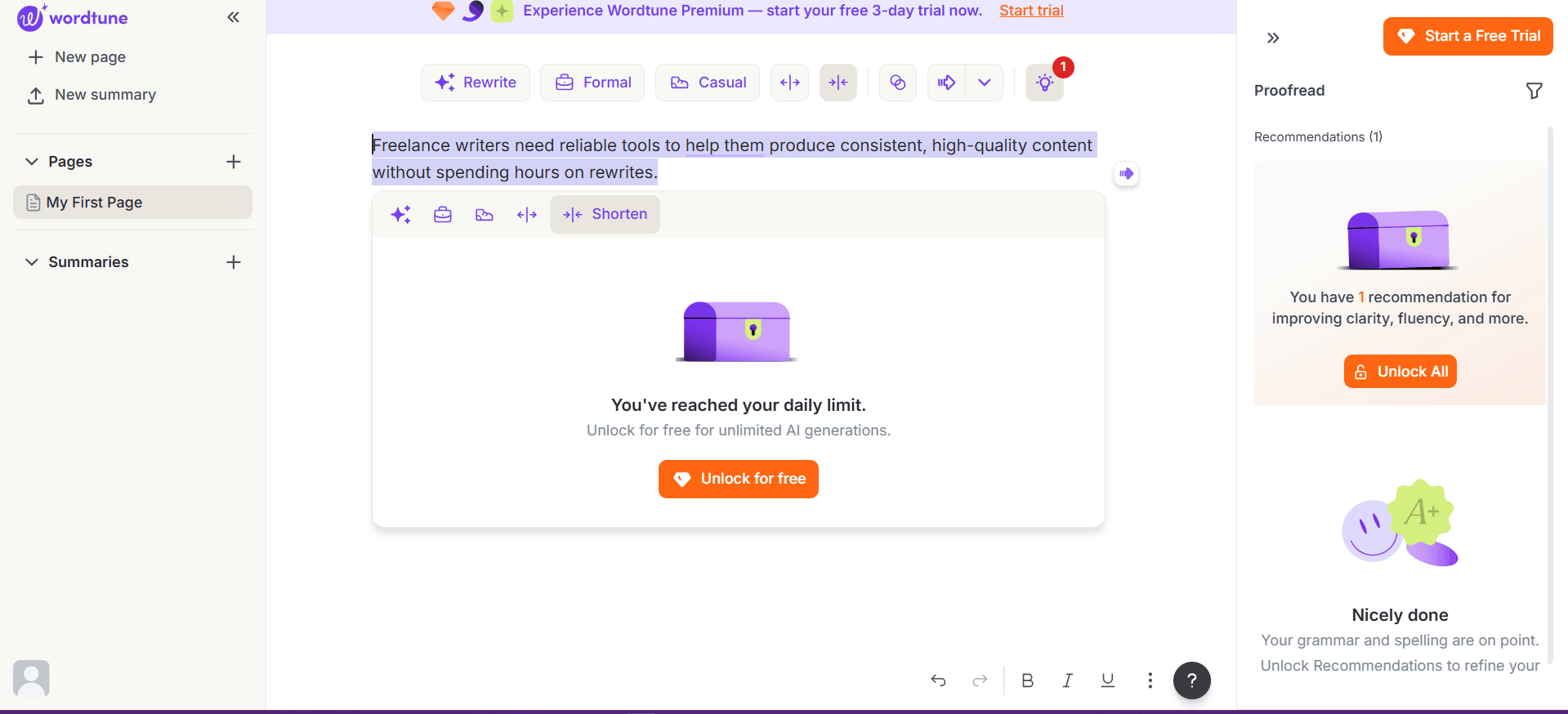
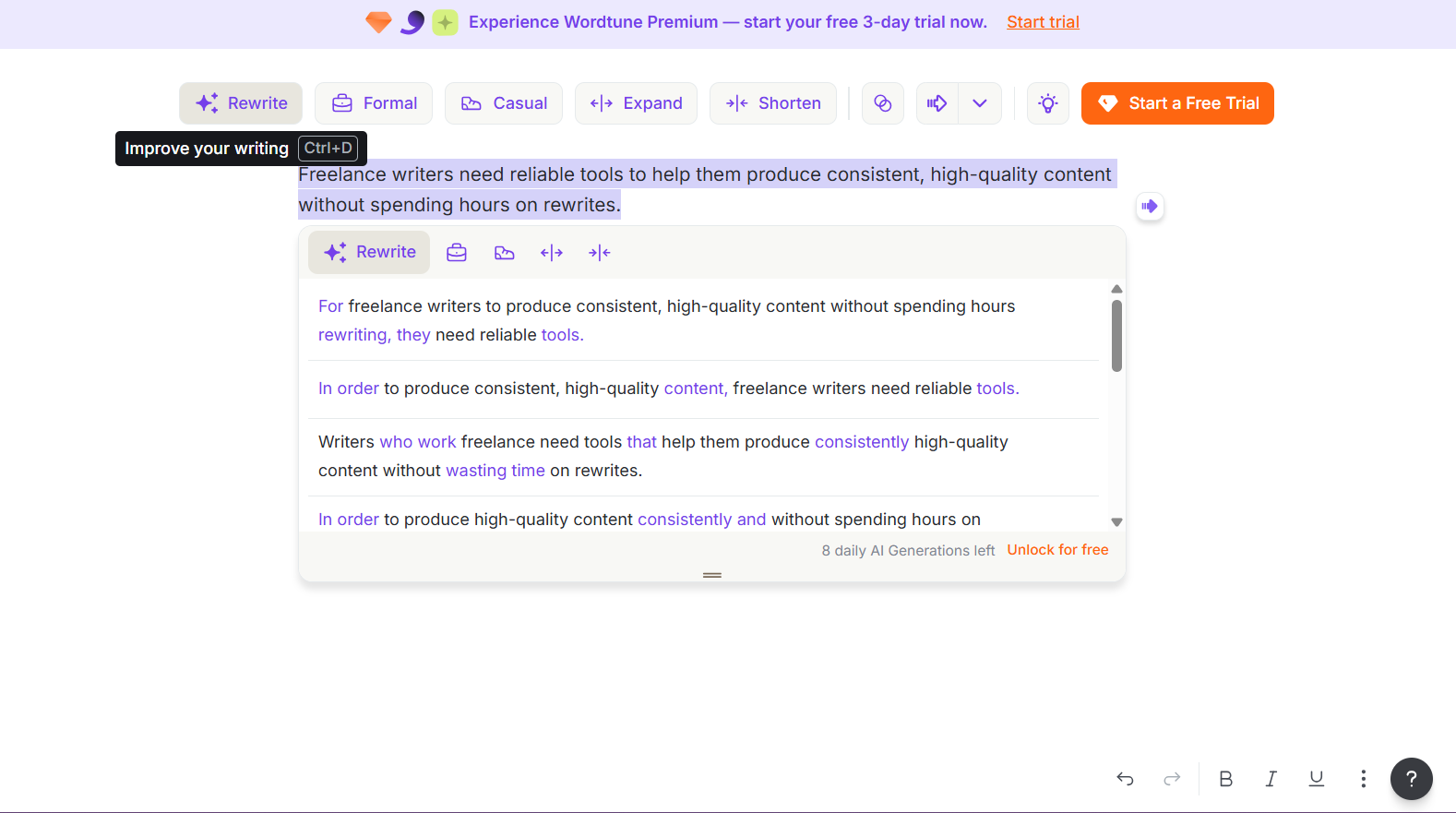
From testing: Wordtune gives you 4–5 rewrite suggestions per sentence across Rewrite, Formal, and Casual modes — and the output quality is noticeably more natural than QuillBot’s free modes. The Casual mode in particular produces conversational rewrites that feel like a human made a deliberate choice. The problem is the counter: each click costs one of your 10 daily AI generations. Run Rewrite + Formal + Casual on the same sentence and you’ve burned 3 generations before you’ve even decided which to use. An image below tells the whole story — after 4 tests on one sentence, the wall hit: “You’ve reached your daily limit.”
One more thing worth flagging: Wordtune Premium offers a 3-day free trial, but it requires a credit card to activate. That’s a real friction point for freelancers who just want to evaluate the tool before committing.
Winner: Free Plan
✅ QuillBot wins this time, but Wordtune’s free tier is better than what most reviews say.
QuillBot gives you unlimited rewrite options in Standard and Fluency mode with no daily cap after signing up but has only a 125-word input limit per session. Wordtune gives you only 10 AI generations per day, but those 10 outputs/day have genuinely better quality — they are more natural, more varied, and aware of tone (Formal and Casual both work free). The problem is that the 10 generations disappear fast.
Testing just one sentence across three modes costs 3 generations. This will cause hitting the daily limit mid-article. If you’re comparing QuillBot free vs premium as a freelancer, QuillBot’s free tier is the more practical daily use tool. However Wordtune free is better quality per generation — but the free generations are capped to 10/day.
Paraphrasing Quality for Freelance Writers: Which Produces Better Output?
This is the core reason most freelancers use either tool — and the question that makes this the best paraphrasing tool for content writers debate worth having. It’s where the two diverge most clearly.
QuillBot Paraphrasing — Modes and Flexibility
QuillBot offers 10+ paraphrasing modes. Here’s a quick breakdown — with an important caveat for free users:
- Standard — General-purpose rewrite, balanced changes (free)
- Fluency — Fixes grammar and makes text read more naturally (free — and the best free mode)
- Formal — Elevates tone for B2B or professional content (premium)
- Simple — Reduces complexity, good for consumer-facing writing (premium)
- Creative — Bigger vocabulary changes, more distinct output (premium)
- Shorten — Cuts word count while keeping meaning (premium)
- Expand — Adds words to hit a target length (premium)
- Academic — Scholarly tone, useful for research-heavy pieces (premium)
- Natural — Conversational, reads like a human wrote it (premium)
- Custom — Set your own tone targets (premium)
Note for free users: Only Standard and Fluency are accessible without a subscription. Creative and Shorten — the two modes most useful for blog writing — are immediately locked. You’ll see the buttons, you’ll click them, and you’ll hit a paywall. That’s by design.
For freelancers, Expand and Shorten are particularly valuable — they let you hit client word count requirements without padding or cutting manually. Formal and Simple give you a clean way to repurpose the same content for different audiences. One thing worth knowing: the synonym intensity slider is less reliable than it looks. In testing, moving it to minimum (fewer changes) actually produced a more altered sentence than maximum — the slider behaviour on the free plan is noisy, not precise. Don’t rely on it as a fine-grained control; use mode selection instead.
Wordtune Paraphrasing — Tone and Natural Flow
Wordtune doesn’t offer preset modes in the same way — instead it gives you 4–5 rewrite suggestions per sentence and you pick the best one. Formal and Casual tone options are available even on the free plan, which is more generous than most comparisons suggest. The output quality is notably more natural than QuillBot’s free modes — Casual in particular produces conversational rewrites that feel writer-made rather than machine-processed.
The Spices feature stands apart: while you’re mid-paragraph, you can ask Wordtune to add an example, a counterargument, a statistic, or a fun fact. For copywriters or bloggers fighting writer’s block, this is genuinely useful mid-draft. The catch on free is the 10 AI generation daily cap — every rewrite, every tone switch, every Expand costs one generation.
Side-by-Side Test — Real Free Plan Outputs
Test sentence: “Freelance writers need reliable tools to help them produce consistent, high-quality content without spending hours on rewrites.”
QuillBot — Standard mode (free): “In order to consistently produce high-quality material without having to spend hours on rewrites, freelance writers require dependable tools.”
Gut reaction: functional but mechanical. The sentence structure flip — leading with “in order to” — feels academic rather than natural. It reads paraphrased, not written.
QuillBot — Fluency mode (free): “Freelance writers require dependable tools that allow them to create regular, high-quality content without spending hours on rewrites.”
Gut reaction: best QuillBot free output. Natural sentence order, cleaner verb construction, better flow. For a blogger using the free plan, Fluency mode is the one to use.
Wordtune — Rewrite mode (free), top suggestions:
- “For freelance writers to produce consistent, high-quality content without spending hours rewriting, they need reliable tools.”
- “Writers who work freelance need tools that help them produce consistently high-quality content without wasting time on rewrites.”
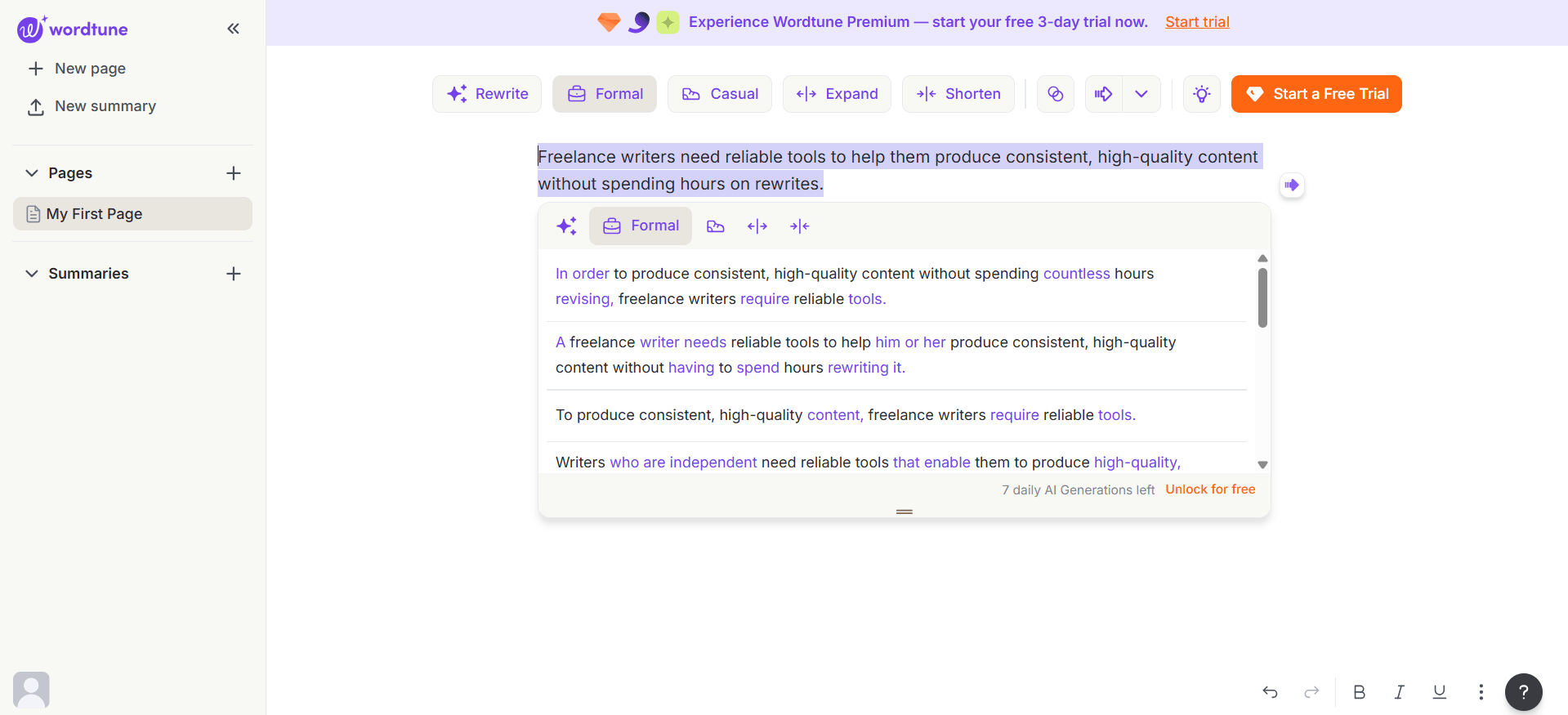
Wordtune — Formal mode (free):
- “In order to produce consistent, high-quality content without spending countless hours revising, freelance writers require reliable tools.”
- “A freelance writer needs reliable tools to help him or her produce consistent, high-quality content without having to spend hours rewriting it.”
Wordtune — Casual mode (free):
- “Writers need reliable tools to produce high-quality, consistent content without spending hours rewriting.”
- “You don’t want to spend hours rewriting content if you’re a freelance writer.”
The difference is clear. QuillBot restructures and substitutes vocabulary — efficient, slightly mechanical. Wordtune gives you 4–5 variants to pick from, with Casual mode producing the most natural output of the whole test. “You don’t want to spend hours rewriting content if you’re a freelance writer” reads like something a human blogger actually wrote. QuillBot can’t produce that on its free tier.
The tradeoff: Wordtune burned through 4 of 10 daily generations just on this one sentence across three modes. After 4 tests, the daily limit was hit.
Of all the outputs across both tools, the Wordtune Formal mode felt the most usable for actual blog writing — it kept the sentence tight and professional without sounding robotic, which is exactly what you want when writing for a business audience.
Winner: Paraphrasing
✅ QuillBot for volume and mode variety. Wordtune for output quality and natural tone.
Freelancers pushing high word counts will prefer QuillBot’s 10 premium modes and no daily cap. But if you test both free plans side by side, Wordtune’s output reads more human — especially in Casual mode. Copywriters crafting ad copy, email sequences, or social content will find Wordtune’s suggestions closer to what they’d actually write themselves. The limitation is purely the 10-generation daily cap on free.
Pricing Breakdown: Which Tool Gives Better ROI Per Article for Freelancers?
Nobody on page 1 calculates actual ROI for freelancers. Let’s fix that.
QuillBot Pricing (2026)
- Free: $0
- Monthly: $9.95/month
- Annual: $8.33/month ($99.95/year) ← best value
- Promotional pricing: ~$4.17/month(billed annually) with discount codes (check official site for current offers)
- Team Plan: available on site
Wordtune Pricing (2026)
- Free: $0
- Advanced: $13.99/month (monthly) / $6.99/month (billed annually)
- Unlimited: $19.99/month (monthly) / $9.99/month (billed annually) ← recommended for freelancers
- Business: Custom
- 3-day free trial available on Premium — but requires a credit card to activate
ROI Calculation for Freelancers
Let’s say you write 20 articles per month. Here’s how both tools stack up:
| Scenario | QuillBot Annual | Wordtune Unlimited (Annual) |
|---|---|---|
| Monthly cost | ~$8.33 | ~$9.99 |
| Articles written/month | 20 | 20 |
| Cost per article | ~$0.42 (or ~$0.21 with promo) | ~$0.50 |
| Time saved per article | ~15 min | ~10 min |
| Hours saved per month | ~5 hrs | ~3.3 hrs |
| Workflow disruption | Higher (copy-paste) | Lower (inline) |
Both tools cost less per article than a cup of coffee. But here’s the practical kicker: QuillBot’s plagiarism checker (Premium) alone saves you from needing a separate Copyscape subscription, which runs around $5/month for basic use. Factor that in and QuillBot is effectively cheaper for freelancers who submit clean work to clients as a deliverable requirement.
📌 Pricing note: QuillBot’s standard annual plan is $8.33/month ($99.95/year). Promotional discount codes can reduce this to approximately $4.17/month — always check quillbot.com/premium for current offers before subscribing. All prices in this section are verified as of April 2026. Subscription pricing can change — always confirm the latest on quillbot.com/premium and wordtune.com/plans before subscribing.
Winner: Pricing
QuillBot’s standard pricing is $8.33/month annually, but promotional discounts often bring it down to ~$4.17/month — check the official site for current offers. Even at full price, it’s still comparable to Wordtune Unlimited’s $9.99/month. And with the plagiarism checker bundled in, it replaces a tool you’d otherwise pay for separately. If you’re asking whether Wordtune Unlimited is worth it — it is, but only if you write primarily for tone and quality inside Google Docs, and the workflow advantage justifies the similar price point (or the premium if you miss QuillBot promos). For most freelancers, QuillBot wins this round on raw value.
Which Tool Fits Better Into a Freelance Writer’s Daily Workflow?
QuillBot Workflow
QuillBot works best as a separate tab or window — you copy text in, rephrase, copy back. The Chrome extension exists but the full feature set (especially mode switching and the slider) requires the main dashboard. It doesn’t work natively inside Google Docs or Gmail.
Best workflow: QuillBot tab open on one side of your screen, your doc on the other.
I didn’t actually like tab switching, to access full features of Quillbot and it broke my concentration much more than I thought- its not a big thing but doing it every time for a long article was exhausting.
Wordtune Workflow
Wordtune lives inside your tools. It works natively in Google Docs, Gmail, LinkedIn, Twitter/X, and Notion. Rewrite suggestions appear in a sidebar panel as you write — no copy-pasting, no tab switching, no breaking your flow.
Best workflow: Install the Chrome extension once. It follows you everywhere you write.
Winner: Workflow
✅ Wordtune wins workflow integration, and it’s not close. For freelancers who live inside Google Docs — which is most of us — Wordtune’s inline editing is a genuine productivity multiplier. QuillBot’s copy-paste requirement breaks writing rhythm, which has a real cost when you’re working at volume.
Beyond Paraphrasing: Extra Tools That Matter to Freelance Writers
QuillBot’s Extra Toolkit
- Plagiarism Checker — scans up to 25,000 words/month (Premium), critical for client submissions
- Citation Generator — 1,000+ citation styles, invaluable for academic or research-heavy freelancers
- AI Summarizer — summarize source articles up to 6,000 words for research
- Grammar Checker — standalone, detailed correction suggestions
- AI Detector — check your output for AI detection risk before submitting to a client
Wordtune’s Extra Toolkit
- YouTube Summarizer — summarize any YouTube video as research; unique in this space
- PDF Summarizer — upload client briefs or research documents and get instant summaries
- Spices — AI assistant for idea expansion inline while writing
- Proofread panel — inline sidebar that catches spelling, grammar, and punctuation errors as you write, with one-click fixes (confirmed in testing: caught spelling typos and punctuation issues in a sample email automatically)
- Grammar — integrated inline (not standalone)
Winner: Extra Tools
✅ QuillBot has more tools for freelancers overall. Plagiarism checker + citation generator + AI detector is a hard combination to match for the price. For a scored accuracy test of how QuillBot’s grammar checker scores against 6 free alternatives including LanguageTool and Hemingway, see our Grammarly alternatives roundup. The one area where Wordtune stands out is research: its YouTube and PDF summarizers are genuinely useful when you’re working through videos, whitepapers, or lengthy documents.
Which Tool Should YOU Choose? (By Freelance Writer Type)
| Freelancer Type | Best Tool | Why |
|---|---|---|
| Content mill writer (10+ articles/week) | QuillBot | Speed, bulk modes, word limits irrelevant at scale |
| Ghostwriter (research-heavy) | QuillBot | Plagiarism checker + citation generator |
| Copywriter (ads, emails, landing pages) | Wordtune | Natural tone, inline editing, sentence-level polish |
| Blogger (1–3 posts/week) | QuillBot | Free plan more usable, better all-in-one value |
| Social media writer | Wordtune | Gmail + LinkedIn integration |
| Beginner freelancer (budget-conscious) | QuillBot Free | Genuinely usable free tier |
| Academic / research writer | QuillBot | Citation generator + plagiarism check |
| Non-English native writer | Wordtune | Better natural fluency output |
Frequently Asked Questions
Final Verdict
Which tool is right for you?
- Choose QuillBot — If you are one who writes at volume, needs a plagiarism checker, and who regularly does heavy academic or research work, or wants the most capable free tier.
- Choose Wordtune — If you are one who gives more weightage to tone and quality, works often inside Google Docs, and wants rewrites that feel like you wrote them in a good mood.
Both tools are cheap enough that serious freelancers will recover the cost in a single article. The real question isn’t which one costs less — it’s which one fits how you actually work.
For a fresh beginner — I would recommend to use QuillBot’s free plan for a week — it’s free and the Fluency mode alone is quite good. If grammar accuracy is your primary concern rather than paraphrasing, our Grammarly Review for Freelancers covers whether the paid plan is worth it. But If you are a copywriter who mostly works with Google Docs, you should try Wordtune’s 3-day trial instead, just know that you will need a credit card for it.
Ready to Try These Tools?
Start with QuillBot’s free plan — no credit card needed. Or jump to Wordtune’s 3-day Premium trial if you work primarily in Google Docs.
Related Posts
- QuillBot Review for Freelancers (2026): Honest Free Plan Tested
- Wordtune Review for Non-Native English Freelancers (2026)
- Grammarly Alternatives Free (2026): 7 Tools Tested on Real Freelance Work
- Jasper Review for Freelancers 2026: Worth $69/Month?
Ready to Try These Tools?
Accuracy disclaimer: Information is based on publicly available data and independent research at the time of writing. Pricing and features may have changed. Always verify directly on the vendor’s website before purchasing.
Independence: TechHelpTips is an independent comparison site. We are not affiliated with, endorsed by, or sponsored by any software company mentioned here. All trademarks belong to their respective owners.
