
This Grammarly review for freelancers will help you decide if the premium version is worth your money. If you write for clients — proposals, emails, blog posts — one grammar mistake can cost you a job. Grammarly promises to fix that. But is Grammarly Premium actually worth the money for freelancers, or is the free version good enough?
I researched this carefully as a new blogger who currently uses Grammarly’s free version. No fake experience, no inflated claims — just honest research and what real freelancers actually need to know before spending money on a writing tool.
Grammarly Review for Freelancers: Quick Verdict
✅ Best for: Client-facing freelancers on Upwork and Fiverr
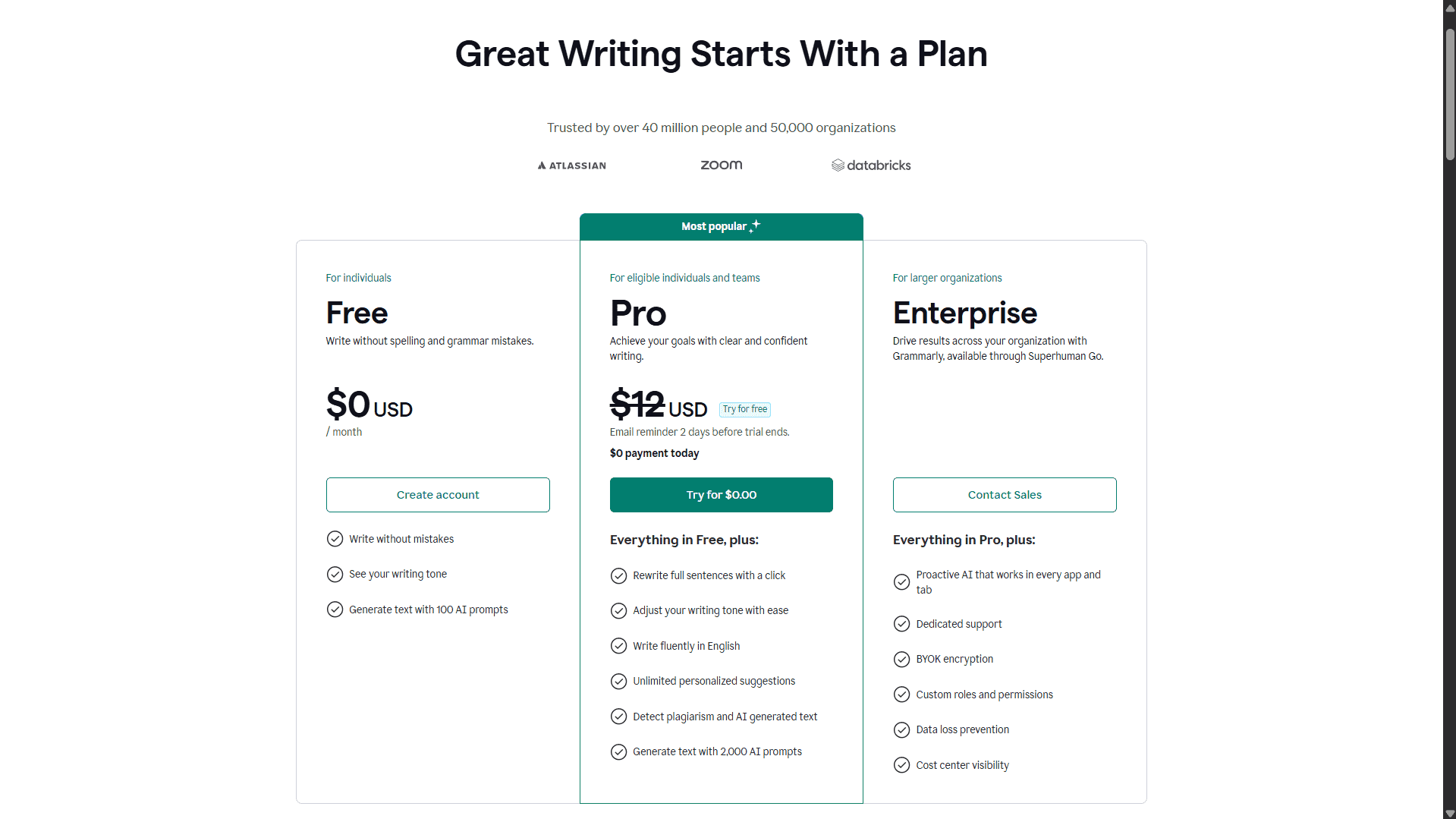
📋 Free plan: Yes — basic grammar and spelling, 100 AI prompts/month, no credit card needed (as of April 2026)
💰 Pro cost: $12/month (billed $144/year) or $30/month
🌍 Regional plan: Grammarly Plus available in India and select countries at significantly lower local pricing
⭐ Worth it?: YES for client work | MAYBE for bloggers | NO if budget is very tight
🔄 Top Budget alternative: LanguageTool (~$70/year, 30+ languages)— best for multilingual writers
What Is Grammarly?
Grammarly is an AI-powered writing assistant that checks your grammar, spelling, punctuation, tone, and clarity — in real time, right where you type.
It works through a browser extension inside Gmail, Google Docs, Microsoft Word, Outlook, WordPress, and most web-based text editors including Upwork’s message box. There are five plans: Basic (Free), Pro (global), Plus (regional), Business, and Enterprise.
- Basic (Free) handles basic grammar and spelling plus 100 AI prompts per month
- Pro / Plus unlock tone detection, a plagiarism checker, GrammarlyGO AI assistant with 2,000 prompts/month, and advanced clarity suggestions
- Business and Enterprise are for teams and organizations
Grammarly holds over 60% market share in a grammar checker market valued at approximately $1.5 billion in 2026, projected to reach $3.5 billion by 2035. It is the tool most clients and editors already recognize by name.
Grammarly Pricing in 2026
| Plan | Price (Global USD) | India / Regional (Plus) |
|---|---|---|
| Basic (Free) | $0 | $0 |
| Pro – Annual | $144/year ($12/mo) | — |
| Pro – Monthly | $30/month | — |
| Plus – Annual | — | ₹4,704/year (~$56/year) |
| Plus – Monthly | — | ₹1,000/month (~$12/month) |
| Business | ~$15–25/user/month | — |
| Enterprise | Custom | — |
Note:- The Prices in this article are as on April 2026. Please check official website for latest prices/promotional offers.
Why Does Grammarly Show Different Prices in Different Countries?
Grammarly uses Purchasing Power Parity (PPP) pricing — a common practice where companies adjust prices to match local income levels. In India and a few other eligible regions, this plan is called Grammarly Plus and costs roughly ₹4,704/year (~$56) — about 60% cheaper than the global Pro plan.
The core writing features are identical between Plus and Pro:
- Full grammar and style checking
- Tone detection
- Plagiarism checker (16 billion+ web pages + ProQuest academic database)
- GrammarlyGO AI assistant
- 2,000 AI prompts per month
The only difference is that Plus cannot be combined with coupons or discount codes.
For readers in other regions: Your local pricing may also differ from the standard $144/year. The best way to check is to visit Grammarly’s pricing page — it will automatically show you the correct plan and price for your country.
📌 Pricing Note for Readers
When you click the Grammarly link on this page, the price you see depends on your billing country. India users will see Grammarly Plus at ₹4,704/year (~$56). Users in other countries may see the global Pro plan at $144/year or a different regional price.
Core writing features are the same across all paid plans. Grammarly automatically shows you the right plan for your region.
Quick tool comparison for freelancers:
| Tool | Annual Price | Plagiarism Check | Languages |
|---|---|---|---|
| Grammarly Pro | $144/year | ✅ Yes (16B+ pages) | English-focused |
| Grammarly Plus | ~$56/year (India) | ✅ Yes (same) | English-focused |
| LanguageTool | ~$70/year | ⚠️ Not core focus | 30+ languages |
| QuillBot | ~$99.95/year | ⚠️ Basic only | Paraphrasing focus |
Note:- The Prices in this article are as on April 2026. Please check official website for latest prices/promotional offers.
Key Features That Matter to Freelancers
1. Grammar and Spell Check
Grammarly catches errors that standard browser spell-check misses — subject-verb agreement, wrong articles, tense confusion, comma splices, and punctuation mistakes. For non-native English writers, it is especially useful for the small but reputation-damaging slips: “ad” vs “add”, “its” vs “it’s”, missing articles before nouns. These are the kinds of errors that make clients quietly lose confidence in you.
2. Tone Detection
Grammarly reads your text and labels the tone — formal, confident, friendly, direct, or accidentally aggressive. For Upwork proposals and client emails, this is genuinely useful. You may think your message sounds professional when it actually reads as uncertain or pushy.
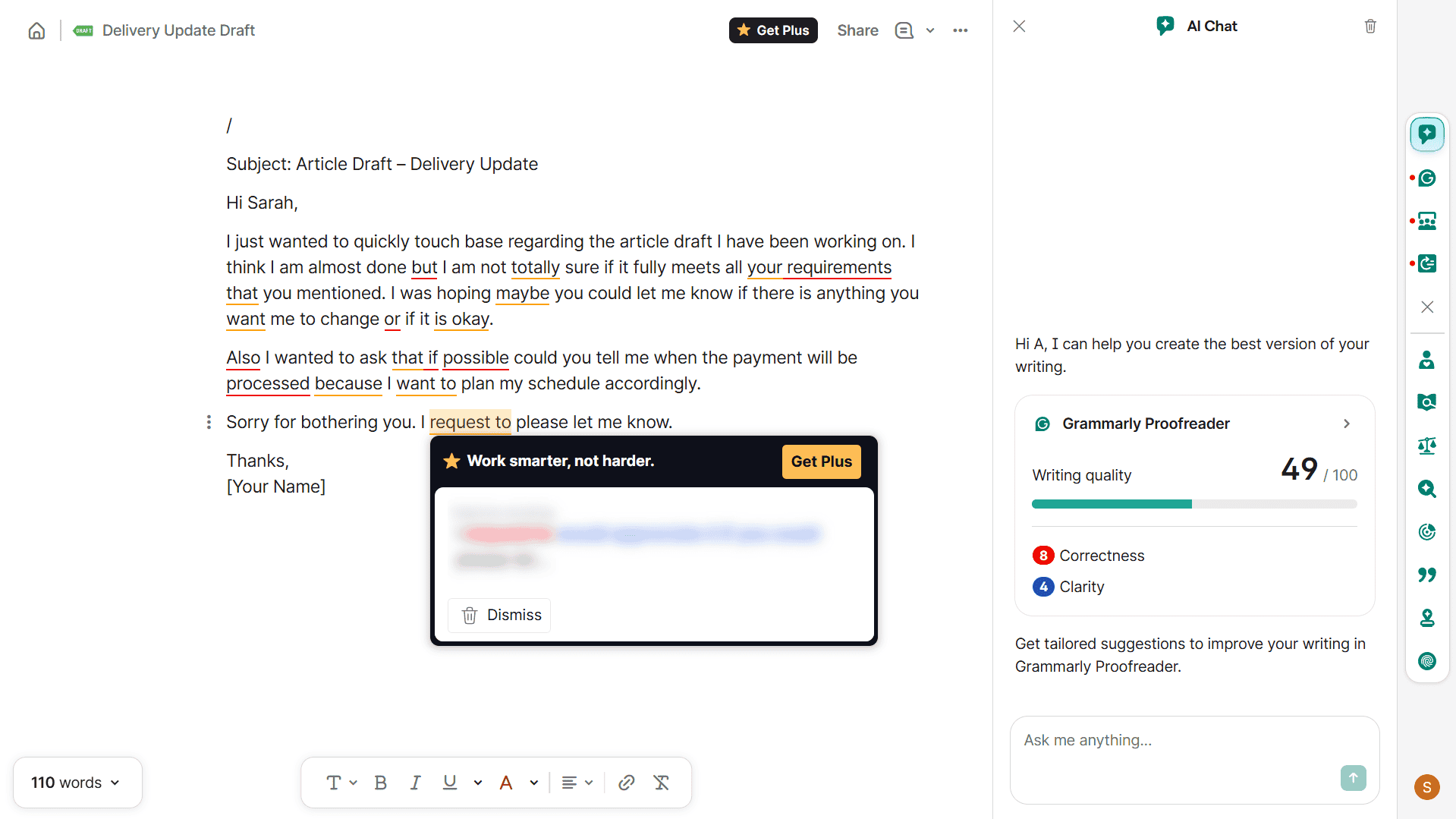
I tested this myself using Grammarly’s free version while drafting a few outreach emails for this blog. The tone label appeared instantly — one email I thought sounded professional was flagged as uncertain, mostly because I had used phrases like “I think” and “if possible.” That was genuinely useful feedback.
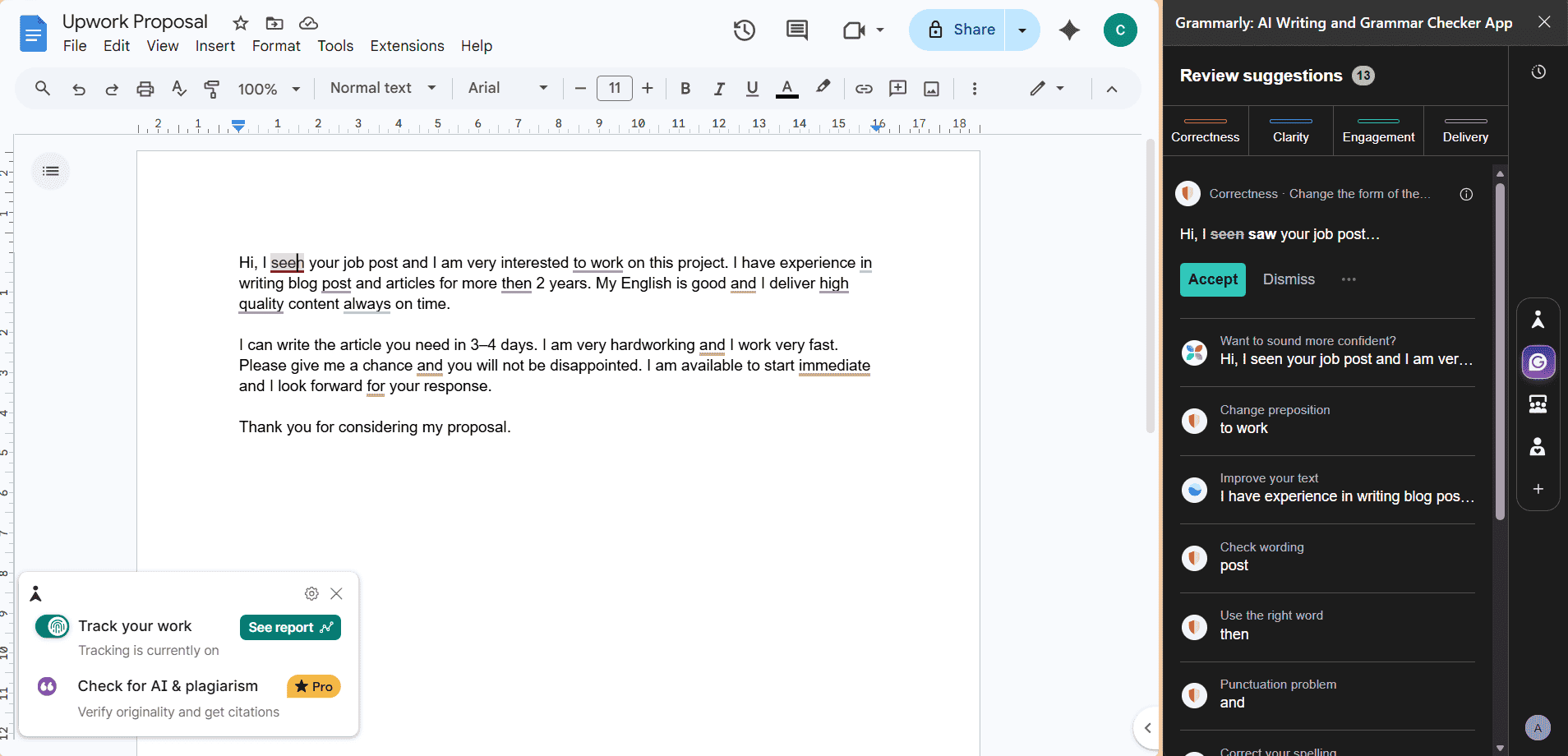
One thing worth knowing if you use Google Docs: Grammarly suggestions do not appear inline inside the document like they do in a regular browser text field — they show up in a sidebar panel on the right instead. It still works, but the experience feels slightly different.
Also, on the free plan, many of the advanced suggestions are locked — you can see that an issue exists, but Grammarly blurs the fix and prompts you to upgrade. For basic grammar and spelling it is enough, but tone detection and clarity rewrites are largely a Pro/Plus feature in practice.
3. Plagiarism Checker (Pro and Plus only)
Grammarly’s plagiarism checker cross-references your text against over 16 billion web pages and ProQuest’s academic database. It flags matching sentences, shows source links, and gives an overall originality percentage score. Accuracy is estimated at 85–90% for web-based content — strong for everyday freelance writing, though not designed for deep academic research.
For freelancers delivering blog posts, web copy, or articles, having a plagiarism report to share with a client is a simple but powerful trust signal.
4. GrammarlyGO — AI Writing Assistant
GrammarlyGO is Grammarly’s built-in AI writing assistant. In October 2025, Grammarly rebranded its parent company to Superhuman, launching a broader AI suite — but the writing assistant features remain available to Pro subscribers as before. It can rewrite full paragraphs in a chosen tone, draft email replies, summarize long documents, and understand document context — it recognizes whether you are writing a client proposal or a casual message and adjusts accordingly. It is not a full SEO content writer, but it saves real time on routine writing tasks and quick paragraph rewrites.
The free Basic plan includes 100 GrammarlyGO prompts per month, while paid plans (Pro and Plus) give you 2,000 prompts per month.
5. Clarity and Conciseness Suggestions
Premium suggestions flag wordy phrases, overly long sentences, and unnecessary filler. This is particularly useful for non-native English writers who tend to write heavy, complex sentences when translating from their first language. The nudge toward cleaner English is immediate and practical.
6. Works Everywhere You Already Write
Grammarly integrates through browser extensions into:
- Gmail and most webmail clients
- Google Docs
- Microsoft Word and Outlook
- WordPress block and classic editor
- Upwork, LinkedIn, Fiverr, and most browser text fields
No copy-pasting into a separate tool. It works live, where you already write.
Pros for Freelancers
- ✅ Plagiarism protection — Proof of originality for clients; catches accidental matches before they become disputes
- ✅ Tone detection — Helps non-native writers sound confident and professional in proposals and emails
- ✅ Runs everywhere — Gmail, Docs, WordPress, Word, Upwork — no copy-pasting required
- ✅ Catches credibility-damaging errors — “your” vs “you’re”, “lose” vs “loose”, missing articles
- ✅ GrammarlyGO saves time — Rewrites a weak paragraph in seconds instead of minutes
- ✅ Free version is genuinely useful — Basic grammar help plus 100 AI prompts per month at zero cost, no credit card needed
- ✅ Recognized brand — Clients and editors already trust tools they know by name
Cons for Freelancers
- ❌ Expensive at standard USD pricing — $144/year is significant when you are just starting out
- ❌ Not always right — Sometimes suggests unnatural or incorrect alternatives; always review manually
- ❌ Privacy consideration — Text is processed on Grammarly’s servers; avoid using it for legally sensitive or confidential client documents
- ❌ English-centric — LanguageTool handles 30+ languages far better for multilingual freelancers
- ❌ Plagiarism check has limits — 85–90% accuracy; weaker for less-indexed sources
- ❌ Over-reliance risk — Treating it as a final editor rather than a helper can slow your own writing skill growth
Is Grammarly Worth It for Freelancers?
This is the real question in any Grammarly review for freelancers. Here is an honest breakdown by situation.
✅ YES — if you:
- Regularly write paid client content — blog posts, web copy, proposals, emails
- Are a non-native English speaker who needs consistent help with tone, clarity, and grammar in English
- Deliver content where originality matters and clients may request a plagiarism report
- Can access regional Plus pricing (India ~$56/year, or similar regional rates elsewhere) — at that price, even two or three freelance projects in a year cover the full cost
🤔 MAYBE — if you:
- Blog mainly for passive income and write only occasionally for clients
- Already have strong English skills and rarely make grammar errors
- Are still testing whether freelancing is right for you and not yet earning consistently
❌ NO — if you:
- Write very little content per month
- Need multilingual grammar support — LanguageTool is a much better fit
- Are comfortable combining free tools like Hemingway Editor, Google Docs grammar check, and browser spell-check
As a new blogger who currently uses the free version, I find it catches errors I would have missed before hitting publish. The tone detection in particular revealed blind spots I didn’t know I had — especially around sounding uncertain in professional emails. For me personally, upgrading to Plus/Pro makes sense once my freelance income becomes more regular, but even the free plan has already improved the quality of what I publish.
Grammarly Alternatives Worth Knowing
- LanguageTool (~$70/year) — Solid grammar checking with support for 30+ languages. Best if you write in multiple languages or need something cheaper. Plagiarism detection is not its main strength.
- QuillBot ($8.33/month billed annually — discounts available on official site) — Strong paraphrasing and rewriting tool with a bundled plagiarism checker, but grammar checking is not its core focus. I cover the QuillBot vs Wordtune comparison in detail if you’re deciding between paraphrasing tools.
- ProWritingAid — Deep style and readability analysis aimed at long-form writers; comparable annual pricing but steeper learning curve.
- Free stack — Hemingway Editor for readability, Google Docs built-in grammar, and browser spell-check. If your budget is zero right now, this combination covers the basics. We scored 7 free tools tested on the same Upwork proposal if you want accuracy data before choosing.
FAQ
Related Posts
- QuillBot vs Wordtune for Freelance Writers — Detailed comparison if you need a paraphrasing tool alongside grammar checking
- Best Free AI Writing Tools for Non-Native English Freelancers — Complete free stack with Hemingway Editor, Google Docs, and more if you’re not ready to pay yet
- Grammarly Review 2026: Worth It After the Superhuman Rebrand? — Full breakdown of what changed after the Superhuman acquisition
- Jasper Review for Freelancers 2026 — If you’re considering premium AI writing tools beyond Grammarly
Accuracy disclaimer: Information is based on publicly available data and independent research at the time of writing. Pricing and features may have changed. Always verify directly on the vendor’s website before purchasing.
Independence: TechHelpTips is an independent comparison site. We are not affiliated with, endorsed by, or sponsored by any software company mentioned here. All trademarks belong to their respective owners.
