
In October 2025, Grammarly made a major announcement: the company rebranded to Superhuman. If you’re a Grammarly user wondering what this means for your subscription, whether prices changed, or if you need to switch to something else — this review answers everything.
I researched this thoroughly as a blogger who uses Grammarly daily. No marketing fluff, no outdated information — just honest answers about what actually changed, what stayed the same, and whether Grammarly is still worth paying for in 2026.
Grammarly Review 2026: Quick Verdict
✅ Still worth it? Yes — especially for freelancers and bloggers
💰 Grammarly Pro: $12/month (billed $144/year) — unchanged after rebrand
💼 Business plan: $33/month (adds Superhuman Mail) — optional for most users
🆕 What’s new: Superhuman Go AI features (proactive suggestions, availability varies)
🆓 Free plan: Still available with 100 AI prompts/month
🌍 Regional pricing: India Plus plan ~$56/year (₹4,704)
🔄 Best alternative: LanguageTool (~$60/year, 30+ languages)
What Happened to Grammarly in 2026?
Direct answer: In October 2025, Grammarly rebranded its parent company to “Superhuman” but kept the Grammarly product name unchanged. Your subscription, pricing, and features stayed exactly the same.
If you opened Grammarly recently and saw “Superhuman” branding, you’re not imagining things. Here’s the timeline of what actually happened:
October 2025: Grammarly Became Superhuman
In October 2025, Grammarly officially announced it was rebranding the parent company to Superhuman. This came after acquiring Superhuman Mail, a premium AI email client used by tech professionals and executives.
The rebrand caused immediate confusion. Users worried their subscriptions would change, prices would increase, or the writing assistant they relied on would disappear. None of that happened.
What Changed for Current Users (Spoiler: Not Much)
Grammarly the product still exists with the same name. The writing assistant you know — the browser extension, the grammar checker, the tone detection — all unchanged. Only the company name changed from “Grammarly Inc.” to “Superhuman.”
Your Grammarly Pro subscription did not automatically convert to anything else. The $12/month pricing stayed the same. The free plan stayed free. If you had Grammarly installed, it kept working exactly as before.
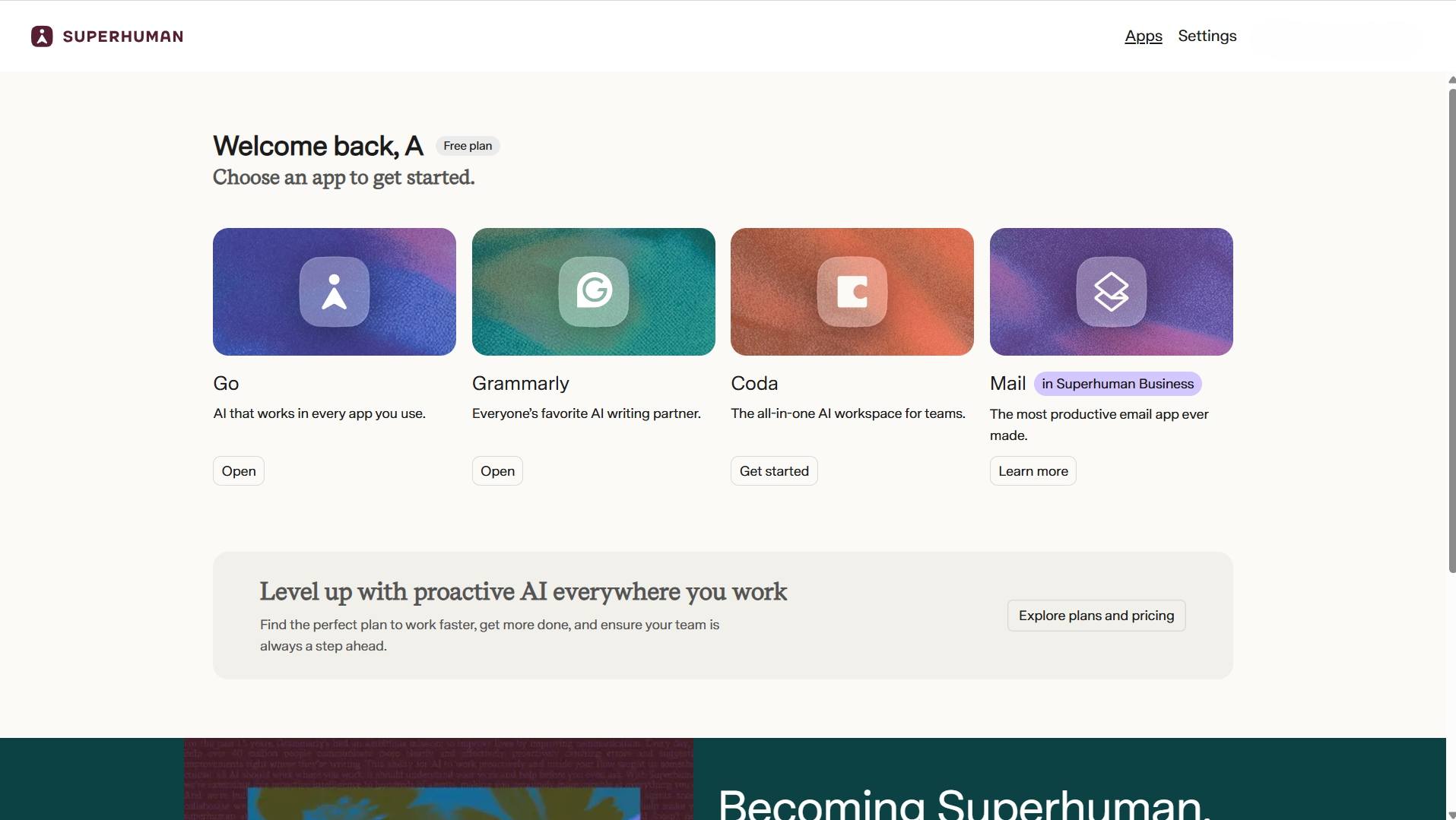
What Products Are Now in the Superhuman Suite
The Superhuman company now owns four separate products:
- Grammarly — the writing assistant (unchanged)
- Coda — collaborative docs and workspace (acquired prior to rebrand)
- Superhuman Mail — AI-powered email client (acquired prior to rebrand)
- Superhuman Go — new proactive AI assistant (launched with rebrand)
Most users only care about Grammarly. The other products are separate tools you can choose to add, but nothing forces you to use them.
How Much Does Grammarly Cost in 2026?
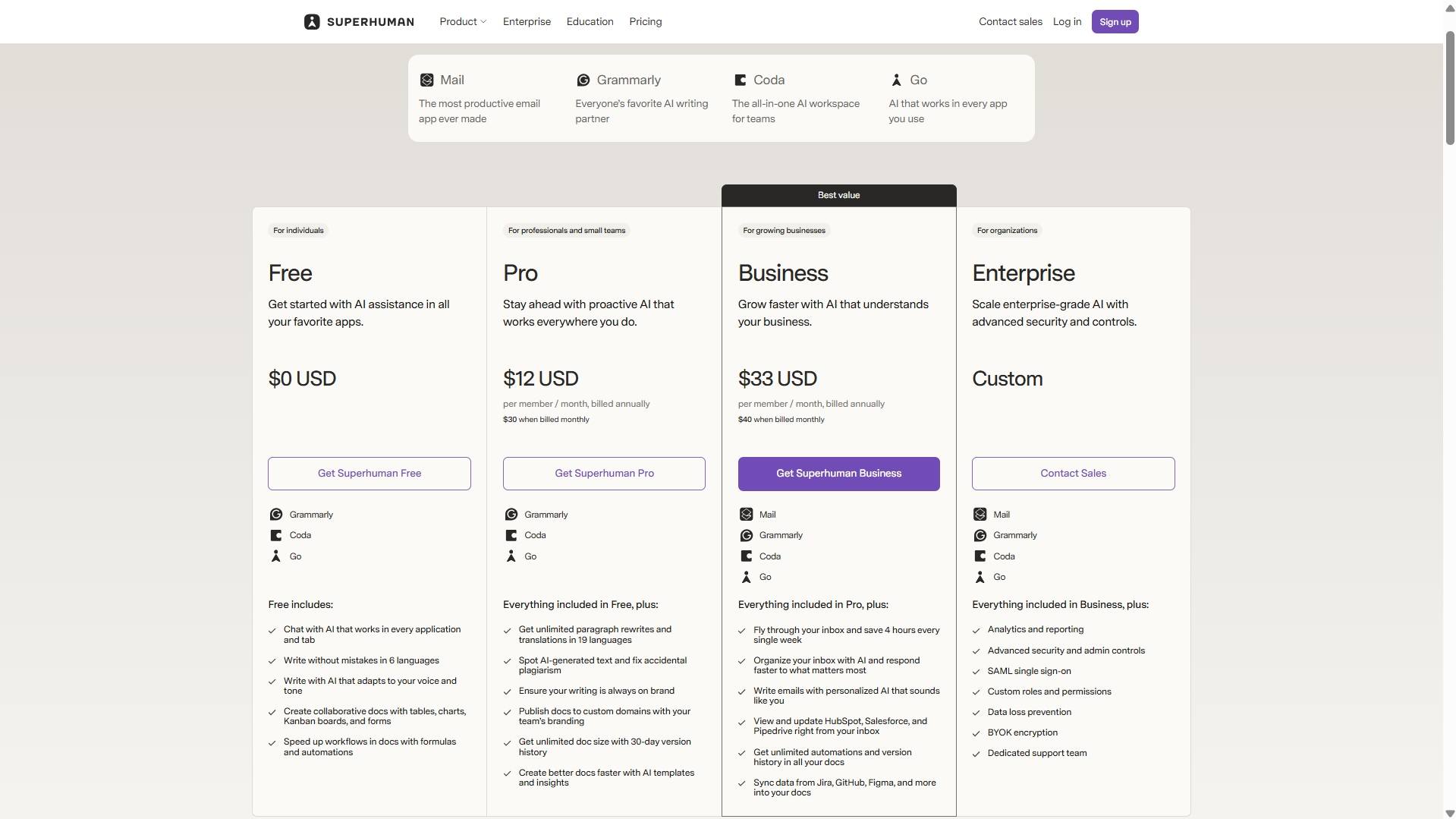
Direct answer: Grammarly Pro costs $12/month ($144/year) as of April 2026 — the same price as before the Superhuman rebrand. India and select regions have a Plus plan at ₹4,704/year (~$56/year).
| Plan | Price (Global USD) | India / Regional (Plus) | Key Features |
|---|---|---|---|
| Basic (Free) | $0 | $0 | Grammar, spelling, 100 AI prompts/mo |
| Pro – Annual | $144/year ($12/mo) | — | Tone, plagiarism, 2,000 AI prompts/mo |
| Pro – Monthly | $30/month | — | Same as annual, no commitment |
| Plus – Annual | — | ₹4,704/year (~$56/year) | Same features as Pro, regional price |
| Plus – Monthly | — | ₹1,000/month (~$12/month) | Same features as Pro, regional price |
| Business | $33/user/month ($40 monthly) | — | Pro features + Superhuman Mail included |
| Enterprise | Contact Sales | — | Custom solutions for large organizations |
Note: Prices as of April 2026. Check Grammarly’s official pricing page for current rates.
Important pricing clarification: The pricing above is for accessing Grammarly through the Superhuman suite. The Business plan ($33/month) bundles Grammarly Pro features with Superhuman Mail (the AI email client that normally costs $30/month standalone). Most freelancers and bloggers only need the Pro plan at $12/month — the Business plan is designed for teams who also want the premium email client.
Did Prices Change After the Rebrand?
No. Grammarly Pro remained $12/month ($144/year annual) through the entire Superhuman transition. The free Basic plan stayed free. Regional Plus pricing in India and select countries stayed the same at ₹4,704/year (~$56).
The rebrand introduced a new Business plan at $33/month that bundles Grammarly Pro features with Superhuman Mail (the AI email client). This is optional — solo freelancers and bloggers can stick with Pro at $12/month.
Regional Plus Pricing (India and Select Countries)
Grammarly uses Purchasing Power Parity pricing, meaning users in India and certain other regions see a lower-cost “Plus” plan instead of the global “Pro” plan. The features are identical — Plus just costs ₹4,704/year (~$56) instead of $144/year.
This regional pricing survived the Superhuman rebrand unchanged. If you see “Plus” on your pricing page, that’s your local equivalent of Pro.
Grammarly Features Review (2026 Update)
1. Grammar and Spell Check (Core Features)
This is what Grammarly has always done well, and the Superhuman rebrand changed nothing here. The grammar engine catches errors standard spell-checkers miss: subject-verb agreement, wrong articles (“a” vs “an”), comma splices, tense confusion, and punctuation mistakes.
For non-native English writers, this remains invaluable for catching reputation-damaging slips like “its” vs “it’s,” “your” vs “you’re,” and missing articles before nouns. These are the small errors that make clients quietly lose confidence.
2. Tone Detection for Freelancers
Grammarly reads your text and labels the tone — formal, confident, friendly, direct, or accidentally aggressive. This feature survived the Superhuman transition completely intact.
I tested this while drafting client emails in early 2026. One message I thought sounded professional was flagged as “uncertain” because I used phrases like “I think” and “if possible.” That instant feedback helped me rewrite it with more confidence before sending.
The free Basic plan shows you the tone label but locks most tone adjustment suggestions behind the Pro paywall. For Upwork proposals and client communication, the Pro upgrade is worth it specifically for this feature.
3. Plagiarism Checker (Pro and Plus Only)
Grammarly’s plagiarism checker cross-references your text against over 16 billion web pages and ProQuest’s academic database. It flags matching sentences, shows source links, and gives an overall originality percentage score.
Accuracy is estimated at 85–90% for web-based content. This feature did not change with the Superhuman rebrand and remains available only on Pro, Plus, and Business plans.
For freelancers delivering blog posts, web copy, or articles to clients, having a plagiarism report to share is a simple but powerful trust signal. It costs nothing extra once you have Pro, and clients appreciate seeing it.
4. GrammarlyGO AI Assistant
GrammarlyGO is Grammarly’s built-in AI writing assistant. It can rewrite paragraphs in a chosen tone, draft email replies, summarize long documents, and understand document context — recognizing whether you’re writing a client proposal or a casual message.
The free Basic plan includes 100 GrammarlyGO prompts per month. Pro and Plus subscribers get 2,000 prompts per month. These limits stayed the same after the Superhuman rebrand.
GrammarlyGO is not a full SEO content writer, but it saves real time on routine writing tasks: turning bullet points into full paragraphs, adjusting tone from casual to formal, or drafting quick email responses. For bloggers and freelancers, 2,000 prompts per month is more than enough for daily use.
5. NEW: Superhuman Go (What It Does for Freelancers)
Superhuman Go is the only genuinely new feature that launched with the October 2025 rebrand. It’s a proactive AI assistant that works across any web-based tool through the Grammarly browser extension.
Unlike GrammarlyGO where you manually prompt the AI, Superhuman Go watches what you’re doing and suggests actions without you asking. For example:
- In Gmail: suggests quick reply drafts based on email context
- In Google Docs: offers to expand bullet points into paragraphs
- On LinkedIn: suggests comment replies or post improvements
- In Upwork messages: drafts professional responses to client questions
Superhuman Go was free during early access for existing Pro subscribers until February 2026. As of April 2026, it’s included in Grammarly Pro at no extra charge for individual users, but businesses pay $33/month for the Business plan to access it across teams.
Is it useful for freelancers? Yes, but not essential. The proactive suggestions save a few seconds here and there, but GrammarlyGO (which you manually trigger) handles most of the same tasks. If you already have Grammarly Pro and Superhuman Go appears as a suggestion, try it — but don’t upgrade specifically for this feature alone.
6. Works Everywhere You Already Write
Grammarly’s browser extension integration remained unchanged after the Superhuman rebrand. It still works seamlessly in:
- Gmail and most webmail clients
- Google Docs
- Microsoft Word and Outlook
- WordPress block and classic editor
- Upwork, LinkedIn, Fiverr, and most browser text fields
No copy-pasting required. It works live, right where you type, with zero workflow disruption.
What’s New After the Superhuman Rebrand?
The October 2025 Superhuman rebrand introduced some confusion about what changed for existing Grammarly users. Here’s what actually happened:
What Stayed Exactly the Same
- ✅ Grammarly Pro pricing: Still $12/month ($144/year)
- ✅ All writing features: Grammar, tone, plagiarism, clarity — unchanged
- ✅ Browser extension integration: Works in all the same places
- ✅ Free Basic plan: Still free with 100 AI prompts/month
- ✅ Regional Plus pricing: India pricing stayed at ₹4,704/year
What’s Actually New
Superhuman Go is the only genuinely new feature that launched with the rebrand. It’s a proactive AI assistant that works across any web-based tool through the Grammarly browser extension. Unlike GrammarlyGO where you manually prompt the AI, Superhuman Go watches what you’re doing and suggests actions automatically.
According to the official rebrand announcement, Superhuman Go was free for existing Pro subscribers through February 1, 2026. Current availability may vary — check your Grammarly dashboard to see if it appears in your account.
Is Superhuman Go Useful for Freelancers?
Yes, but it’s not essential. The proactive suggestions save a few seconds here and there — suggesting email replies, expanding bullet points, or drafting LinkedIn comments. But GrammarlyGO (which you manually trigger) handles most of the same tasks.
If you already have Grammarly Pro and Superhuman Go appears as a feature, try it. But don’t upgrade to Pro specifically for this feature alone — the core writing tools (grammar, tone, plagiarism) are still the main value.
Testing Superhuman Go in Browser (April 2026)
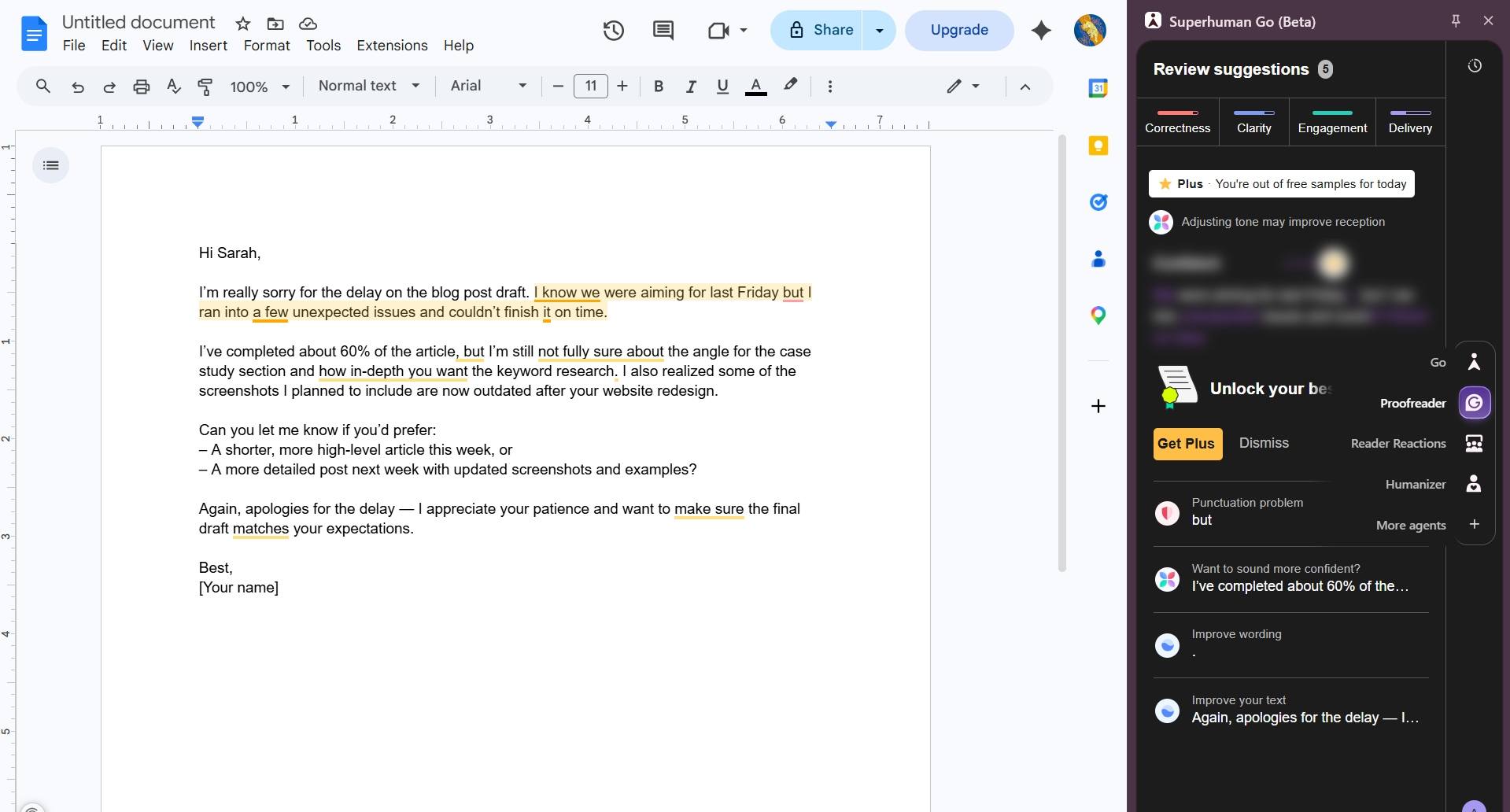
I tested Superhuman Go to see how the proactive AI suggestions actually work in practice. The feature appears as a sidebar panel that monitors your writing in real-time and offers suggestions without you asking.
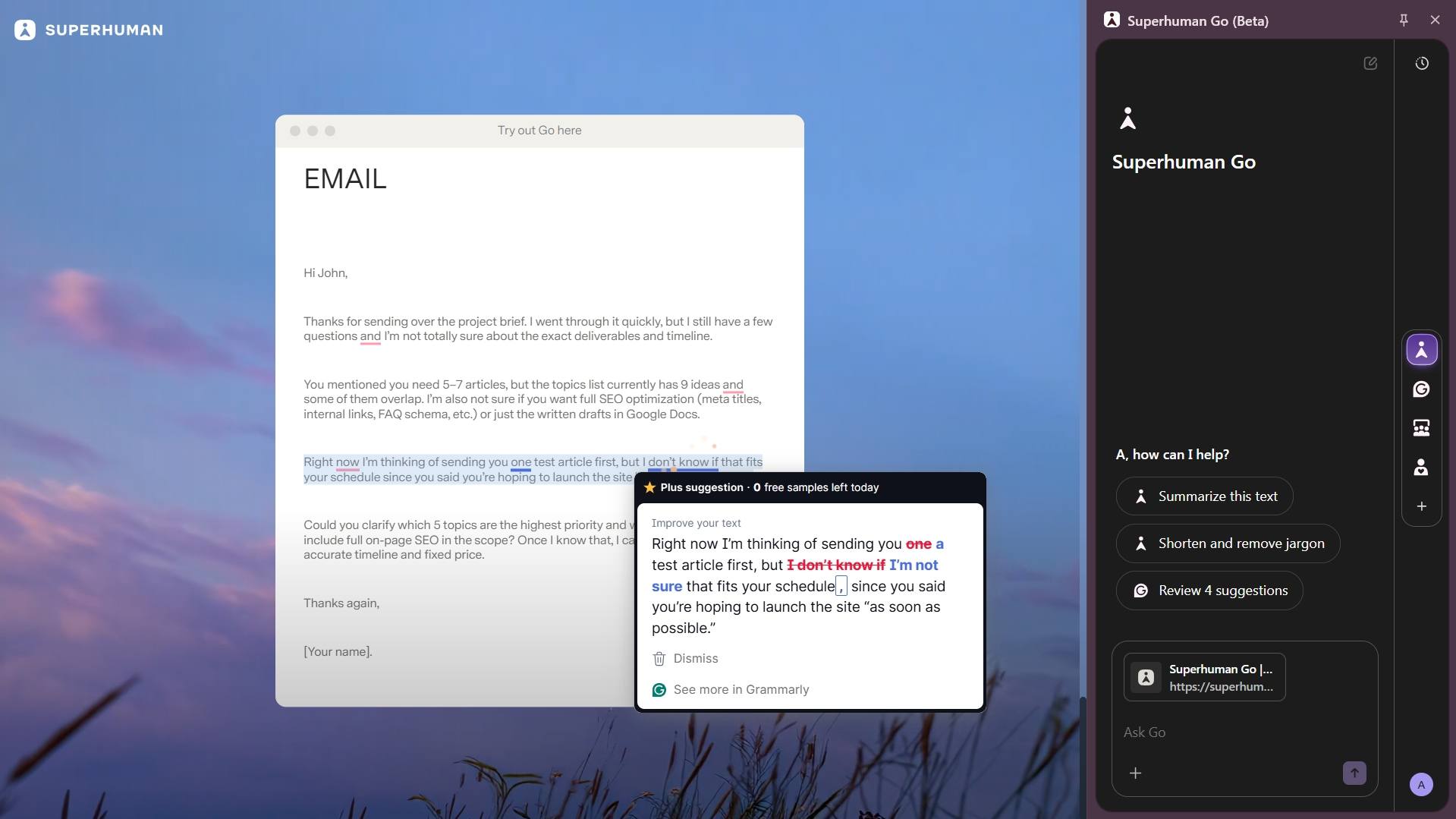
In my test, I wrote a draft email apologizing for a delayed blog post. Superhuman Go immediately flagged tone issues — phrases like “a few unexpected issues” and “not fully sure” were highlighted as uncertain language that could weaken the message. The sidebar suggested “Adjusting tone may improve reception” and offered rewrites that sounded more confident.
The tool also has usage limits on the free tier — after a few suggestions, it showed “You’re out of free samples for today” with a prompt to upgrade to Plus for unlimited access. This confirms that Superhuman Go follows the same 100 prompts/month limit as GrammarlyGO on the free Basic plan, with 2,000 prompts/month on paid plans.
Overall impression: Superhuman Go works as advertised — it genuinely catches tone problems I wouldn’t notice myself. But it’s not a game-changer over manually triggering GrammarlyGO when you need it. The proactive suggestions save a few seconds here and there, but won’t transform your writing process.
Pros and Cons for Freelancers (2026 Post-Rebrand)
Pros
- ✅ Survived the rebrand unchanged
- All writing features work exactly as before
- ✅ Pricing stayed the same
- Pro remained $12/month through the Superhuman transition
- ✅ New AI features added for free
- Superhuman Go included in Pro at no extra cost (as of April 2026)
- ✅ Plagiarism protection
- Still the best value for freelancers who need originality reports
- ✅ Tone detection
- Remains invaluable for non-native English writers and client communication
- ✅ Free plan still useful
- 100 AI prompts/month plus basic grammar at zero cost
- ✅ Works everywhere
- Gmail, Docs, WordPress, Upwork — integration unchanged
Cons
- ❌ Rebrand caused confusion
- Many users still don’t understand what changed (or that nothing changed)
- ❌ Business plan adds cost for most users
- $33/month bundles Mail + Grammarly — only worth it if you actually want the email client
- ❌ Not always right
- Still suggests unnatural alternatives sometimes; manual review required
- ❌ Privacy consideration
- Text processed on Superhuman’s servers; avoid for sensitive documents
- ❌ English-centric
- LanguageTool still better for multilingual writers (30+ languages)
- ❌ Superhuman Go is optional
- Useful but not essential; don’t upgrade specifically for it
Is Grammarly Still Worth It After the Superhuman Rebrand?
Direct answer: Yes — especially for freelancers and bloggers. The Superhuman rebrand changed nothing about Grammarly’s writing features, pricing ($12/month for Pro), or browser integrations. You got new AI features (Superhuman Go) at no extra cost.
Yes — and the Superhuman rebrand didn’t change that answer. Here’s the honest breakdown by situation:
✅ YES — if you:
- Write regularly for clients — proposals, emails, blog posts, web copy
- Are a non-native English speaker who needs consistent help with tone, clarity, and grammar
- Deliver content where originality matters and clients may request plagiarism reports
- Can access regional Plus pricing (India ~$56/year makes it extremely affordable)
- Want AI writing assistance (GrammarlyGO) without paying for ChatGPT Plus separately
🤔 MAYBE — if you:
- Blog mainly for passive income and write only occasionally for clients
- Already have strong English skills and rarely make grammar errors
- Are still testing whether freelancing or blogging is right for you
- Use the free Basic plan regularly and wonder if Pro is worth the upgrade
❌ NO — if you:
- Write very little content per month (less than a few emails and one article)
- Need multilingual grammar support — LanguageTool handles 30+ languages better
- Are comfortable combining free tools: Hemingway Editor + Google Docs grammar + browser spell-check
- Only need basic spell-check (the free Basic plan covers this)
The Superhuman rebrand created uncertainty, but the core value proposition remains unchanged. For freelancers and bloggers who need plagiarism protection and tone detection, Grammarly Pro at $12/month is still the strongest option at this price point — especially given the new AI features came at no extra cost.
For a more detailed breakdown specifically focused on freelancers who write for clients on Upwork and Fiverr, see my Grammarly Review for Freelancers — it covers plagiarism checking, tone detection for proposals, and regional Plus pricing in much more depth.
What Are the Best Grammarly Alternatives in 2026?
Direct answer: LanguageTool (~$60/year) for multilingual writers, QuillBot ($99.95/year) for paraphrasing, and ProWritingAid for long-form content analysis. All survived the Grammarly rebrand unchanged as independent competitors.
- LanguageTool (~$60/year) — Best if you write in multiple languages. Supports 30+ languages with solid grammar checking. Plagiarism detection is not its core strength. Great alternative if the Superhuman rebrand made you reconsider Grammarly.
- QuillBot ($8.33/month billed annually, $99.95/year) — Strong paraphrasing tool with basic grammar checking and plagiarism detection. Better for rewriting than editing. See my QuillBot vs Wordtune comparison for details.
- ProWritingAid — Deep style and readability analysis aimed at long-form writers. Comparable annual pricing to Grammarly Pro but steeper learning curve. Good for novelists and technical writers.
- Free stack — Hemingway Editor for readability, Google Docs built-in grammar, and browser spell-check. If your budget is zero, this combination covers basic needs. My Best Free AI Writing Tools for Non-Native English Freelancers covers the full free stack. For a scored head-to-head of 7 free Grammarly alternatives tested on a real Upwork proposal, see our dedicated roundup.
FAQ
Final Verdict: Is Grammarly Still Worth It After the Superhuman Rebrand?
Yes — Grammarly remains worth it in 2026 despite the Superhuman rebrand.
The confusion around the October 2025 company name change created uncertainty, but the facts are clear: Grammarly the product works exactly the same. The writing features you rely on didn’t change. The $12/month Pro pricing didn’t increase. Your subscriptions didn’t get auto-upgraded to anything more expensive.
What changed: you got new AI features (Superhuman Go) without paying extra, the parent company now owns additional products you can choose to use (Coda, Superhuman Mail), and the branding shifted to “Superhuman” at the company level.
For freelancers and bloggers, Grammarly Pro at $12/month remains the best value in writing assistance tools. The plagiarism checker alone saves you from client disputes. The tone detection helps non-native English writers sound professional. The GrammarlyGO AI features (2,000 prompts/month) give you ChatGPT-style assistance without needing a separate subscription.
If you were worried the Superhuman rebrand meant you needed to find a new writing tool — you don’t. Grammarly is still Grammarly.
Related Posts
- Grammarly Review for Freelancers (2026): Is Premium Worth It? — Detailed breakdown specifically for freelancers writing on Upwork and Fiverr
- QuillBot vs Wordtune for Freelance Writers — Side-by-side comparison if you need a paraphrasing tool
- Best Free AI Writing Tools for Non-Native English Freelancers — Complete free stack if you’re not ready to pay yet
- Otter.ai Review for Freelancers (2026) — AI transcription for client calls
- Jasper Review for Freelancers 2026: Worth $69/Month? — For freelancers considering premium AI writing tools
