
Looking for grammarly alternatives free to use in 2026? One of them outperforms Grammarly Free on raw error detection without asking for your email address. Based on testing the same 140-word Upwork proposal across all seven tools, LanguageTool caught the most errors in our test, requires no sign-up, and has no daily cap on the free web version. For readability alongside grammar, Hemingway Editor pairs well — also free, no account needed. For corrections explained rather than just flagged, Scribens is the strongest no-sign-up option.
But the right grammarly alternative free of charge depends on what you actually need. This article ran the same 140-word Upwork proposal with 10 deliberate errors through all 7 tools plus Grammarly Free as the benchmark — wrong prepositions, passive voice, missing plurals, unnatural phrasing. Here is exactly what each tool caught, what it missed, and where the free tier runs out.
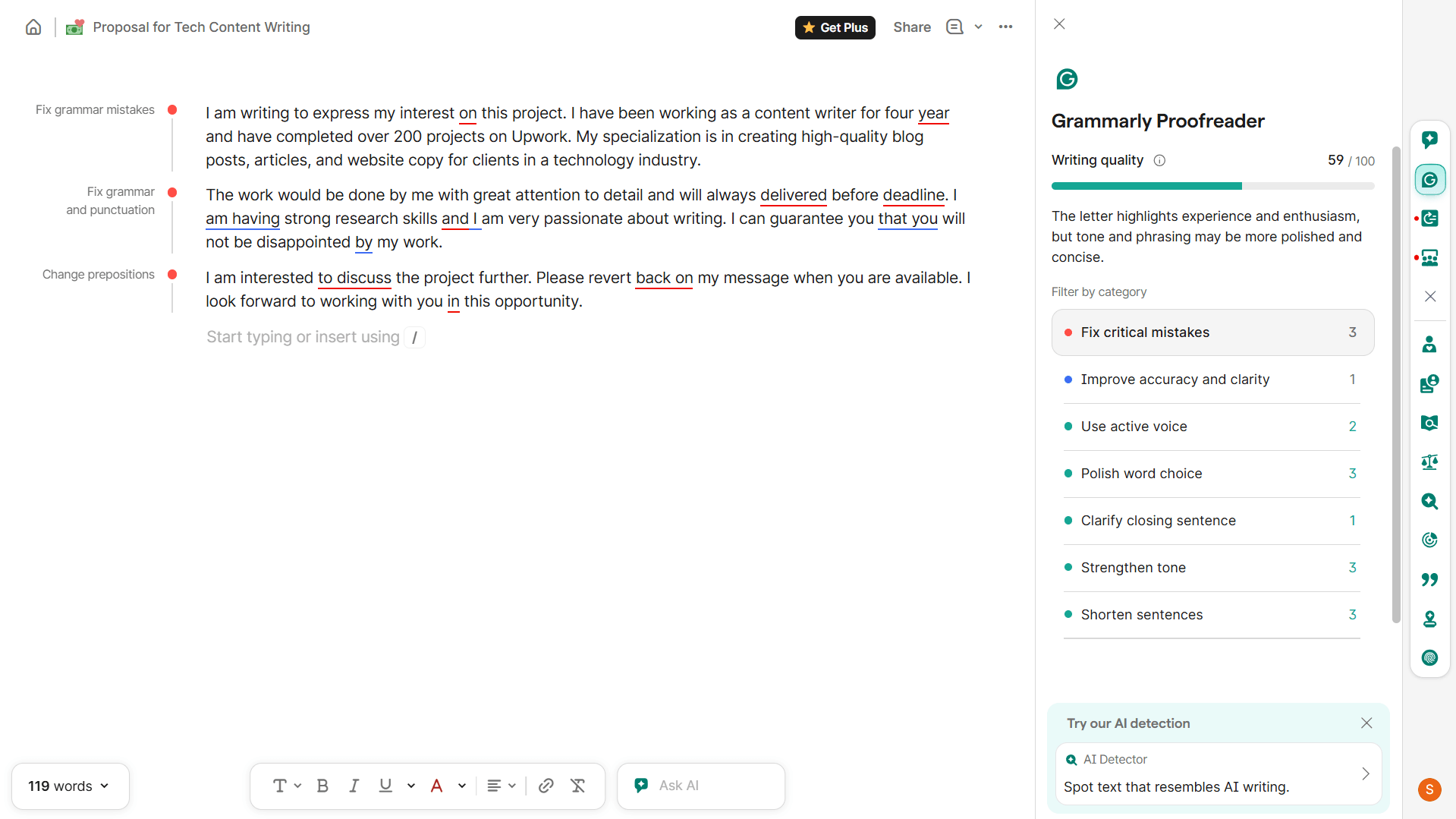
Note: Grammarly Free is still genuinely useful — its internal Writing Quality metric showed 59/100 on our test proposal (this is Grammarly’s own proprietary scoring system, not an external benchmark), and it flagged critical grammar mistakes accurately. If you are hitting the paywall on AI rewrites or plagiarism checks, these grammarly alternatives free of paywalls fill those specific gaps. If you find Grammarly Free limiting on basic grammar, read on — several of these tools outperform it on raw error detection at zero cost.
For a fuller picture of what Grammarly Free covers in 2026, see our Grammarly Review 2026.
How I Tested These Grammarly Alternatives Free
I ran the same 140-word Upwork proposal through all 7 tools plus Grammarly Free as the baseline. The text had 10 deliberate errors: three wrong prepositions (“interest on this project,” “interested to discuss,” “working with you in this opportunity”), one missing plural (“four year”), one wrong article (“a technology industry”), one passive construction (“would be done by me”), one missing auxiliary verb (“will always delivered”), one unnatural phrasing (“I am having strong research skills”), one weak phrase (“you will not be disappointed”), and one redundant phrase (“revert back on”).
I recorded every suggestion flagged, noted which errors each tool missed, and whether the free tier ran out mid-test. Screenshots were taken of every suggestion panel — those are the basis for the numbers below. This is a single-sample test designed to surface practical differences between tools, not a statistically rigorous benchmark. Results will vary by text type and error complexity.
7 Grammarly Alternatives Free — Quick Comparison
| Tool | Errors Caught (of 10)* | Sign-up? | Free Limit | Best For |
|---|---|---|---|---|
| Grammarly Free (baseline) | 6 | Yes | Unlimited grammar checks | Benchmark |
| LanguageTool | 10 + 1 style flag | No | 10,000 chars/check (web) | Best overall free replacement |
| Hemingway Editor | 8** | No | Unlimited | Grammar + readability combined |
| Scribens | 8 | No | 8,000 chars/day | No sign-up grammar checking |
| QuillBot | 9 | No | Unlimited grammar checks | Grammar + paraphrasing combo |
| ProWritingAid | 5 free / 3 gated | Yes | 500 words/check, 2 reports/day | Deep style analysis (long-form) |
| Wordtune | 10 (1 questionable) | Yes | 10 rewrites/day; grammar unlimited | Tone and fluency rewrites |
| Engram | 8 | Yes | 150 words/check, 300 words/day | Natural-sounding output |
*Single-sample test on a 140-word proposal — results will vary by text. **Hemingway flags combine grammar issues and readability problems; not directly comparable to grammar-only tools.
The 7 Best Grammarly Alternatives Free for Freelancers (2026)
1. LanguageTool — Best Free Grammarly Alternative Overall
LanguageTool earns the top spot among grammarly alternatives free of charge for three specific reasons: no sign-up required on the web version, the highest error catch rate in our test (10 of 10 deliberate errors plus one bonus style flag), and a 10,000 character limit per check — generous enough for a full Upwork proposal or client email without splitting the text.
LanguageTool FREE
Free / Premium from ~$4.99/mo (annual)
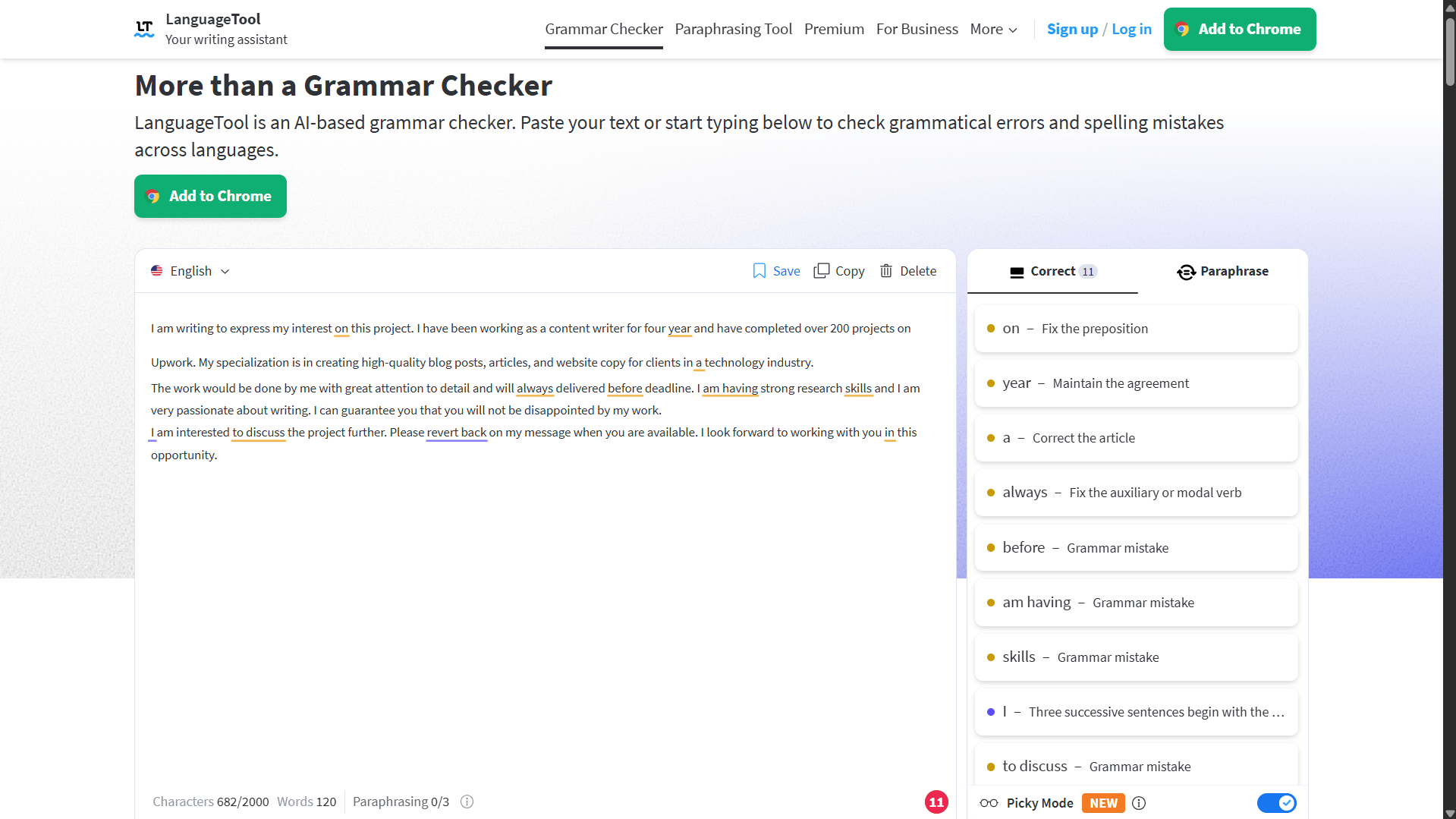
LanguageTool is an open-source grammar and style checker supporting 30+ languages. On the free web version, no sign-up is required — paste your text and corrections appear immediately. In our test it returned 11 flagged items on the proposal: all 10 deliberate errors caught in our test, including all four wrong prepositions, the missing plural, the wrong article, the passive construction, and the unnatural “am having” phrasing. It also flagged a style issue — three consecutive sentences starting with “I” — that none of the other tools picked up. The free web version allows up to 10,000 characters per check, which covers most freelance documents comfortably.
The browser extension also works free without a sign-up across Chrome, Firefox, Edge, and Safari. Premium upgrades the character limit to 100,000 and adds Picky Mode, unlimited AI rephrasing, and Word/Google Docs add-ins.
- No sign-up on web version or browser extension
- Caught all 10 errors in our test — highest rate of any tool
- Flags style issues beyond grammar
- 10,000 characters per check on free plan
- 30+ language support
- Explains each correction clearly
- AI rephrasing limited to 3 uses/day on free plan
- Advanced Picky Mode requires Premium
- Word and Google Docs add-ins are Premium only
Tip: LanguageTool’s free web editor has a “Picky Mode” toggle in the top right corner. Turning it on surfaces additional style suggestions beyond standard grammar — worth enabling for client-facing documents where you want extra polish. Note: Picky Mode is a Premium feature on the browser extension but available in the free web editor.
2. Hemingway Editor — Best for Grammar + Readability Combined
Hemingway Editor FREE
Free web / Editor Plus from $10/mo
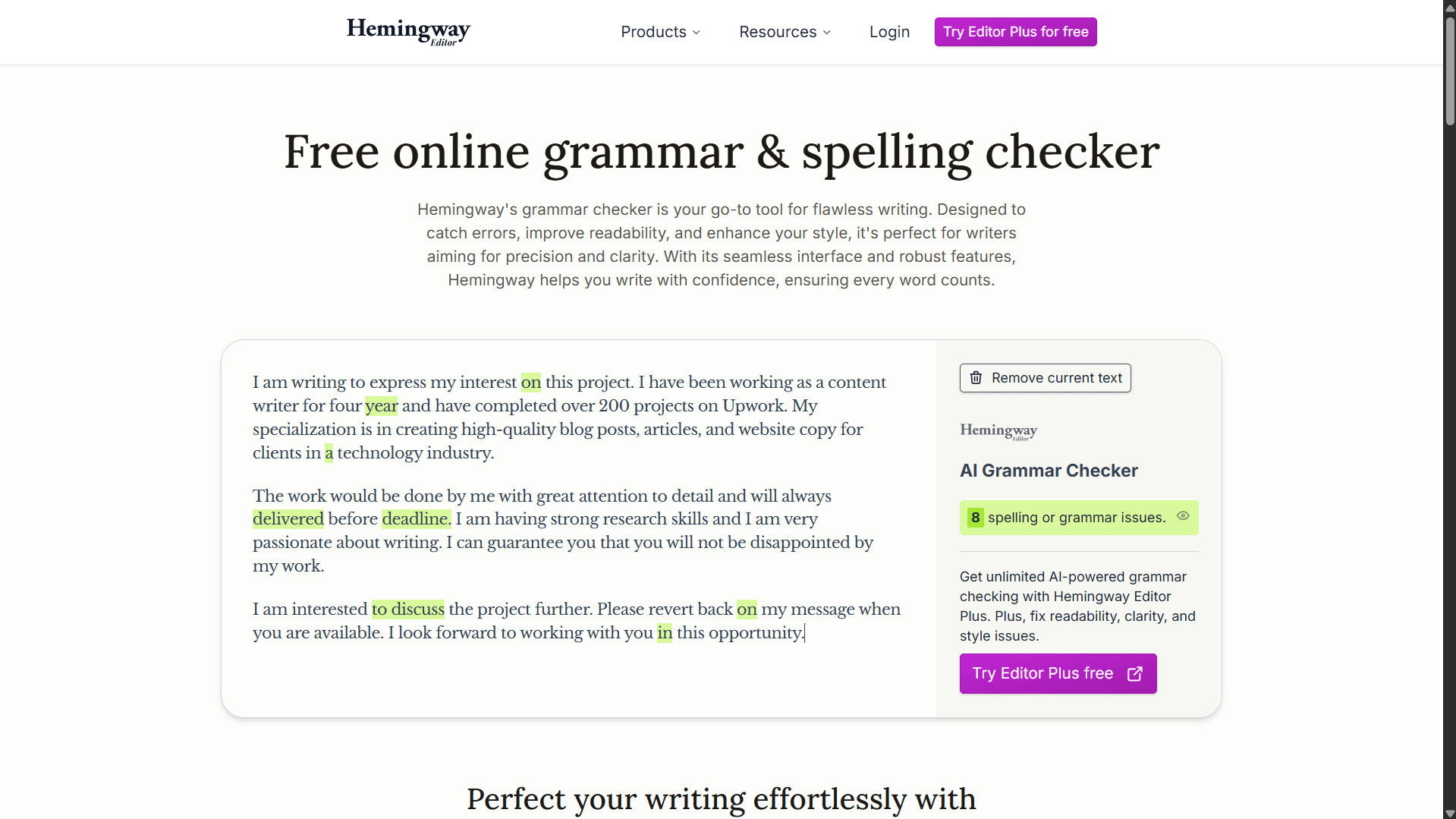
Hemingway has long been known as a readability tool — flagging complex sentences, passive voice, and grade level. What changed: the free homepage now includes an AI Grammar Checker that flagged 8 issues on our test proposal. That makes it the only tool on this list combining grammar correction with readability analysis in a single free, no-sign-up interface. No account needed, no character limit.
It did not catch every error. The preposition errors (“interested to discuss,” “working with you in this opportunity”) went unflagged, and it does not explain corrections the way Scribens does. The 8 flags it returned mix grammar issues with readability problems — so the catch count is not directly comparable to grammar-only tools. Still, for a freelancer who wants one tool to cover both angles at zero cost and zero friction, Hemingway is a genuine grammarly alternative free of accounts and paywalls.
- No sign-up, no character limit
- Grammar checker now built into free version
- Readability grade score useful for proposals and blog posts
- Color-coded highlights — fast to scan and act on
- Missed some preposition errors in testing
- Does not explain the reason behind corrections
- Grammar flags include readability issues — not a pure grammar count
- AI grammar checker is a newer feature — less established than LanguageTool
3. Scribens — Best No-Sign-Up Grammar Checker with Explanations
Scribens FREE
Free / Premium available
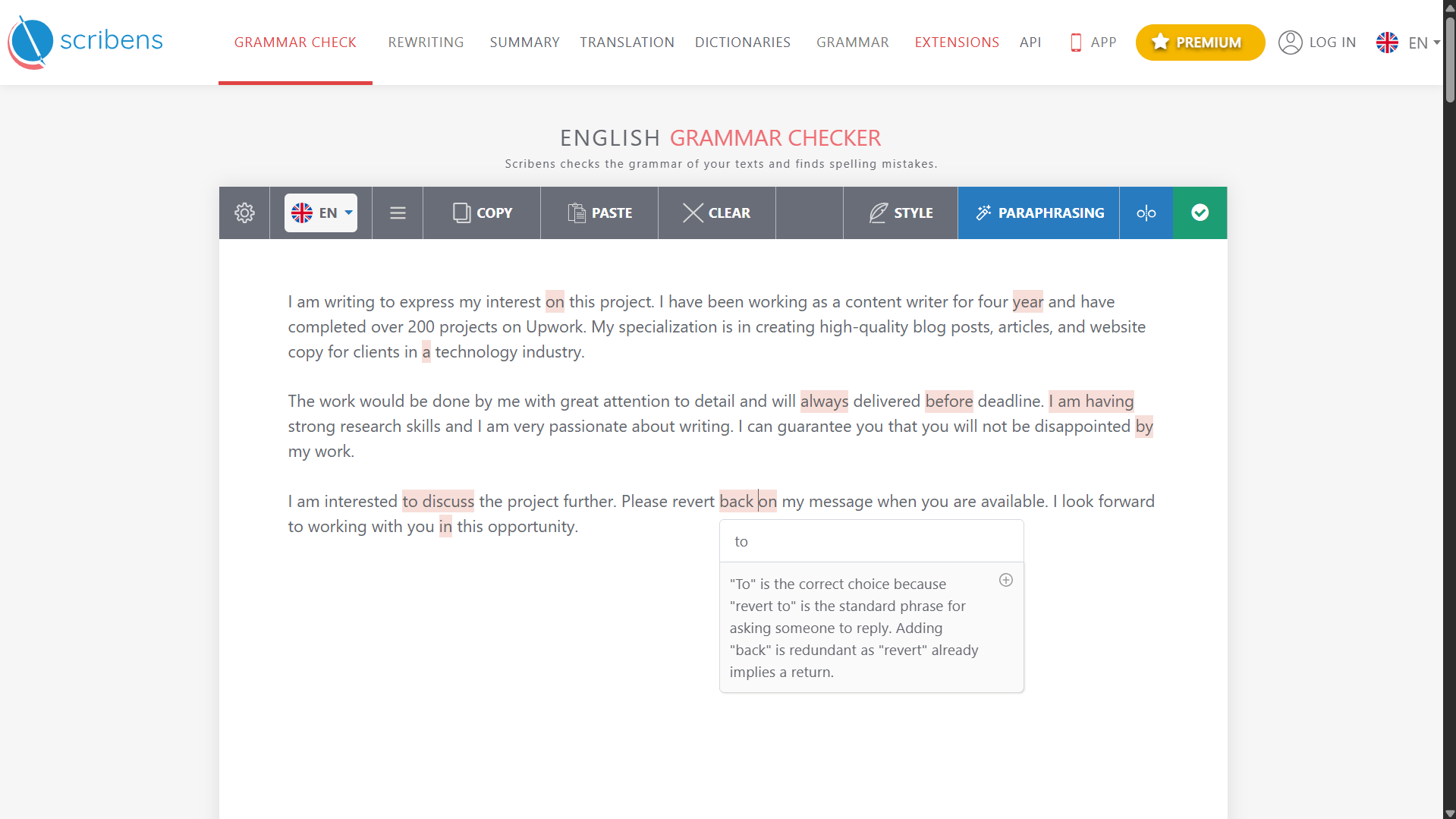
Scribens is the most underused grammarly alternative free to access without an account. No sign-up, no account, paste and check — up to 8,000 characters per day on the free plan. In testing it caught 8 of 10 errors, matching Hemingway, but what stood out was the explanation quality. When it flagged “revert back on,” it did not just suggest a fix — it explained the grammar rule in full: “revert to” is the standard phrase; “back” is redundant because “revert” already implies a return. That level of explanation appears in almost no free grammar tool, let alone one that needs no account.
It missed the “am having” phrasing error and did not flag the passive construction explicitly. For pure grammar checking of proposals and client emails in the 100–300 word range, it is one of the most practical no-friction options on this list.
- No sign-up required
- Explains the grammar rule behind each correction
- 8,000 chars/day free — covers most freelance documents
- Supports 30+ languages
- Strong at catching redundant and incorrect phrases
- Missed unnatural phrasing (“am having”) in testing
- Did not flag passive construction explicitly
- Less known — fewer native integrations than Grammarly
4. QuillBot Grammar Checker — Best for Grammar + Paraphrasing Together
QuillBot FREE
Free / Premium from $4.17/mo
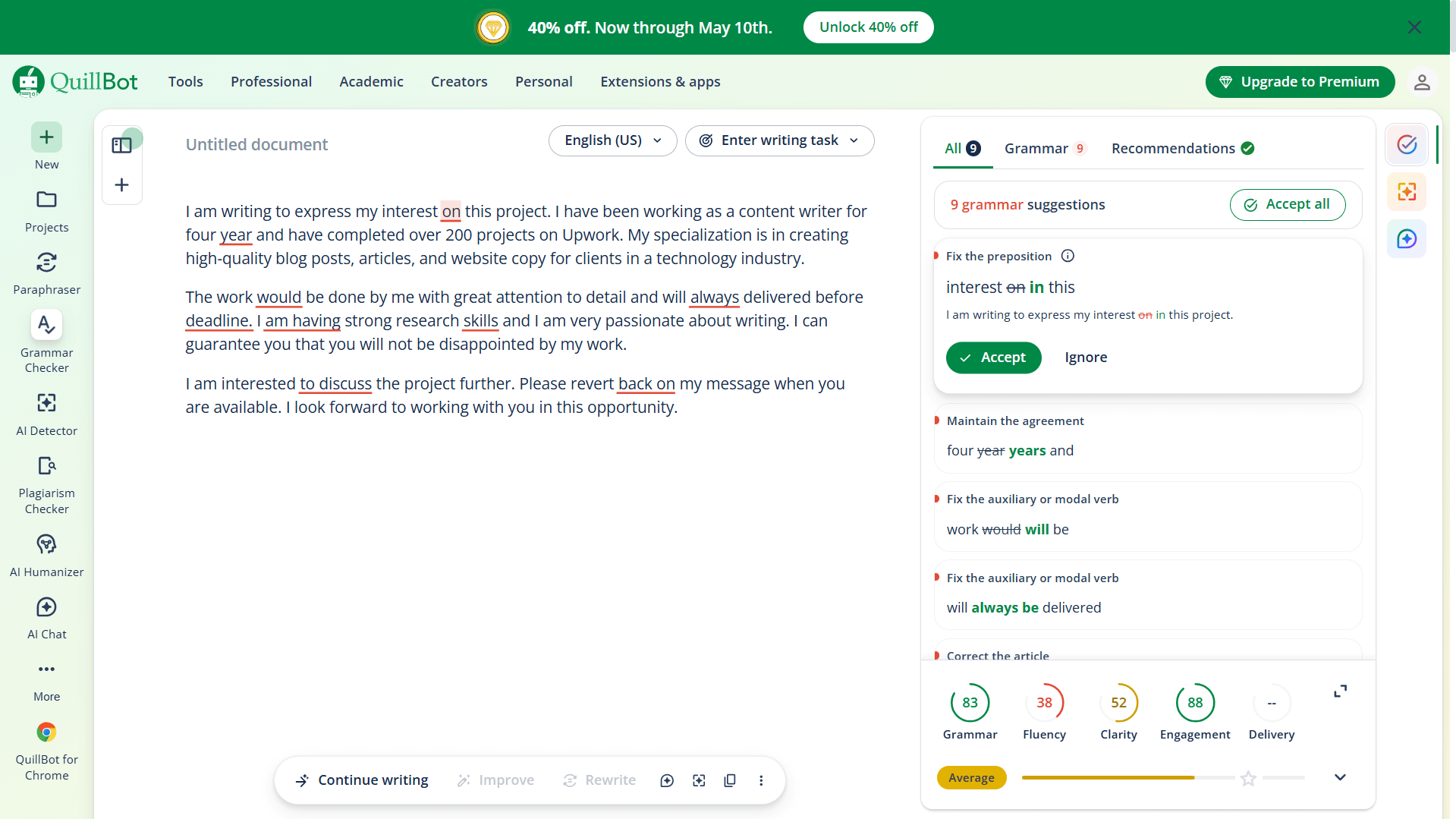
QuillBot’s Grammar Checker is separate from its better-known Paraphraser — and it requires no sign-up, with unlimited free grammar checks. In our test it flagged 9 suggestions including the wrong preposition, missing plural, auxiliary verb errors, and the passive construction. It also returned four writing dimension scores: Grammar 83, Fluency 38, Clarity 52, Engagement 88. The Fluency score of 38 — rated “Average” on QuillBot’s internal scale — is the most useful data point here. It signals that the proposal reads unnaturally even where grammar is technically close, which aligns with the deliberate errors embedded in the test text. No other free tool in this test returned this kind of multi-dimensional scoring.
The grammar checker and paraphraser work well together. After running the grammar check, paste individual awkward sentences into the Paraphraser on Fluency mode. The free plan handles up to 125 words per paraphraser pass — enough for a proposal opening paragraph or gig description without signing up.
- No sign-up required — grammar checker is fully free
- Unlimited grammar checks on free plan
- Grammar + paraphraser in one platform
- Multi-dimensional writing scores (grammar, fluency, clarity, engagement)
- Caught 9 of 10 errors in our test
- Paraphraser limited to 125 words per pass on free plan
- Fluency score of 38 on the test proposal — useful signal but fixing it requires the paraphraser, which has its own word limit
5. ProWritingAid Free — Best for Long-Form Style Analysis
ProWritingAid LIMITED FREE
Free (limited) / Premium from ~$10/mo
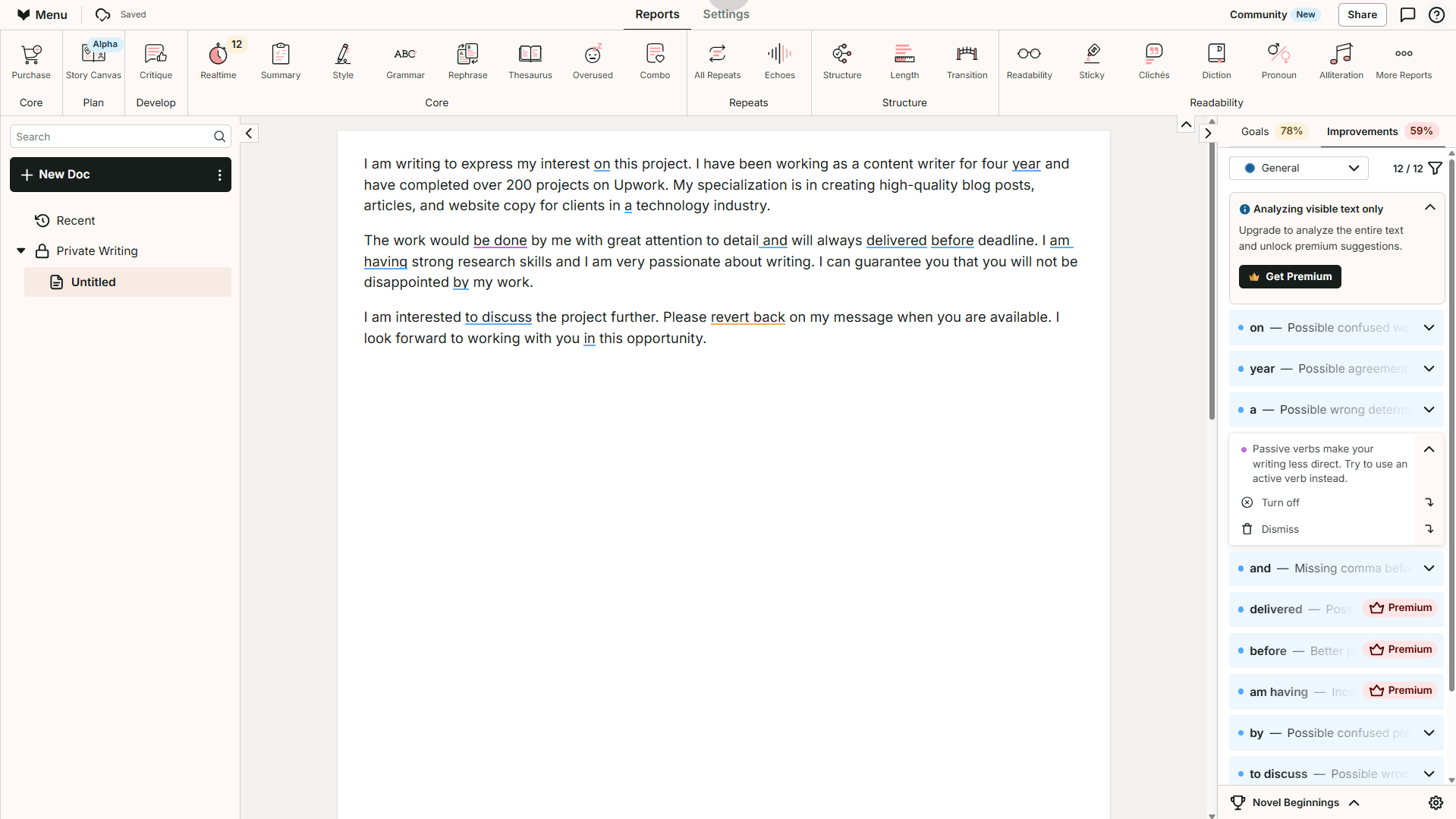
ProWritingAid showed the highest total suggestion count on our test proposal — 12 flagged items across the board. The issue is what was accessible. Three of the most useful corrections were locked behind a Premium badge, as observed in our test: the auxiliary verb error (“will always delivered”), the “am having” phrasing, and the “before deadline” placement. The free tier returned a Grammar/Spelling score of 44% and a Style Score of 61% — useful directional signals even without the full corrections visible. The passive voice was flagged with a general note rather than a specific fix, which is less actionable than what Grammarly Free or LanguageTool return.
The 500-word per check limit is the real constraint for day-to-day use. A long Upwork proposal or client email may need multiple paste sessions. For short documents it works fine; for blog posts and long-form content, the 25+ report types — overused words, sentence length variation, style consistency — make it the most thorough grammarly alternative free option on the list for that specific use case.
- Highest total suggestion count in our test (12)
- Writing quality scores give a fast directional picture
- 25+ report types on free plan (limited runs)
- Strongest tool for long-form blog content style analysis
- 500 words per check — restrictive for longer documents
- Only 2 report runs per day on free plan
- Key corrections gated behind Premium
- Requires sign-up
Watch out: ProWritingAid’s free plan limits you to 2 report runs per day. Running the Grammar report and then the Style report burns both. Decide which report matters most before you paste anything.
6. Wordtune — Best for Tone and Sentence Confidence
Wordtune LIMITED FREE
Free (10 rewrites/day) / Premium from $6.99/mo
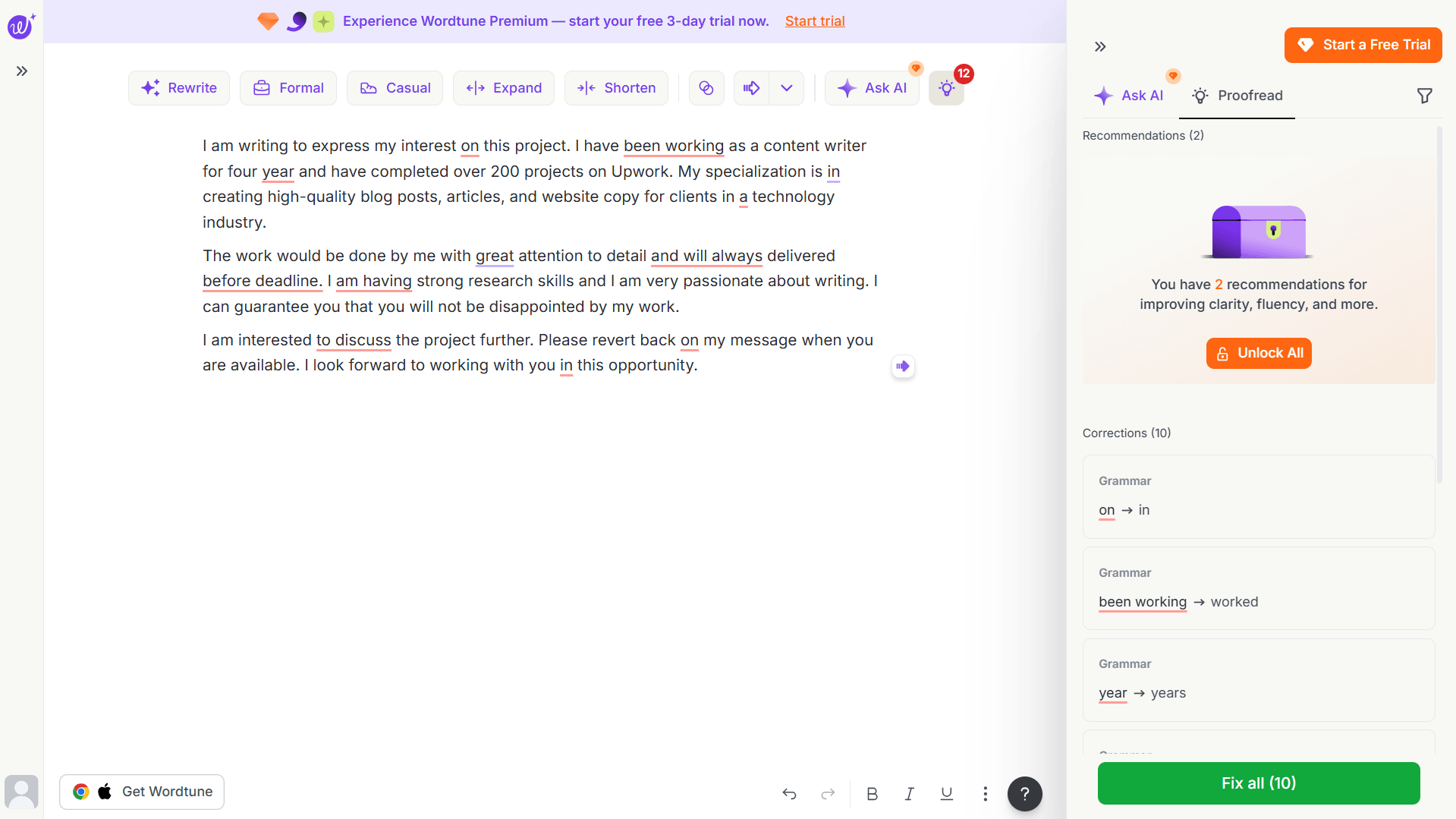
Wordtune flagged 10 corrections on our test proposal. But one finding is worth paying attention to: one of those corrections was questionable. It suggested changing “have been working” to “worked” — yet “I have been working as a content writer for four years” is grammatically correct. Changing it to “worked” alters the tense and shifts the meaning. It is worth noting because accepting all suggestions without review in Wordtune could introduce new errors, not just fix existing ones. Wordtune’s strength is tone and fluency — not strict grammar policing.
What the free plan actually limits is rewrites, not grammar checks. Basic spelling and grammar corrections are unlimited on the free tier. The 10-rewrite daily limit applies to the AI sentence rewriting feature — so use those 10 on the sentences that matter most, not every flagged item.
- Unlimited grammar and spelling corrections on free plan
- Flagged all 10 error locations in our test
- Rewrite suggestions sound genuinely natural
- Casual, Formal, Expand, Shorten modes available free
- Strong for improving proposal tone and email confidence
- One questionable correction found in testing (“been working → worked”)
- 10 AI rewrites/day limit — exhausts quickly on longer documents
- Requires sign-up
- Not a precision grammar tool — always review suggestions individually
7. Engram — Best for Natural-Sounding Corrections
Engram LIMITED FREE
Free (150 words/check, 300/day) / Premium available
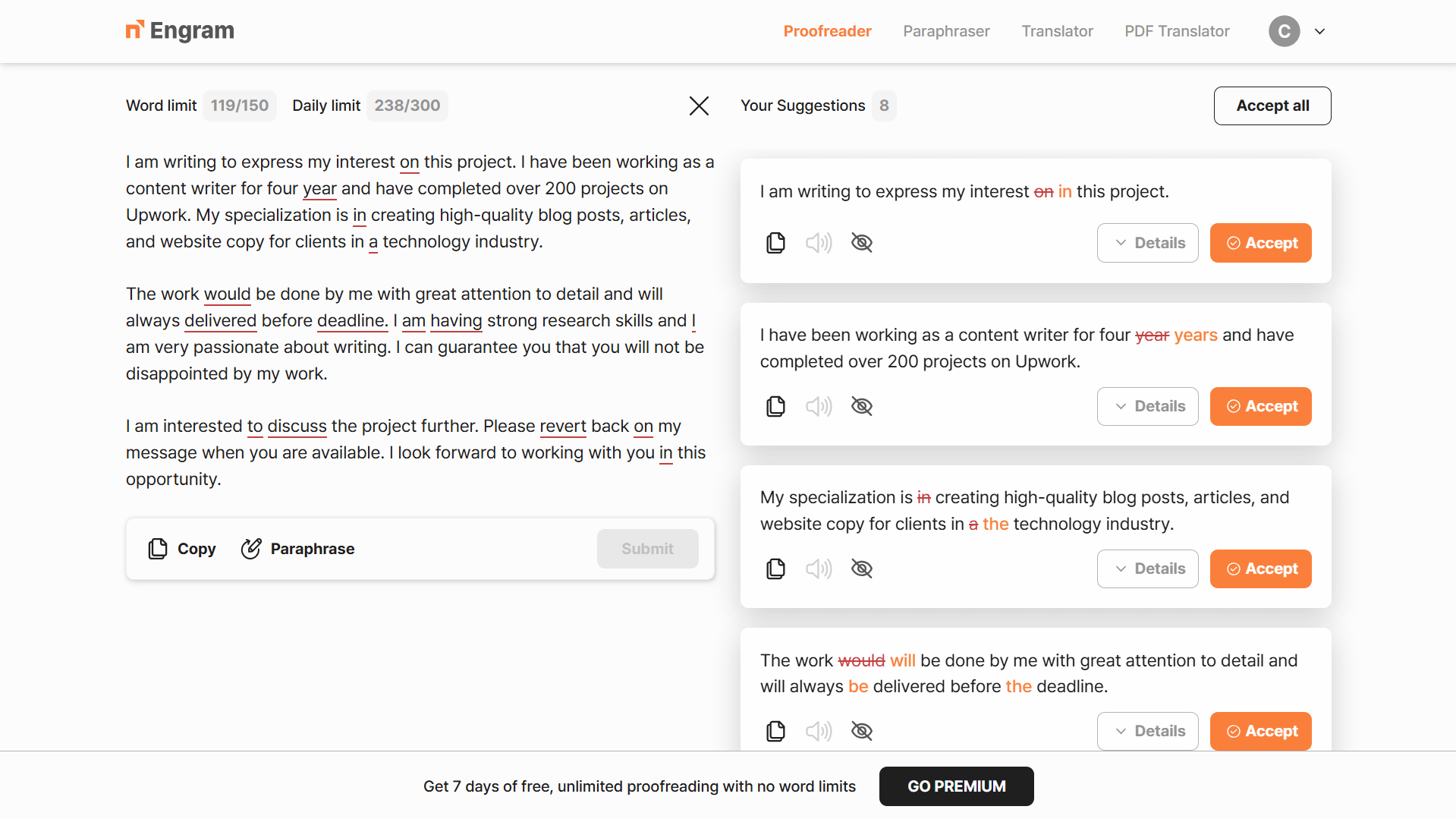
Engram is built around natural language patterns rather than rule-based flagging. In testing, it returned 8 suggestions and presented them differently from every other tool: full sentence rewrites rather than individual word swaps. Instead of just flagging “a technology industry,” it showed the full corrected sentence in context — making it easier to evaluate whether the suggestion improved the writing or just changed it. That approach is more useful than a list of isolated corrections, especially for non-native speakers trying to understand why something sounds wrong.
The free tier constraint is tight: 150 words per check and 300 words per day — confirmed on the official Engram pricing page. The test proposal used 119 of the 150-word limit in one paste. A longer proposal would need to be split into sections, which breaks the workflow. At 300 words per day, it covers one solid document. Use it on your most important paragraph each session, not a full document.
- Full sentence-level rewrites — easier to evaluate than word swaps
- Catches article and preposition errors clearly
- Good at passive voice restructuring
- Clean, uncluttered interface
- Tightest free limit of any tool (150 words/check, 300/day)
- Not practical for batch freelance work
- Requires sign-up
- Primarily designed for non-native English speakers — less relevant for native writers
Which Grammarly Alternative Free Plan Is Right for You?
Find Your Best Match
- Need a Grammarly replacement right now, no sign-up, no friction? → LanguageTool (web version, paste and check, 10,000 chars free)
- Want grammar + readability in one free tool with no account? → Hemingway Editor
- No sign-up but want corrections explained, not just flagged? → Scribens
- Want grammar checking AND sentence rewriting, also no sign-up? → QuillBot (grammar checker is free and unlimited)
- Write long-form blog content and need style depth beyond grammar? → ProWritingAid (500 words at a time, 2 reports/day)
- Want proposals and emails to sound more confident, not just correct? → Wordtune (review suggestions individually — do not fix all)
- Need one key paragraph to sound completely natural? → Engram (use the 150-word limit on your most important text)
For most freelancers, the strongest free setup is two tools: LanguageTool for grammar accuracy (no sign-up, 10,000 chars, caught the most errors in our test) plus Hemingway for readability (no sign-up, grammar + clarity in one pass). Together they cover what Grammarly Premium charges for. Add QuillBot — also no sign-up — if you need paraphrasing on top. That three-tool stack costs nothing and takes about 10 minutes per document. Of all the grammarly alternatives free to use today, this combination gives the best coverage without a single paywall.
Errors caught by LanguageTool in our test — highest of all 7 tools
Tools needing no sign-up: LanguageTool, Hemingway, Scribens, Quillbot
QuillBot’s internal Fluency score on the test proposal — flagged as “Average”
LanguageTool free character limit per check — largest of any no-sign-up tool tested
Frequently Asked Questions: Grammarly Alternatives Free
Related Reads
- Grammarly Review 2026: Worth It After the Superhuman Rebrand?
- QuillBot Review for Freelancers (2026)
- Wordtune Review for Non-Native Freelancers (2026)
- QuillBot vs Wordtune for Freelance Writers (2026)
- Best Free AI Writing Tools for Non-Native English Freelancers (2026)
