
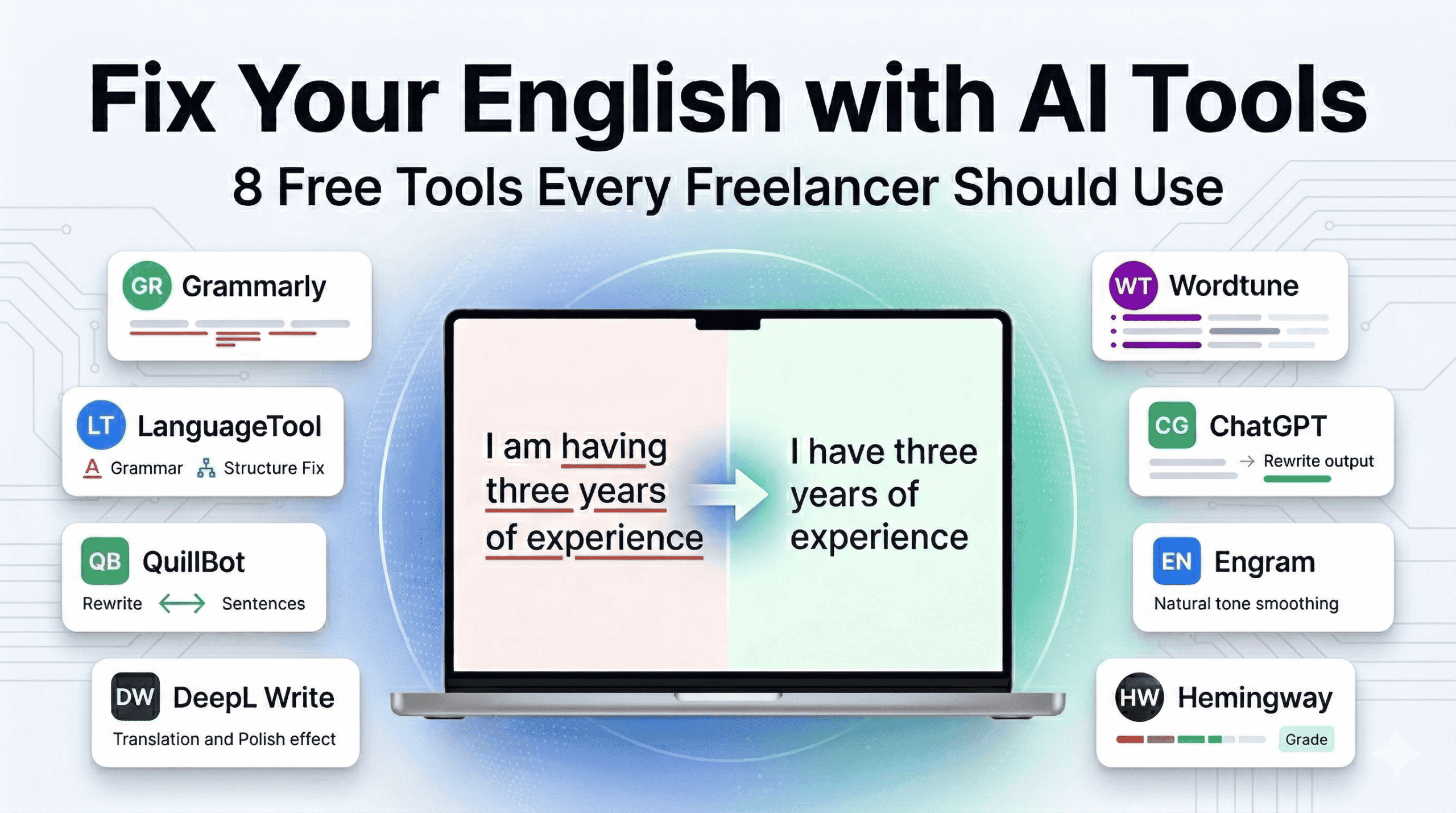
TL;DR — Best free AI writing tools for non-native English freelancers: Use Grammarly Free for real-time article and grammar fixes, LanguageTool for preposition and word-order errors, QuillBot Free (Fluency mode) to rewrite unnatural sentences, Hemingway App to simplify complex writing, and Engram for the most natural-sounding output on high-stakes submissions. All five are completely free. Full 7-stage workflow is below.
The best free AI writing tools for non-native English freelancers solve a problem spell-checkers were never built for. Your Upwork proposal is grammatically correct. It still loses to a native speaker’s — not because of spelling, but because of naturalness. “I am having three years of experience” passes every spell-checker. It fails every client.
I run a software comparison blog for freelancers and I am a non-native English speaker myself. When my readers started asking which free AI tools actually help with the English problems non-native freelancers face — wrong prepositions, missing articles, overly formal phrasing — I built this comparison specifically for them. I tested 8 completely free AI writing tools on real freelancer scenarios — proposals, gig descriptions, client emails — specifically for the patterns non-native speakers produce. No credit card. No trials. Every tool below is free right now. If you want a head-to-head look at two of the most popular rewriting tools specifically, see our QuillBot vs Wordtune comparison for freelance writers.
Jump to:
- The Real Problem
- How I Tested
- Quick Comparison Table
- The 8 Best Tools
- Full Workflow Stack
- Decision Guide by Freelancer Type
- 5 Common Mistakes and Fixes
- FAQ
The Real Problem: Naturalness, Not Grammar
Here’s something I learned the hard way. Your Upwork proposal can be 100% grammatically correct and still lose to a native speaker. Not because you misspelled anything. Because it just doesn’t sound right.
❌ Before (correct but unnatural): “I am having three years of experience and I can do quality work for you.”
✅ After (natural): “I have three years of experience and deliver high‑quality work.”
Standard spell-checkers? Useless for this. They were built for native speakers who make typos. They don’t catch the patterns that give away non‑native writing – missing articles, wrong prepositions, overly formal phrasing. That’s exactly what the tools below fix.
Before a client sees your portfolio, they read your proposal. Before they hire you again, they read your email. The gap between “grammatically correct” and “professionally natural” is where jobs are won and lost. These eight free tools close that gap.
How I Tested These Tools (No Fluff)
Look, I didn’t run any fancy lab tests. I did what you’d do. I wrote three real documents – an Upwork proposal, a Fiverr gig description, and a client email. Each one had the kind of mistakes non‑native writers actually make: missing articles, wrong prepositions, passive voice, stiff phrasing.
Then I ran every tool on this list through those same texts. I tracked three things:
- What errors did each tool catch?
- What did it miss?
- Did the final output actually sound like a native speaker wrote it?
What surprised me: LanguageTool caught preposition errors Grammarly free completely ignored. Grammarly was a beast at fixing missing articles. QuillBot’s Fluency mode made awkward sentences flow. And Engram? It was the only one that fixed over‑formal phrasing on the Fiverr gig description – the others just left it.
If your first language is different from mine, don’t worry. These tools are built to handle patterns from dozens of languages. The results hold up.
Quick Comparison Table
| Tool | Best For | Free Limit | Sign-Up? | Browser? |
|---|---|---|---|---|
| LanguageTool | Grammar + mother-tongue errors | 2,000 chars/check (website only)* | No | Website only (extension is premium) |
| Grammarly Free | Real-time client emails | Unlimited grammar checks; 100 AI rewrites/month | Yes | Yes |
| QuillBot Free | Rewriting awkward paragraphs | 125 words/rewrite | Yes | Yes |
| DeepL Write | Drafting in native language first | ~1,500 chars/paste (DeepL Write free)** | No | Yes |
| Hemingway App | Simplifying complex sentences | Unlimited | No | Yes |
| ChatGPT Free | Full draft rewrites + learning | ~10 messages/5-hr window on full model, then lighter model | Yes | Yes |
| Engram | Most natural-sounding rewrites | 150 words/check; 150 words paraphraser; 300 words/day per tool | Yes | Yes |
| Wordtune Free | Confident phrasing | 10 rewrites/day | Yes | Extension (basic) / Web editor (tone modes) |
Note:-*LanguageTool Basic (free) plan: 2,000 characters per text field — split long proposals into paragraphs and check each separately. ** DeepL Write and DeepL Translate are separate tools with different limits.
The 8 Best Free AI Writing Tools for Non-Native English Freelancers
1. LanguageTool — Best Free AI Grammar Tool for Mother-Tongue Interference Errors
What it is: LanguageTool is a free AI grammar tool for non-native speakers that detects errors caused by native language patterns — not just typos.
Best for: Non-native freelancers who want a thorough grammar check that catches what Grammarly free misses — specifically prepositions, word order, and over-formalization.
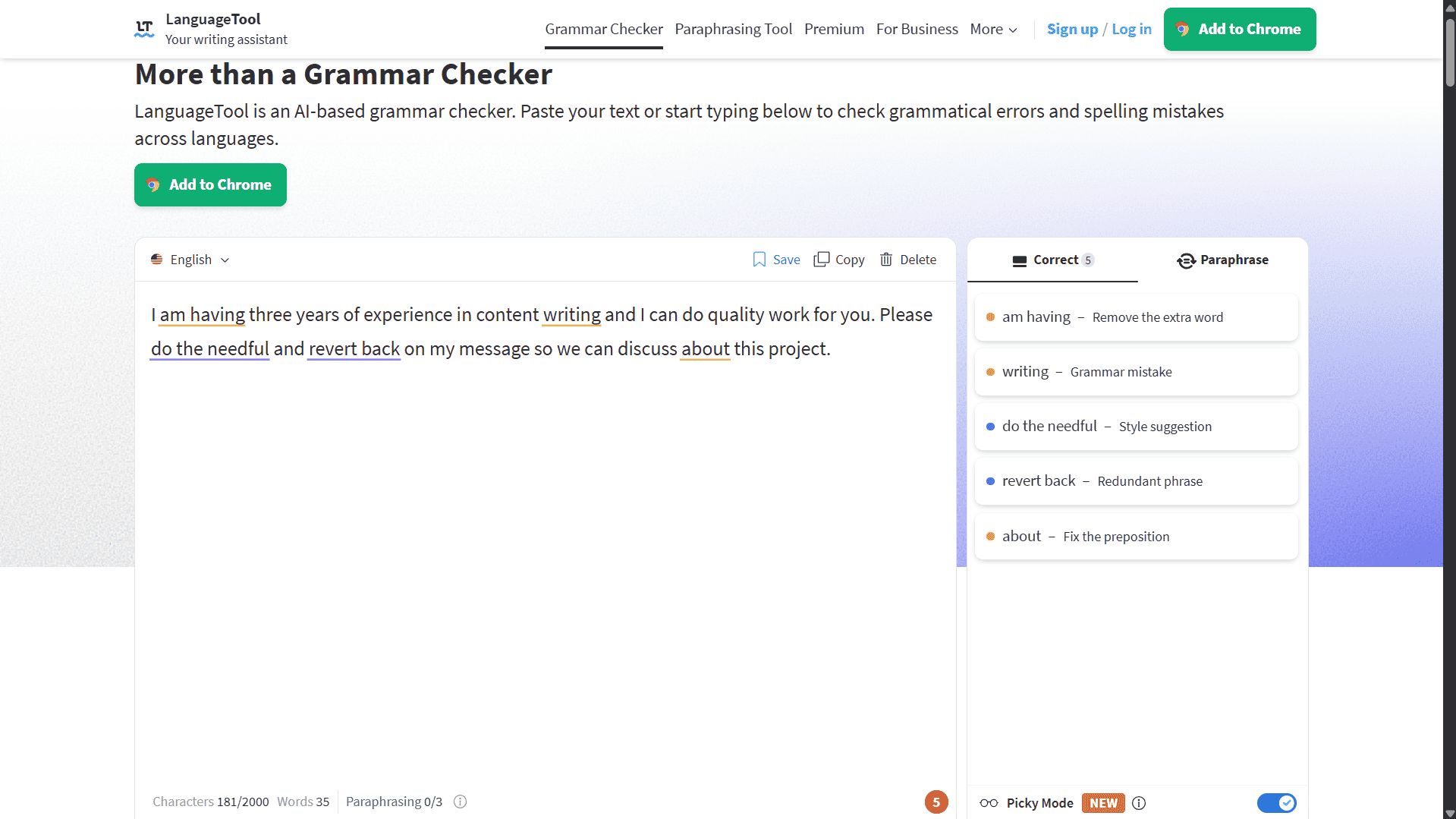
LanguageTool is the most underrated free grammar tool for non-native writers. Most people assume it is just a weaker version of Grammarly. It is not — it catches a different category of errors entirely.
In testing, LanguageTool stood out on the kinds of errors Grammarly free missed — wrong prepositions and word order issues that come from native language interference. This is the pattern that makes LanguageTool specifically valuable for non-native speakers: it targets errors that come from thinking in one language and writing in another, which is exactly the gap standard grammar checkers do not cover.
The free plan at languagetool.org supports up to 2,000 characters per text field — enough for a short email or one proposal paragraph at a time. Split longer proposals into separate paragraphs and check each one. No sign-up is required. It supports 30+ languages and includes 3 free AI sentence rephrases per day.
Important 2026 update: LanguageTool’s browser extension is now available to premium subscribers only — the change was announced in late 2025 and took effect from January 2026. The free website at languagetool.org still works fully — paste your text there in chunks. Picky Mode (advanced style suggestions) is limited on the free plan.
Free tier limits: 2,000 characters per text field on website. No live extension on free plan. Picky Mode limited. 3 AI rephrases/day. (See free vs premium)
Verdict: Paste your text into languagetool.org before every important submission — in chunks of up to 2,000 characters. It catches preposition and word-order errors that Grammarly free misses, specifically the patterns that reveal non-native phrasing.
2. Grammarly Free — Best for Real-Time Error Catching in Client Communication
What it is: Grammarly Free is a real-time grammar checker that works across browser-based text fields including Gmail, Google Docs, and most web-based writing environments as you type.
Best for: Any non-native English speaker who sends client messages daily and needs errors caught live — not through a paste-and-check workflow.
In testing, Grammarly free was the most reliable tool for catching article errors (a/an/the) — consistently flagging missing or wrong articles that other tools missed. This is its single strongest feature for non-native speakers. Hindi and many other languages have no articles at all, which makes article errors almost universal for their speakers. Grammarly catches them reliably in real time, which means every client message goes out cleaner than it came in.
It also catches subject-verb agreement, wrong prepositions, and basic tone issues. The free plan includes a basic tone detector — useful when you are unsure whether a message reads as too formal or too casual for a specific client.
The browser extension works across Gmail, Google Docs, and most web-based text fields. That live integration is what sets Grammarly free apart from LanguageTool on the free tier — you do not need to copy, paste, and return. It corrects as you write.
Honest note: Grammarly sometimes over-corrects toward American corporate English and strips out natural voice in the process. Accept every grammar fix. Treat style suggestions as optional.
Free tier limits: Grammar checking is unlimited on the free plan. 100 AI generative rewrites per month. No plagiarism checker. Does not generate content from scratch.
Verdict: Install Grammarly Free on your browser on Day 1. Grammar checking is unlimited — it is non-negotiable for any non-native English speaker sending client messages on Upwork or Fiverr.
For a full breakdown of Grammarly’s free vs paid plans—and whether Premium is actually worth it for freelancers—see our in-depth Grammarly Review for Freelancers (2026). You can also see how Grammarly Free scored against 6 other tools in our tested comparison on a real Upwork proposal.
3. QuillBot Free — Best for Rewriting Awkward Sentences in Proposals
What it is: QuillBot Free is a paraphrasing tool that rewrites sentences to sound more natural, with a side-by-side view of original and rewritten text.
Best for: Freelancers who have already run grammar checks but still have sentences that feel unnatural — particularly in proposals and gig descriptions.
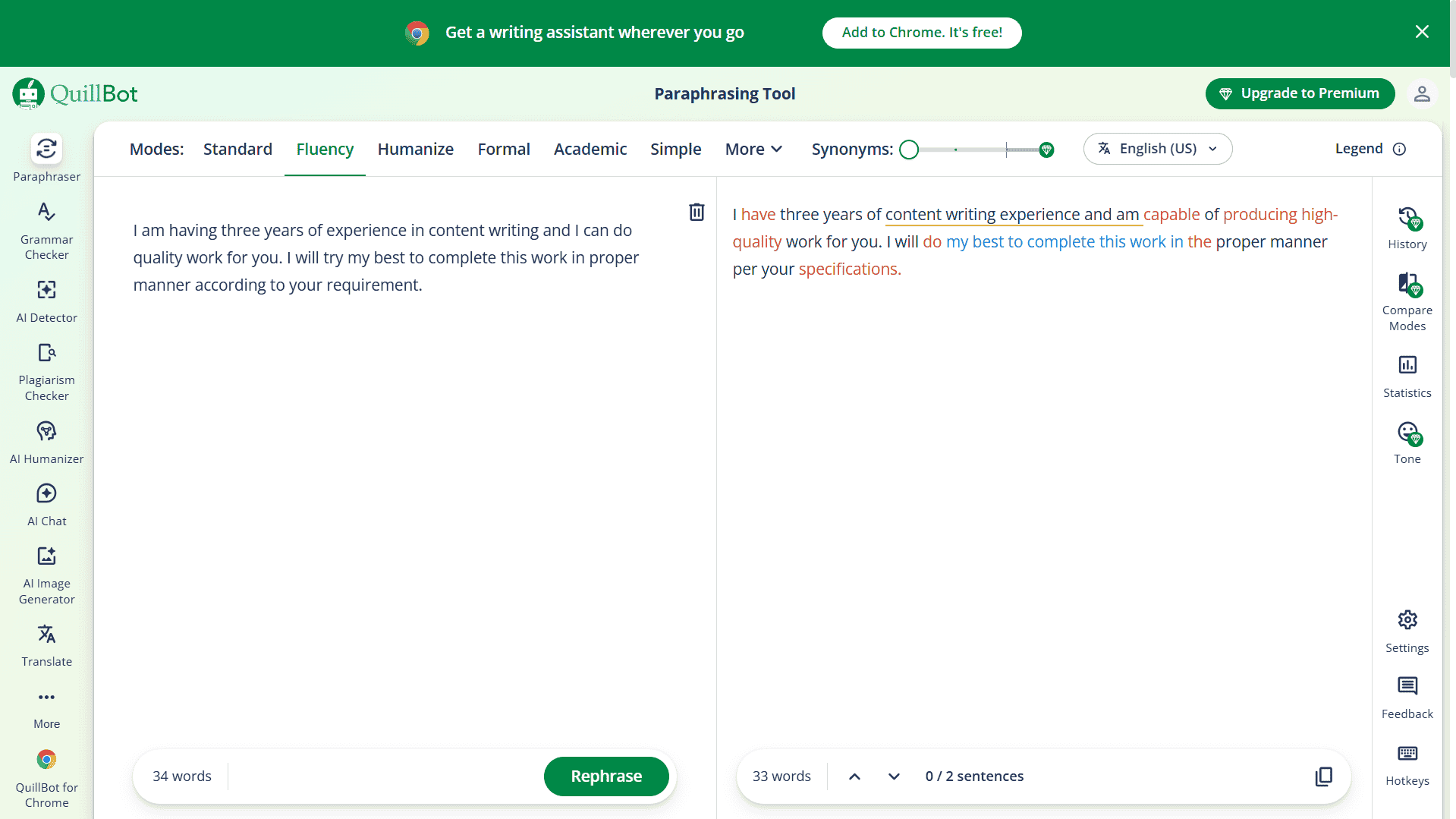
After Grammarly cleans up grammar errors, you will often still have sentences that are technically correct but sound like a translation. “I am having three years of experience in content writing and I can do quality work for you” has no grammar errors — but no native speaker writes that way. QuillBot’s Fluency mode — available on the free plan — rewrites it to “I have three years of content writing experience and can deliver high-quality work.” Same information, completely different level of professionalism.
In testing, QuillBot’s Fluency mode produced the most natural-sounding sentence-level rewrites of any tool on this list — particularly strong on shifting individual sentences from translated-sounding to naturally professional.
The free plan at quillbot.com gives 125 words per paraphrasing rewrite. For proposals, this is enough for one paragraph at a time — which is the right workflow anyway. Identify the paragraphs that sound most off and run those specifically. If you are deciding between QuillBot and Wordtune, we have a detailed QuillBot vs Wordtune breakdown for freelance writers that covers both tools side by side.
One feature most users miss: the Grammar Checker tab inside QuillBot is a completely separate tool from the paraphraser and catches additional errors. Run your text through both.
Free tier limits: 125 words per paraphrasing rewrite. Standard and Fluency modes only. Split longer documents into paragraphs. (See QuillBot free vs premium)
Verdict: Use QuillBot Free as your second pass after Grammarly — specifically for sentences that are grammatically correct but still sound like they were written by a non-native speaker.
For a full breakdown of Quillbot’s free vs paid plans—and whether Premium is actually worth it for freelancers—see our in-depth QuillBot Review for Freelancers (2026).
4. DeepL Write — Best If You Think in Your Native Language First
What it is: DeepL Write is a free AI writing polish tool that pairs with DeepL Translate to enable a native-language-first drafting workflow for non-native English writers.
Best for: Non-native freelancers whose ideas come out clearer and faster in their native language than in English.
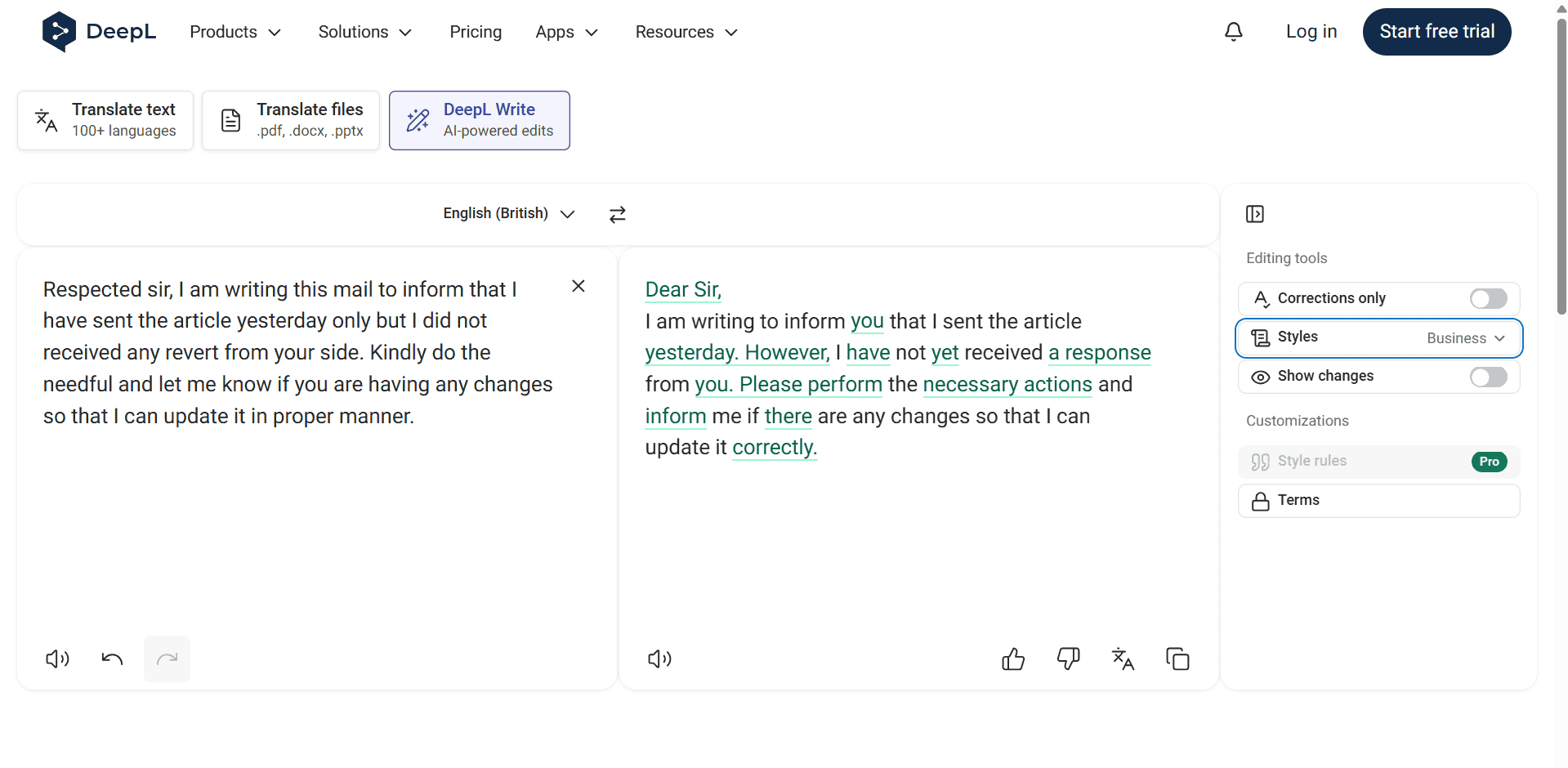
Many non-native writers force themselves to draft directly in English — assuming that is what professional freelancers do. The result is often simplified, underselling proposals and gig descriptions, because the writer is simultaneously managing ideas and vocabulary in a second language.
The DeepL workflow removes that constraint. Write your draft in your native language — your ideas come out complete and confident. Use DeepL Translate to convert to English. Use DeepL Write to remove the stiffness that direct translation introduces. The output reads like English that was written in English, not translated into it.
One useful note on tone: DeepL Translate (not Write) includes a formality slider — formal or informal — when translating into supported languages. Use this during the translation step to set the right tone before you bring the text into DeepL Write. Advanced style controls within DeepL Write itself are part of the paid Write Pro plan.
Free tier limits: The free version of DeepL Write limits text to approximately 1,500 characters at a time — meaning a full proposal will need to be split into several chunks. This is tighter than the Translator limit, so plan accordingly. No browser extension for live editing on the free plan.
Verdict: If your ideas come out better in Hindi or another Indian language, stop fighting it. Write there first — then use DeepL to make it English.
5. Hemingway App — Best for Making Your Writing Simple Enough to Win Clients
What it is: Hemingway App is a free browser-based editor that colour-codes your text to show which sentences are too complex, passive, or adverb-heavy — and gives you a reading grade level.
Best for: Non-native freelancers whose writing is grammatically correct but exhausting to read.
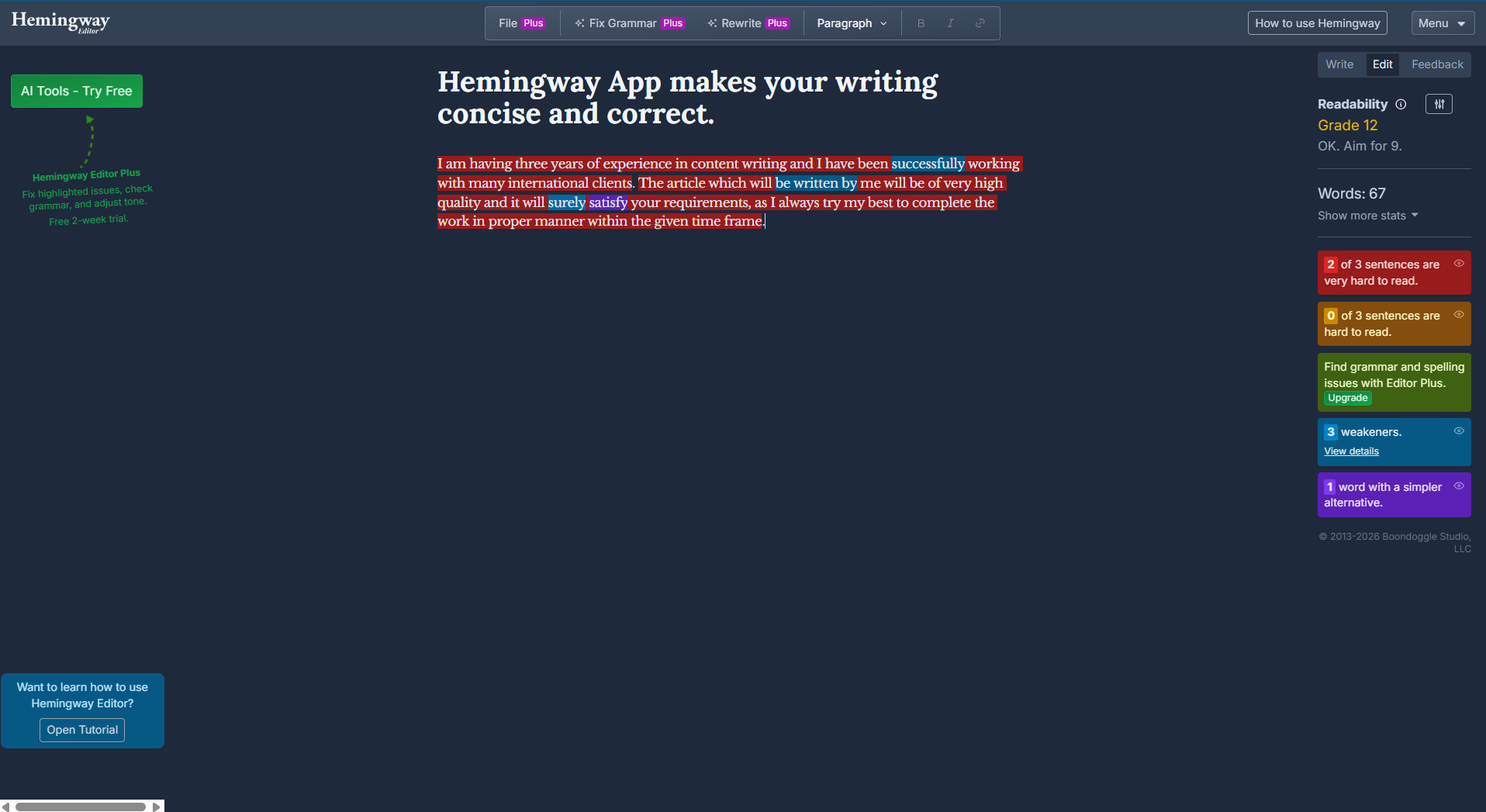
Non-native writers — especially those from South Asian and East Asian educational backgrounds — are often taught that formal, complex sentences signal intelligence. In English professional writing for US and UK clients, the opposite is true. Clients want to scan quickly and understand immediately. Hemingway enforces this visually.
Red sentences are very hard to read — rewrite them without exception. Yellow sentences are hard to read — simplify where possible. Green highlights are passive voice — convert to active. Blue is adverbs — cut them. Target a reading grade of 6 to 8 for all client-facing writing.
In testing, sample proposals consistently came in well above Grade 8 before running through Hemingway. After fixing the red and yellow sentences the grade dropped significantly, and the proposals became noticeably easier to scan — which is exactly what a client reviewing 30 proposals needs.
Hemingway App is completely free in the browser, requires no account, and has no word limit.
Free tier limits: No grammar correction. No AI rewriting — Hemingway shows you the problems, you fix them manually. The desktop app costs money — the browser version is all you need.
Verdict: Run every piece of client-facing writing through Hemingway before delivery. If a sentence is highlighted red, rewrite it before you send.
6. ChatGPT Free — Best for Full Rewrites and Learning Why Your English Sounds Off
What it is: ChatGPT Free is an AI chatbot that rewrites entire drafts, matches specific tones, and explains grammar corrections — functioning as both an editor and a free English tutor.
Best for: Non-native freelancers who want to improve their English over time, not just fix individual documents.
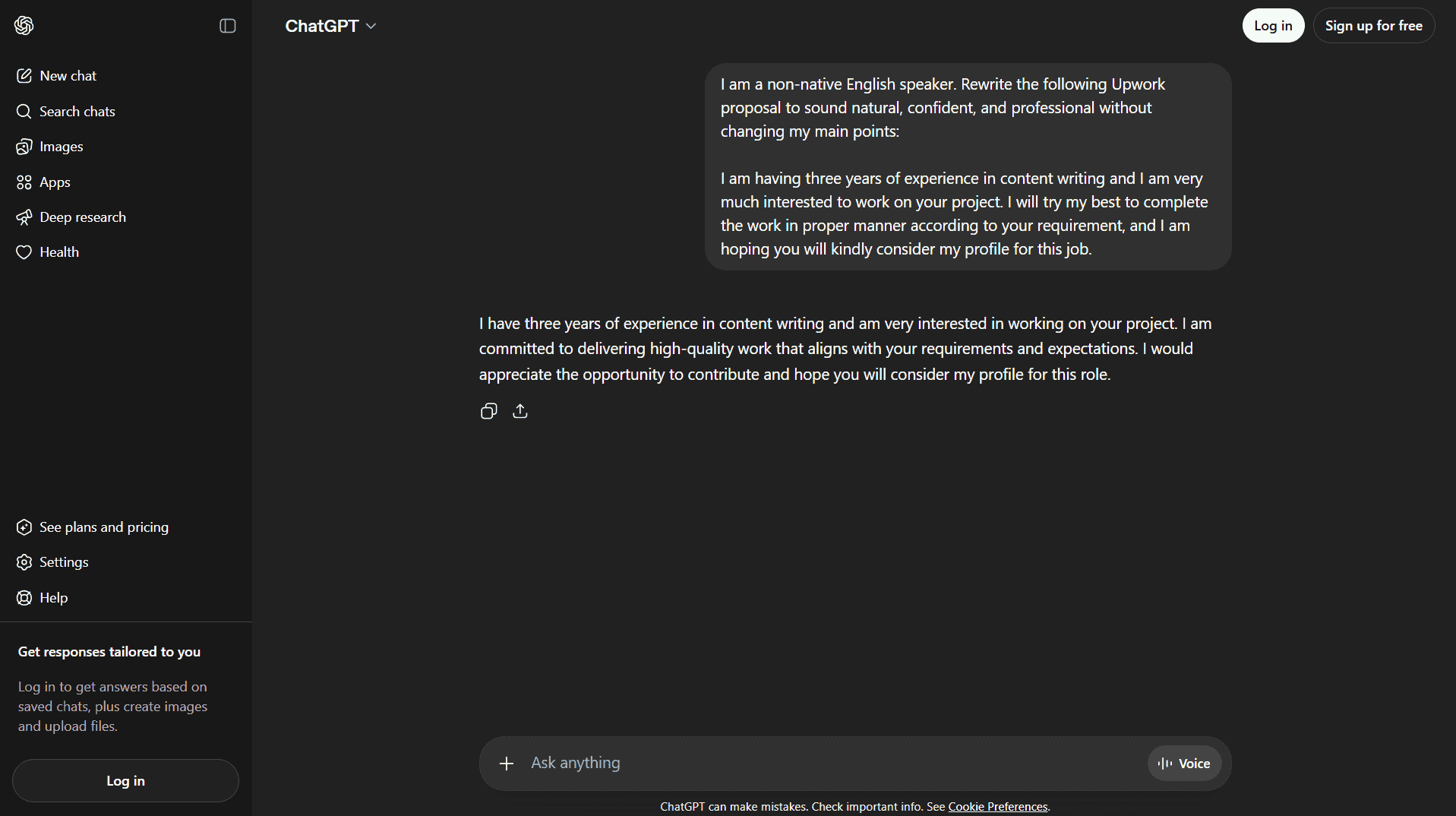
Every other tool on this list fixes your writing. ChatGPT is the only one that can explain why it was wrong — which means the learning compounds over time. Using the learning prompt below regularly builds English intuition in a way that passive spell-checking never does.
For full rewrites, ChatGPT is unmatched on the free tier. Paste an entire proposal, email, or blog post and get a rewritten version in seconds. The prompts below are specifically designed for non-native freelancers — generic prompts produce generic output:
Prompt 1 — Upwork proposal rewrite:
“I am a non-native English speaker. Rewrite the following Upwork proposal to sound natural, confident, and professional without changing my main points: [paste your text]”
Prompt 2 — Client email:
“Rewrite this client email to sound polite but direct. I am writing to an American client to ask for feedback on my submitted work: [paste your text]”
Prompt 3 — Learning mode:
“Correct the following paragraph and explain each correction so I can learn from it: [paste your text]”
Free tier limits: On the free plan, ChatGPT allows approximately 10 messages per 5-hour rolling window on the full model — after that it falls back to a lighter model that still works but with reduced quality. No hard daily cutoff. Copy-paste only — no live integration. Can flatten your voice if overused — apply suggestions selectively.
Verdict: Use ChatGPT Free for full rewrites and for learning. Save the three prompts above — they are the most immediately useful thing on this page.
7. Engram — The Only AI Writing Tool Built From the Ground Up for Non-Native Speakers
What it is: Engram is a free AI writing tool for non-native English speakers that combines proofreading, paraphrasing in 7 styles, and translation — trained specifically on the errors non-native speakers make.
Best for: High-stakes writing where you need the most natural-sounding free output — important proposals, long-term client pitches, Fiverr profile bios.
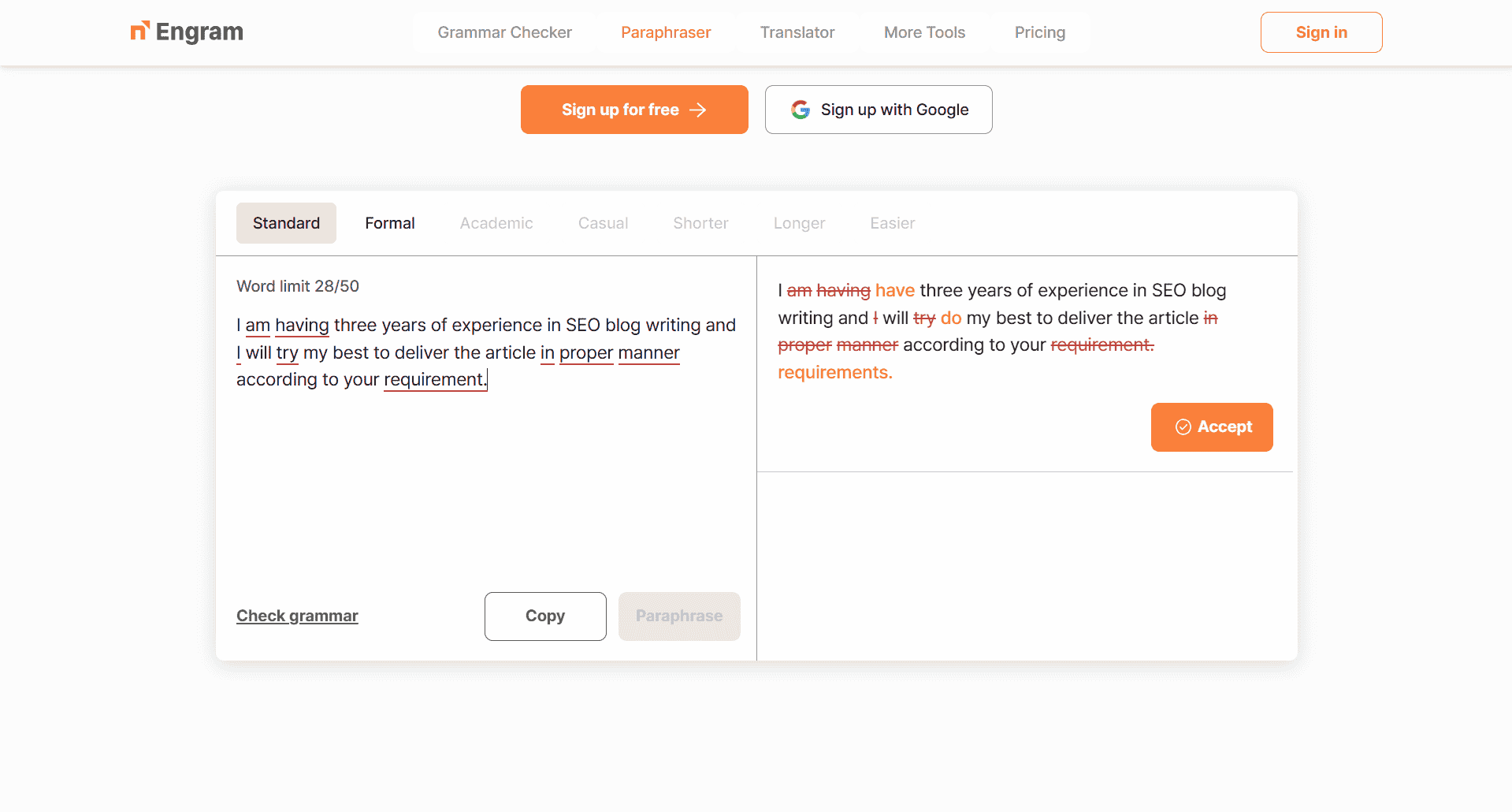
Every other tool on this list was built for general writing and adapted for non-native speakers. Engram was built from the start for people whose native language is not English — and that fundamental difference is visible in the output.
Where Grammarly corrects by native speaker grammar rules, Engram corrects by understanding the specific patterns non-native speakers produce. It knows Korean speakers omit articles. It knows Indian English over-formalizes. It catches these patterns and rewrites accordingly — producing output that sounds like a native speaker wrote it, not like a corrected translation.
In testing, Engram was the strongest performer on the Fiverr gig description — catching unnatural phrasing that the other tools left untouched, particularly over-formal Indian English phrasing in a context that called for casual, conversational copy.
The paraphraser offers seven styles: Standard, Formal, Academic, Casual, Shorter, Longer, and Easier. However, only 2 styles are available on the free plan — full access to all 7 requires a Premium subscription. For freelancers on the free plan, the available styles still cover the most common use cases.
Free tier limits (verified from official pricing page): The grammar checker allows 150 words per submission with a 300-word daily limit. The paraphraser allows 150 words per submission with a separate 300-word daily limit. These are tight — Engram on the free plan is best used for your single most important sentence or paragraph, not full documents. Check current limits at engram.us/pricing as these can change.
Verdict: Engram’s free tier is tight — 150 words per submission for both the grammar checker and paraphraser, 300 words/day per tool. Use it deliberately for your proposal headline, email opener, or Fiverr gig title. For those high-stakes lines, it is the closest thing to a native English speaker reviewing your work at zero cost.
8. Wordtune Free — Best for Sounding Confident, Not Just Correct
What it is: Wordtune Free is an AI rewriting tool that replaces tentative, hesitant phrasing with confident, natural alternatives — designed to help writers express what they actually mean.
Best for: Freelancers who write grammatically correct English but sound uncertain or unconfident in proposals and gig descriptions.
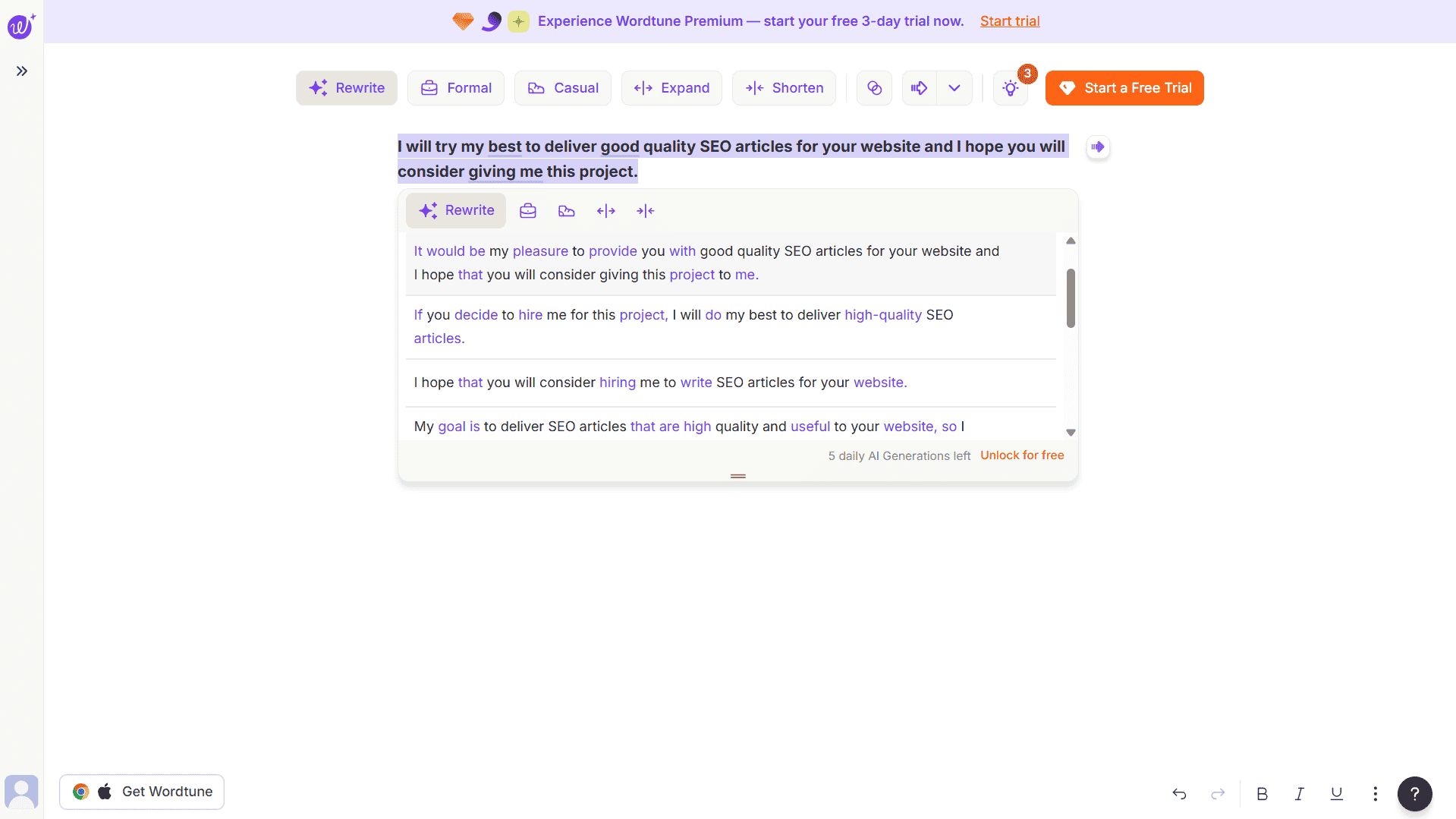
Grammar tools make your writing correct. Wordtune makes it sound like you mean it. Non-native speakers often phrase things tentatively without realizing it — “I think I can maybe do this project” instead of “I can deliver this,” “it would be possible to complete” instead of “I will complete it.” In testing, Wordtune’s rewrites on the Fiverr gig description consistently shifted the tone from uncertain to authoritative — with no change to the underlying information.
The free plan at wordtune.com gives you 10 rewrites per day. Use them on the lines that matter most: your proposal headline, your Fiverr gig title, your email opener. Those three lines determine whether a client reads the rest.
Important for free users: The browser extension on the free plan gives you the basic Rewrite option on Gmail, Google Docs, and most browser-based text fields. For formal and casual tone modes you need the free web editor at wordtune.com — these modes are not available through the extension on the free plan. Use your 10 daily rewrites intentionally — check Wordtune’s current terms for whether previewing a suggestion without selecting it counts toward your limit.
Free tier limits: 10 rewrites per day total. Formal/casual/shorten/expand modes require the web editor. No full document editing on free plan. (See Wordtune plans)
Verdict: Use Wordtune for Fiverr gig descriptions, proposal headlines, and client-facing profile bios. Use the web editor at wordtune.com when you need tone control — not just the extension.
The Free Freelancer Writing Stack — Your Complete Workflow
No single tool solves the full problem. This seven-stage stack combines all eight tools in the right order to take writing from rough draft to professional output. Every tool is free. Total cost: ₹0 / $0.
Stage 1 — Draft in whatever language your ideas flow fastest.
If that is Hindi or another Indian language — write there first. Use DeepL Translate to convert to English, then DeepL Write to remove the translation stiffness. If you draft directly in English, write fast without editing yet.
Stage 2 — Structural clarity check.
Paste into Hemingway App at hemingwayapp.com. Fix all red sentences. Reduce yellow where possible. Remove passive voice. Target Grade 7–8 reading level before moving on.
Stage 3 — Grammar and mother-tongue error fix.
Paste into languagetool.org in chunks of up to 2,000 characters (free website — no extension needed on free plan). Accept all corrections. Pay specific attention to articles, prepositions, and subject-verb agreement — the top three error categories for non-native speakers.
Stage 4 — Sentence-level polish.
Find two or three sentences that still sound off. Paste them into QuillBot Free in Fluency mode. For your single most important sentence — a proposal headline or opening line — run it through Engram instead.
Stage 5 — Confidence and tone check.
Paste key sentences into Wordtune Free. Use the browser extension for basic rewrites on Gmail or Google Docs. Use the free web editor at wordtune.com for formal or casual tone modes. Save your 10 daily rewrites for the lines that matter most.
Stage 6 — Final review for high-stakes submissions.
For important proposals or pitches, paste the full text into ChatGPT Free with this prompt: “I am a non-native English speaker. Read this and tell me: (1) Does any sentence sound unnatural to a native speaker? (2) Is the tone appropriate for a US/UK client? (3) Suggest 3 improvements.” Apply selectively — do not let ChatGPT erase your voice.
Stage 7 — Grammarly final pass.
Paste into Grammarly Free or use the extension across Gmail or other browser-based writing environments. Accept remaining corrections. Check that the tone reads as Confident or Professional. Then send.
One line: Draft → Simplify (Hemingway) → Grammar fix (LanguageTool) → Polish sentences (QuillBot/Engram) → Tone check (Wordtune) → Final review (ChatGPT) → Send (Grammarly).
Want to go beyond free? See the full upgrade path in our AI writing stack for solo bloggers under $50/month — covering all six workflow layers with paid tier recommendations.
Which Tool Should You Use? Decision Guide by Freelancer Type
Pick Your Situation
- Brand-new freelancer, zero clients yet:
Start with Grammarly Free and Hemingway App only. These two cover 80% of errors and take ten minutes to set up. Add more tools as you get comfortable. - You draft in Hindi or another Indian language first:
Priority stack: DeepL Translate + DeepL Write + LanguageTool. This directly solves the stiff-translation problem that holds most Indian freelancers back. - You write Upwork proposals every day:
QuillBot Free (Fluency mode) + Grammarly Free + ChatGPT proposal rewrite prompt. Run every proposal through this sequence before submitting. - You write Fiverr gig descriptions or your profile bio:
Wordtune Free (web editor for tone modes) + Hemingway App. Fiverr conversions depend on confident phrasing — this combination is built for exactly that. - You write long-form blog content for clients:
ChatGPT Free + LanguageTool + Hemingway App. ChatGPT handles full rewrites; LanguageTool and Hemingway refine and simplify. - You want the single most natural-sounding free tool:
Engram. It is the only tool on this list built specifically to make non-native English sound native.
5 Common English Mistakes Non-Native Freelancers Make (And Exactly How to Fix Them)
Mistake 1 — Missing or wrong articles (a / an / the)
Before: “I have experience in content writing and can deliver quality article.”
After: “I have experience in content writing and can deliver a quality article.”
Fix it with: Grammarly Free — the most reliable tool in testing for catching article errors consistently. Hindi and many other languages have no articles, making this error almost universal and Grammarly the most dependable fix.
Mistake 2 — Overly formal or stiff sentence structure
Before: “Kindly revert at your earliest convenience regarding the aforementioned project.”
After: “Please get back to me when you can about this project.”
Fix it with: ChatGPT Free using the tone rewrite prompt, or Wordtune Free web editor with Casual mode.
Mistake 3 — Passive voice overuse
Before: “The article was written by me and was submitted on time.”
After: “I wrote the article and submitted it on time.”
Fix it with: Hemingway App — flags every instance of passive voice in green so you can find and convert all of them at once.
Mistake 4 — Wrong prepositions
Before: “I am interested on this project.” / “Please revert back on my email.”
After: “I am interested in this project.” / “Please reply to my email.”
Fix it with: LanguageTool — in testing it was the strongest tool for preposition errors, catching mistakes in this category that Grammarly free missed. One of its clearest strengths for Indian English speakers.
Mistake 5 — Grammatically correct but unnatural phrasing
Before: “I am having three years of experience in this field.”
After: “I have three years of experience in this field.”
Fix it with: QuillBot Free in Fluency mode, or Engram for the most natural-sounding rewrite.
Frequently Asked Questions
Conclusion
Your English does not need to be perfect. It needs to be professional. Those are two entirely different things — and the eight free tools in this post close the gap between where your writing is today and where it needs to be to win clients consistently on Upwork and Fiverr.
The full stack one more time: Draft → Simplify (Hemingway) → Grammar fix (LanguageTool) → Polish sentences (QuillBot/Engram) → Tone check (Wordtune) → Final review (ChatGPT) → Send (Grammarly). Every step is free. Every tool is available right now.
Bookmark this page and come back to the workflow every time you write a proposal or client email. Within a week it becomes a five-minute habit that protects your professional reputation on every submission.
Start With Grammarly Free Today
Two minutes to install, works silently from the moment it is set up.
These are the tools. The workflow is proven. The only thing left is to use them.
Also worth reading:
- QuillBot vs Wordtune for Freelance Writers — Which Rewriting Tool Is Worth Your Time?
- If you use Grammarly for client work, don’t miss: Grammarly Review for Freelancers (2026): Is Premium Worth It?
- Otter.ai Review for Freelancers (2026) — Once your writing workflow is solid, add AI transcription for client calls
- For visual content alongside your writing tools, our Canva AI review breaks down what the free plan covers for bloggers making graphics without a design background.
Accuracy disclaimer: Information is based on publicly available data and independent research at the time of writing. Pricing and features may have changed. Always verify directly on the vendor’s website before purchasing.
Independence: TechHelpTips is an independent comparison site. We are not affiliated with, endorsed by, or sponsored by any software company mentioned here. All trademarks belong to their respective owners.
