
Last verified: May 2026 | This otter ai review covers pricing verified from the official Otter.ai pricing page and help centre; user sentiment drawn from public reviews across G2, Capterra, TrustRadius, and Trustpilot.
How I researched this review: Pricing and plan limits verified directly from official Otter.ai sources and help centre. User sentiment drawn from public reviews across G2 (482 reviews), Capterra (100 reviews), TrustRadius, Trustpilot (549 reviews), and Reddit. All claims cross-checked against Otter.ai’s official documentation. Verified May 2026.
Three hundred minutes a month sounds like a lot. It isn’t.
If you’re a freelancer doing two or three client calls a week — 45 minutes each, roughly — you’ll burn through Otter.ai’s free allowance before the month is half over. Not buried in small print. Just maths. But almost no otter ai review actually runs those numbers for you.This one does.
What is Otter.ai? Otter.ai is an AI transcription and meeting notes tool that records Zoom, Google Meet, and Teams calls via a bot, transcribes in real time, and generates summaries automatically. It supports transcription in English, Spanish, French, and Japanese, with separate US and UK English dialect settings. Free plan: 300 minutes/month, 30-minute call cap, 3 lifetime file imports. Pro: $16.99/month.
What Is Otter.ai? (Quick Overview for Freelancers)
Otter.ai records your calls, transcribes them in real time, and drops a summary in your account when you’re done. Connect it to Zoom, Google Meet, or Microsoft Teams and a bot joins automatically. No manual recording, no forgetting to hit record halfway through.
It also works without a meeting. Open the app, tap record, speak. Transcripts sync straight to your account — useful for in-person interviews or quick voice notes on the go.
After any call, you get a transcript, an AI summary, and extracted action items. You can also search any word spoken across your recent calls and jump directly to that moment in the audio. That last feature gets undersold. It’s genuinely one of the more useful things Otter does.
One thing to flag before anything else: Otter.ai supports transcription in English (US and UK dialect settings), Spanish, French, and Japanese. If your clients work in other languages — Hindi, German, Portuguese — it’s not the right tool.
Otter.ai LIMITED FREE
Free / $16.99/mo Pro
AI transcription and meeting notes tool for Zoom, Google Meet, and Teams. Strong transcript search, generous Pro allowance, but a free plan that runs out fast for active freelancers.
- Strong transcript search — praised consistently in reviews
- Real-time transcription on live calls
- Auto-generated summaries after every call
- Calendar auto-join on Pro — set and forget
- iOS and Android app for on-the-go recording
- Limited language support — no Hindi, German, Portuguese, etc.
- Free plan: 300 min/month, 30 min/call cap
- Only 3 lifetime file imports on free
- Only 25 conversations visible on free — older ones archived
- No free trial for Pro — blind $16.99 commitment
Otter.ai Plans and Pricing (May 2026)
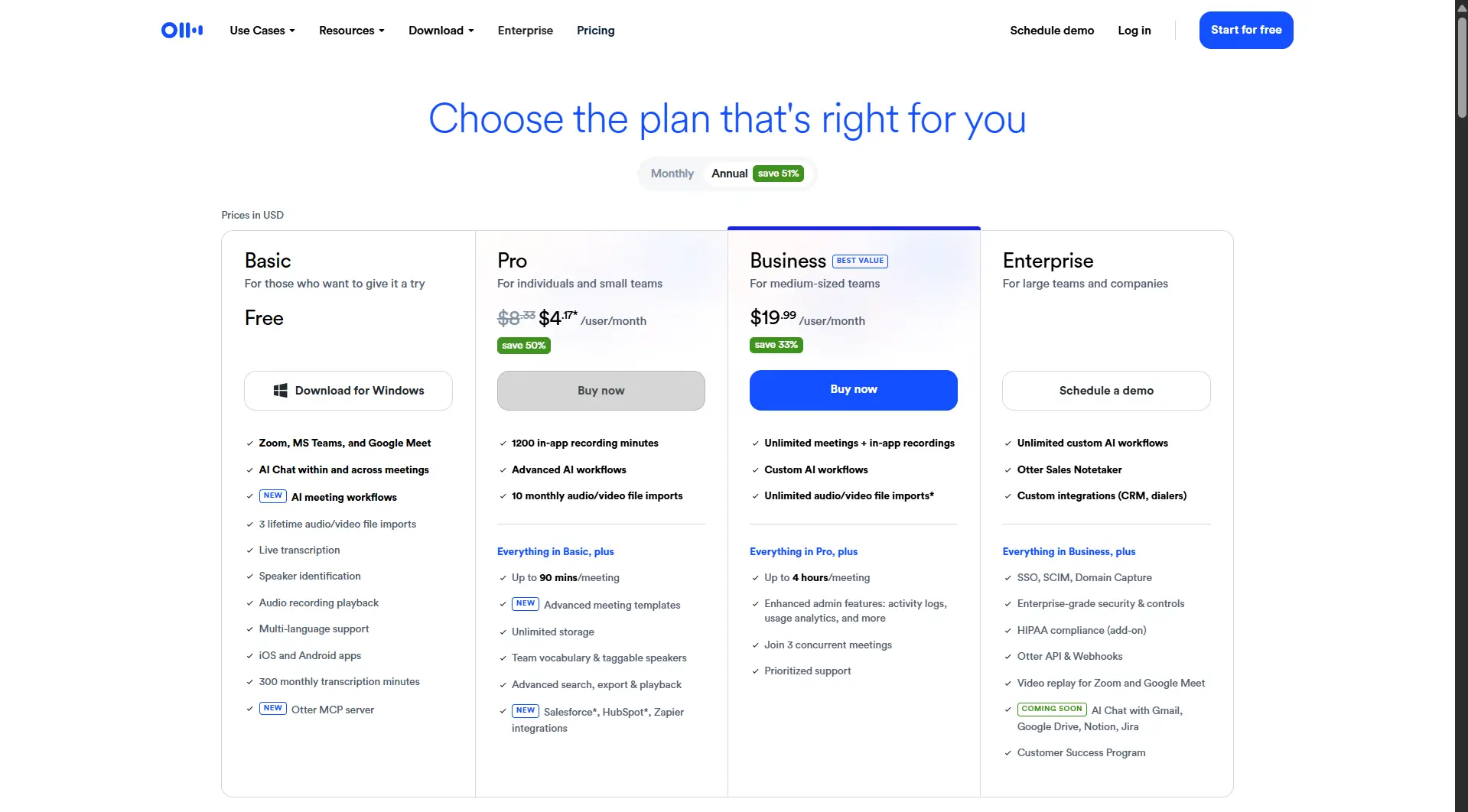
| Plan | Monthly Price | Annual Price | Min/Month | Call Cap | File Imports |
|---|---|---|---|---|---|
| Free (Basic) | $0 | $0 | 300 | 30 min | 3 lifetime |
| Pro | $16.99 | $8.33/mo ($99.99/yr) | 1,200 | 90 min | 10/month |
| Business | $30/user | $19.99/user/mo | Unlimited meetings | 4 hrs | Unlimited files (6,000 min/mo cap) |
A few things the pricing page doesn’t lead with.
There’s no free trial for Pro. You pay $16.99 upfront and find out if it works for you afterwards — no refunds. Business has a 7-day trial, but it requires payment info upfront and auto-charges the moment it ends. And hitting your monthly minute cap doesn’t trigger an overage charge. Otter just stops. No warning, no flexibility. You wait for the reset or upgrade immediately.
Start Otter.ai free here — no credit card needed →
Is 300 Minutes a Month Actually Enough?
This is the question every freelancer should ask before signing up — and the one most reviews quietly skip.
Let’s run the numbers.
Free plan minutes per month
Minutes needed for 3 calls/week × 45 min (avg month)
Max minutes per call on free plan
Conversations visible on free — older ones archived
A freelancer with three client calls a week, averaging 45 minutes each, needs roughly 540–585 transcription minutes per month (three calls × 45 minutes × 4 to 4.33 weeks). Otter’s free plan gives 300. That’s barely half. And that’s before the 30-minute per-conversation cap comes into play — meaning a single 45-minute briefing call produces two separate, incomplete transcripts. You piece them together manually.
The file upload limit is the other trap most people miss. Three lifetime imports — not three per month. Ever. If you record calls outside the app and want to upload them, you’ll blow through that limit in a week. It doesn’t come back.
And there’s one more limit that matters if you’re thinking long-term. The Basic plan only shows your 25 most recent conversations. Older transcripts are archived — not deleted — but you can’t access them without upgrading. For a freelancer building a running archive of client calls, that limit can arrive faster than the minute cap suggests.
Honest verdict: The free plan suits freelancers with one short call per week at most. Anyone with a regular client schedule hits the ceiling fast — often within the first two weeks based on Capterra user reports.
Key Features Freelancers Actually Use
Live Transcription
When Otter joins your call, it shows up as a named participant. Clients can see “Otter.ai” in the participant list — worth a quick heads-up before the first call, especially with clients who care about privacy.
Accuracy under clean conditions is consistently praised in public reviews as strong — particularly for one-speaker, quiet-room, clear English calls. Outside those conditions, the picture changes. Reviewers on G2 and Capterra consistently report accuracy dropping with background noise, crosstalk, and strong accents. In specialist niches — legal, medical, technical — several reviewers cite significant drop-off when jargon-heavy vocabulary isn’t pre-configured. For freelancers in those fields, custom vocabulary setup isn’t optional, it’s necessary.
AI Meeting Summary
Otter generates a summary automatically after every call — key points, action items, the broad strokes. For structured, agenda-driven calls, this works well. Multiple TrustRadius and Capterra reviewers praise it for exactly that kind of meeting.
Looser, conversational calls? Weaker. The action item detection in particular draws consistent criticism in Capterra reviews — it regularly misses the actual next steps from a conversation, pulling surface-level phrases instead of real decisions.
Search Inside Transcripts
Otter’s transcript search is one of its strongest advantages. In public reviews across G2 and Capterra, search and playback are repeatedly praised — the ability to type any word and jump straight to that moment in the audio. For freelancers digging back through long client briefings or tracking down a specific instruction, this is legitimately useful. Few free alternatives match it for this specific use case.
Otter Assistant (Auto-Join)
On Pro and above, Otter can join meetings from your calendar automatically — even if you’re double-booked or just want to step away. Useful in theory. In practice, several TrustRadius users flag that the auto-join triggered without clear approval, entering calls they hadn’t scheduled or sending calendar invites to colleagues without permission. Turn this on carefully. Check your sync settings before enabling it.
Mobile App
iOS and Android, both functional. Record without a meeting — open the app, hit record, speak. Syncs to your account. Good for in-person interviews or capturing voice notes when a laptop isn’t close.
What Real Users Say
Across over 1,100 public user reviews on G2, Capterra, TrustRadius, and Trustpilot, the same patterns come up time and again.
What keeps people on the tool:
The search-and-playback combination. Reviewers across G2 and Capterra cite it as the feature that makes Otter worth keeping — the ability to find any moment in any past call without scrubbing through audio. Calendar sync and auto-join on paid plans also get consistent praise. Several Capterra reviewers describe it as being able to show up to a call and actually focus, knowing the notes are handled. Speaker identification holds up well for two-person calls. More than that and it starts to slip.
What frustrates users most:
The OtterPilot bot joining meetings uninvited is the loudest complaint across Reddit and TrustRadius. Multiple users report it entering calls they didn’t set up, or — worse — sending calendar invites to their entire organisation without explicit permission. One widely-shared r/projectmanagement thread warned users that enabling Otter could result in the bot contacting your whole company. That’s not a fringe complaint.
Trustpilot’s 3.1 score looks alarming until you read what’s actually driving it — billing practices, mostly. Charges after cancellation, no response from support, transcripts locked behind paywalls after plan downgrades. Worth knowing. G2 and Capterra both sit at 4.4/5, which suggests the product isn’t the core problem. The billing experience is. Read Trustpilot with that context in mind.
One more frustration that runs deep: Otter reduced Pro plan minutes from 6,000 to 1,200 without touching the price. Users who signed up for the generous allowance felt the ground shift under them.
Otter.ai vs Fireflies.ai vs tl;dv — Quick Comparison
| Feature | Otter.ai Free | Fireflies.ai Free | tl;dv Free |
|---|---|---|---|
| Storage/minutes | 300 min/month | 800 min storage total | Unlimited (deleted after 3 months) |
| Call cap | 30 min | No cap | No cap |
| File imports | 3 lifetime | Limited | 5 lifetime uploads |
| AI summaries | Included | 20 credits/month | 10 lifetime only |
| Conversation history | 25 most recent | Unlimited | 3 months |
| Bot visible in call | Yes | Yes | Yes |
| Languages | 4 (+ EN dialects) | 100+ | 30+ |
| Auto-join free plan | No | No | No |
| Best for | Search + notes | Multi-language calls | Regular freelance calls |
A quick note on each.
Fireflies.ai gives 800 minutes of storage and 20 AI summary credits per month, with transcription across 100+ languages. That language range is where it pulls ahead — if you work with international clients beyond Otter’s supported languages, Fireflies is worth a serious look.
tl;dv has the most generous free tier on paper. Unlimited recordings, transcripts in 30+ languages, no per-minute cap. But read the fine print before you rely on it: recordings get deleted after three months, and AI summaries are capped at 10 for the lifetime of your free account. After that, you only get notes for the first ten minutes of each call. Download anything you need before the 90-day window closes — because it won’t ask.
Google Meet bot warning: In March 2026, Google rolled out a safeguarded guest admit flow for Meet. Join requests can now appear in two queues, and requests that need closer review default to “deny” — though hosts can override this. This does not hard-block Otter, Fireflies, or tl;dv, but it does add friction for bot-based notetakers in some client meetings. Worth checking your clients’ platform settings before committing to any of these tools.
Otter’s edge is the transcript search. If that’s the feature you actually need — and you’re working in its supported languages — it holds its own.
Who Should (And Shouldn’t) Use Otter.ai
Otter.ai makes sense if:
- You have one or two short calls per month and want a free option
- You work in English, Spanish, French, or Japanese — and need reliable search across recent transcripts
- You’re on Pro and run regular Zoom calls where auto-join saves setup time every week
- You need speaker-separated transcripts for client records
Skip Otter.ai if:
- You do three or more calls per week — the free plan won’t survive the month
- Your clients speak languages outside Otter’s supported options
- You regularly upload pre-recorded files — three lifetime imports kills that workflow fast
- You need a long-term call archive — 25 conversations is a tight limit
- Your clients are sensitive to third-party bots appearing in calls
If you’re still building out your freelance toolkit, start with free writing tools for your freelance workflow (grammarly alternatives) before committing to paid transcription.
Is Otter.ai Pro Worth It for Freelancers?
At $16.99/month, Pro gives you 1,200 minutes — roughly 20 hours of calls. A freelancer averaging three 45-minute calls per week uses about 540–585 minutes a month, so Pro has real room to breathe.
The problem isn’t the allowance. It’s the blind commitment. No free trial, no refund if it doesn’t suit how you work. And tl;dv’s free plan covers most of what Otter Pro offers solo freelancers — at zero cost, 10-summary limit aside.
Pro earns its price if you specifically need Otter’s transcript search, want dependable Zoom auto-join, and run enough calls in Otter’s supported languages to justify the allowance. If you’re still figuring out whether you actually need a transcription tool, start with tl;dv free. See what you miss. Most freelancers find they don’t miss much. For a benchmark on how other premium AI tools justify their price, our Jasper review runs the same ROI calculation
Verdict (May 2026): Otter.ai is a capable transcription tool for freelancers working in its supported languages — but its free plan is too limited for anyone doing more than two short calls a month. Pro is worth it if transcript search and Zoom auto-join are non-negotiable. If not, test tl;dv free first.
If Pro suits your workflow, sign up here →
Frequently Asked Questions
Related Posts
- Notion AI Review for Freelancers
- Best Free AI Writing Tools for Non-Native English Freelancers
- Grammarly Review 2026: Worth It After the Superhuman Rebrand?
- Grammarly Alternatives Free (2026)
- Canva AI Review for Freelancers (2026)
- Loom AI Review for Freelancers (coming soon)
- Best Free AI Tools for Freelancers (coming soon)
